1
6
4. PROGRAMMING THE METER
4.1 BASIC PROGRAMMING
4.1.1 STARTING PROGRAMMING
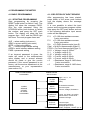
Start programming by pressing the
RESET push button for about 5 sec. The
display will show the message PASS.
Give the right password using the
UP/DOWN arrow push buttons to select
the number, and press the SET push
button. The display will show the first
program item - ALR, and the PROG light
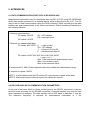
will show. The main program items are:
ALR = alarm setting (sub-menu)
SENS = sensor setting (sub-menu)
OFFS = offset value setting
OP = current output values setting
ADDR = serial interface address setting
PASS = password setting
If an incorrect password is given, the
meter will return to the measurement
value display and a second attempt
should be made to give the correct
password. If the correct password is not
known, call the service department at the
manufacturers or your representative
(see section 6.2).
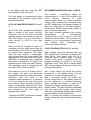
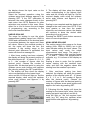
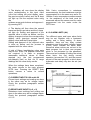
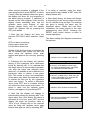
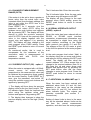
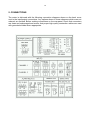
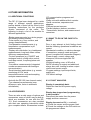
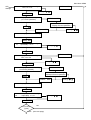
MAIN PROGRAM MENU
PASSWORD
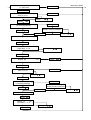
4.1.2 SELECTION OF INPUT SENSOR
After programming has been started,
press either of the arrow push buttons
until the display shows the message
SENS.
It is now possible to select the input
sensor and to set sensor program values.
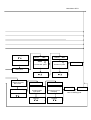
Now press the SET push button and one
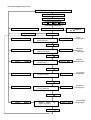
of the following alternative input sensor
codes will be displayed:
P-3
= Pt-100 ohm resistance sensor,
3-wire connection.
P-2 = Pt-100 ohm resistance sensor,
2-wire connection.
Prh = Pt-Pt/Rh thermocouple (type S).
Chal = Ni-Ni/Cr thermocouple (type K).
FECO = Fe-Const thermocouple (type J).
U-01 = Voltage, range 0-100mV.
U-1 = Voltage, range 0-1V.
U-10 = Voltage, range 0-10V
0-20 = Current, range 0-20mA.
4-20 = Current, range 4-20mA.
r-3
= Resistance, range 0-1400 ohms,
3-wire connection.
r-2
= Resistance, range 0-1400 ohms,
2-wire connection.
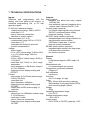
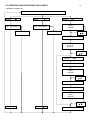
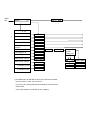
SUBPROGRAM
SELECTIONS
ALARM
LIMITS
ALARM
SENSOR
OFFSET
OPTIONS
PASSWORD
High, Low, L1, L2
Hysteresis
Delay
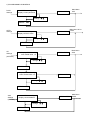
INPUT
SENSOR
Pt Resist thermometer,
Thermocouples
Current, Voltage, Resistance
NUMERICAL
VALUES
Linear, non-linear, no scaling
Offset values, current limits
Password change
OUTPUT
OPTIONS
Current output
Serial output address
Additional alarm limits
Using the arrow push buttons, scroll up or
down to select the required input sensor code