1
Configuration
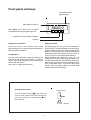
level with ★ key. You may set alarms in configuration
or in display stage. Alarm levels can be set in configuration state or measuring state. You can cancel changes
by selecting text UnDo to display and by pressing ➤
key. Next page describes in more details configuration
functions.
You can enter configuration state by pressing two
seconds ▲ and ★ keys at same time. By arrow keys
▲ and ▼ you can move upwards and downwards in
main menu. By pressing ➤ key you can enter
configuration state at wished point. From setting
state you can skip direct to save state or to previous
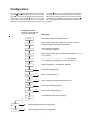
Configuration start:
Press two second ▲ and
★ keys at same time
Description
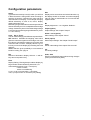
Sens
Select sensor selectivity Default 2mV/V
Load
Select display value with 6 digits for max. load of sensors,
number of decimals are selected separately
Dec
Select number of decimals
0 = no decimals in display
Filter
Digital filter for input signal (damping) selectable 0.01...1.0
(1.0= no filter)
Halt
Display shows zero below Halt value, e.g.onrange
0..5.0 display should be showed zero, set Halt = 5.0
Bri
Display brightness 1..15=brightest, Default 7
Output
Alarm 1
Alarm 2
Serial
Code
Cal
➤
➤
➤
➤
➤
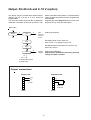
Output settings (page 10)
Alarm 1 settings (page 11)
Alarm 2 settings (4 relays selectable in menu)
Serial output settings (page 12)
Secret code settings (page 14)
Unit calilbration state (factory setting)
★
Save
Undo
➤
Save settings and exit from configuration.
➤
Undo changes and exit from configuration.
7