1
7. ERRORS
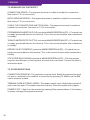
7.2 MESSAGES ON THE RECEIPT
CONNECTION ERROR = The payment terminal is unable to establish a connection.
See section 7.3 for instructions.
BATCH SENDING ERROR = The payment terminal is unable to establish a connection.
See section 7.3 for instructions.
CHECK THE CONNECTIONS AND TRY AGAIN = The payment terminal is unable to
establish a connection. See section 7.3 for instructions.
PYYTÄMÄÄNNE AINEISTOA EI OLE (printed at MAKSUPÄÄTEPALAUTE) = The bank has
no ready-processed data for the terminal. This is the normal situation after a weekend
or holiday.
TAPAHTUMATIEDOSTO PUUTTUU (printed at MAKSUPÄÄTEPALAUTE) = The bank has
no ready-processed data for the terminal. This is the normal situation after a weekend
or holiday.
ERROR FILE NOT EXISTENT (printed at MAKSUPÄÄTEPALAUTE) = The bank has no
ready-processed data for the terminal. This is the normal situation after a weekend or
holiday.
OTA YHTEYS NEUVONTAAN (printed at MAKSUPÄÄTEPALAUTE) = The information
requests are different on the payment terminal and in the bank. Contact the bank’s
information desk.
7.3 OTHER EXCEPTIONS
CONNECTION PROBLEM = The connection may be stuck. Switch the payment terminal
off and on, and then try to establish a connection by pressing F2. Make sure the SIM
card is properly in place.
TERMINAL DOES NOT READ CARDS = The reader may be stuck. Switch the terminal off
and on and try again. The reader may also be dusty. Clean the reader and try again.
POWER IF OFF = Switch on the terminal by keeping Enter pressed down. If the battery
is empty, recharge the payment terminal.
30