1
Inviting other CampusNet users
People cannot just be added to an interest group. New users must be invited, and it is up to
the individual whether to accept or reject the invitation.
If you invite John Doe, he will receive an e-mail containing a link to a page in CampusNet
where he can accept or reject the invitation.
As soon as he accepts, he becomes a user of the group.
•
Go to the interest group in question in the left hand menu
•
Click Admin > Invite users - accept/decline participation requests
•
Click Search the user database
•
Enter the person’s name and click Search.
•
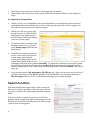
Click on the Select button beside the name of the person you want to invite. This person’s Register ID will appear in the field.
•
Click on the OK button to confirm the invitation. The person’s name is now displayed in
your overview of invited users until that person accepts or rejects your invitation.
Joining an interest group
If you wish to become a user of an open or semi-open group, click Search open/semi open
groups, and click Display all groups to get a complete overview of all open and semi open
interest groups.
Unsubscribing from an interest group
•
Click Settings in your personal menu
•
Find the group in your group overview
•
Click on the Unsubscribe button in the column to the right.
NB: For practical reasons the last administrator in an interest group cannot unsubscribe
from it.
28