1
First Use
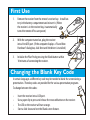
1.
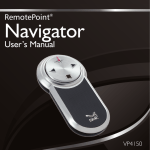
Remove the receiver from the remote’s receiver bay. Install battery in the battery compartment and reinsert it. (When
the receiver is in the receiver bay, it automatically
turns the remote off to save power.)
2.
With the computer turned on, plug the receiver
into a free USB port. (If the computer displays a “Found New
Hardware” dialog box, click Next until the driver is installed.)
3.
Initialize the Pilot Pro by pressing the Blank button within
10 minutes of connecting the receiver.
Changing the Blank Key Code
In certain languages a different key code may be needed to blank the screen during a
presentation. Three key codes are provided for the various presentation programs.
To change between the codes:
•
•
•
•
Insert the receiver into a USB port.
Use a paper clip to press and release the recessed button on the receiver.
The LED on the receiver will turn orange.
Start a slide show and test the Blank screen feature.