1
Main screen
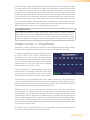
The main screen gives a fader overview for the output
channels of the amplifier. Depending the channels for the
corresponding model (two for SMA or four for SMQ), the
output level for each channel can be adjusted.
On top of the screen, the names of the output channels
are shown (OUT 1, OUT 2, … ). Right under, the name
of the inputs (INPUT 1, INPUT 2, … ) linked with these
outputs are indicated. And below the input, the level of
the output channel is indicated.
The selection of the corresponding channel can be made
using the ‘Channel selection buttons’ which are located below the VU meters of every channel
on the front panel of the amplifier. The output level for the currently operated channel is
indicated in green and can be adjusted by turning the rotary function dial in clockwise (up)
and counter-clockwise (down) direction. The fader will slide up or down when the output
level is adjusted. The output level can be adjusted within range of 0 dB and -70 dB.
On the bottom of the this screen, a mute indicator is shown for every channel. This button
will be indicated in green when the channel is playing and turns red when muted.
Settings menu
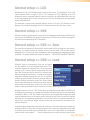
By pressing the rotary function dial once (when the main
screen is displayed), the output settings menu will be
shown. This menu is only accessible in administrator
mode (will be described extensively in a later section of
this user manual) and allows to make adjustments to the
channel setup and general setup.
Scrolling through this menu is possible by turning the
rotary function dial. The currently selected option will be
highlighted and the possibilities will be shown on the right
side of the screen. Settings can be called by pressing the
rotary function dial. Depending of the selected setting,
a selection menu will be indicated on the right side of the display, the selected setting will
toggle between two possibilities or another selection screen will be indicated.
Level
The first selection is the adjustment of the output level for the corresponding channel. The
output level which can be selected here is identical to the output level which can be adjusted
on the main screen of the amplifier as described above. It can be adjusted within a range
of 0 dB and -70 dB. After the selection has been made, returning to the settings menu is
possible by confirming the selection through pressing the rotary function dial.
21