1
2. Home
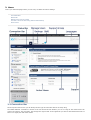
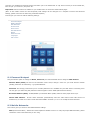
This is your XYFI homepage where you can carry out basic connection settings.
Connection Bar
Status Bar
Manage Users and your XYFI
Connect a device to XYFI using WiFi Protected Setup
Active Users
2.1 Connection Bar
On the top left of the screen you can always see the type of connection XYFI is currently using.
The Mobile Network connection is shown to the far left and shows whether you are in range of the network and can
connect to internet. The more bars, the stronger the signal. Next to the signal bar you will see the Network Provider. If
there is no signal, this will not be shown.