1
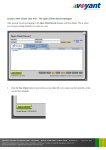
20. Asset: Click the dropdown list and select Home (John, Julia).
Why Link a Mortgage to a
Property?
Linking establishes a connection
between the property and
mortgage. When a property is
sold, the software will use the
21. Click the Link / Unlink button. A link icon will appear in the list above,
next to Home (John, Julia). This link indicates that the property is linked
proceeds first to pay off (or at
to the debt.
least pay down) and remaining
balance due on any linked debts,
providing a more realistic
projection of what proceeds
might be realised from the sale of
the property.
Since the debt is linked to a property (the Campbell’s home), there is no need to select
a start event for it. Notice that the Time panel is now greyed out. The debt has
inherited its timing from the linked property meaning that whenever this property is
liquidated, if any balance remains due on the debt, proceeds from the sale will be
applied first to paying off of the balance of the linked debt.
If you were entering an unsecured debt, a start event would need to be selected for on the Time panel to
indicate when the debt is to become active in the plan.
Multiple mortgages could be entered and linked to a single property if necessary.
22. Click Add. The mortgage will be shown in the ledger on the
right side of the screen, displaying the balance due on this debt
at the beginning of the plan.
A link icon is shown next to the debt indicating items in the
plan are linked to this property.
VOYANT ADVISER INTRODUCTORY TUTORIAL – BUILD Y OUR FIRST CLIENT CASE
(Tutorial 1)
Voyant, Inc. proprietary information which is privileged, confidential, or subject to copyright belonging to Voyant, Inc.
Use of this information is solely for the recipient of this document.
Voyant, Inc. 2012