1
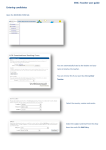
5. Select “Book Slot” to provisionally book a room. Depending which slot you
are booking the available time is displayed at the bottom of the page. In the
case below we can book the room from 09:00 to 18:00 that day as there are no
conflicting bookings.
If we choose a time outside the valid slot we will get an error message
Once we have entered our requested times and meeting purpose we can submit the
request. Note the contact name, extension and location must be entered. The
system will auto add this information from the myDCN system if the data is
available. Note the booker should ensure this information is correct as a
confirmation will be sent to this email address.