1
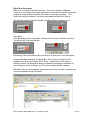
The size of file chosen will depend very much on the project in hand, but should probably be
no less than 5 minutes; otherwise the number of files recorded may become excessive and
difficult to manage.
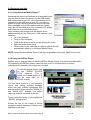
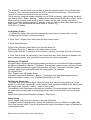
Video File Location, Share and Templates:
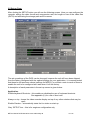
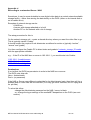
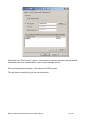
Store Path – This is the location that your video files
The default location for the removable device is “D”.
Videofile
Prefix
will
be
stored.
-
Adds a chosen name or auto variable to the video file
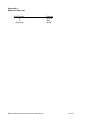
Select “?” for list of auto name options – see appendix 2
Snap File Prefix – Adds a chosen name to the still image grab
Add Seqno –
Adds an incrementing number to the file name
Date –
Adds the current date to the file name
Time –
Adds the current time to the file name
Reset ssn=1, reset seq=0 – Reset auto increment numbers
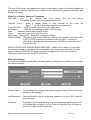
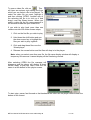
SNAP FORMAT – The default stills format is Bitmap, however it is possible to record the stills
in GIF or JPEG format which makes smaller file sizes. To select an
alternative to Bitmap, click the radio button ‘OTHER’ and then select the
relevant tick box.
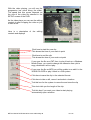
SHOW STATUS INFO SCREEN WHEN SNAPPING – When a still is taken you can make
the recorder indicate to you that a still is being taken, this momentarily interrupts the video
signal, however it DOES NOT stop the recorder recording video. If you do not want to
interrupt the onscreen video DO NOT tick the box.
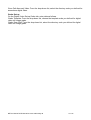
Black Box Settings
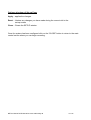
If you have purchased the Black Box recording option, clicking this box enables you to modify
the relevant settings.
Storage Path -
Unless otherwise arranged, the default storage location is the d: drive and
should not be changed.
Job Reference -
This would ideally refer to the general operation (e.g. diver, ROV) and not
a specific task.
Password -
A password can be entered here to prevent accidental switching on or off
of the Black Box recording, or if the “Reqr for Stop Only” box is ticked, to
prevent accidental switching-off only.
NETmc Marine DVRi Manual rev4.05-coabis May 06
12 of 38