1
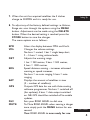
7. When the unit has acquired satellites the 3 dashes
change to 000MPH and it is ready for use.
Setting Up
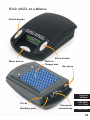
8. To adjust any of the factory defined settings i.e.Volume,
Range etc. scan through the options using the MENU
button. Adjustments can be made using the DELETE
button. When the desired setting is reached press the
STORE button to save the changes.
The menu options are as follows:SPD
VOL
DST
SDS
SAT
GPS
DL9
MUTE
Alters the display between MPH and Km/h.
Changes the volume settings.
No bars = muted, 1 bar = single beep alert,
2 – 5 bars = rising volume levels.
Adjusts the warning range.
1 bar = 250 metres, 2 bars = 500 metres,
3 bars = 1000 metres.
Speed distance sensing – increases advanced
warning as speed increases.
No bars = no auto ranging, 5 bars = auto
ranging.
Displays the amount of satellites in view
(S – number of satellites).
Outputs GPS data for use with Auto-routing
software programmes. No bars = switched off
(for updates), 5 bars = data output switched
on. NB. GPS should be switched off to enable
updates.
Sets your ROAD ANGEL to dial nine.
To Mute ROAD ANGEL when nearing a danger
zone simply push the MENU button for one
second.
Your ROAD ANGEL is now ready for use.
Back To Contents
4