1
Version 1.2
Accounting & Settlement Repository User Guide
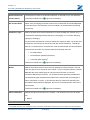
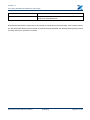
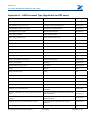
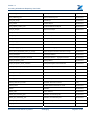
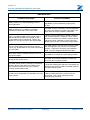
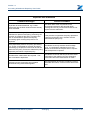
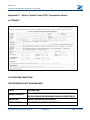
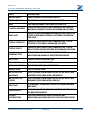
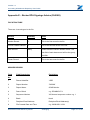
Error Message Displayed
Description
Please enter broker contact name
The name of the brokers contact for queries must be entered
Please enter broker contact email
The email address of the brokers contact for queries must be
entered
Please enter broker contact email in
valid email address format
The email address of the brokers contact for queries must be
entered in a valid email address format
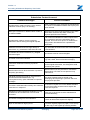
Please enter broker contact phone
The telephone number of the brokers contact for queries must be
entered.
Please enter Xchanging Contact name
The name of the Xchanging technician must be entered for a
resubmission
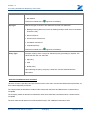
Please select submission type
A value must be selected from the drop-down list.
Please select market
A value must be selected from the drop-down list.
Please select Class of Business
A value must be selected from the drop-down list.
Please select Slip Type
A value must be selected from the drop-down list.
Please select Processing Required
A value must be selected from the drop-down list.
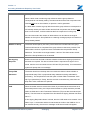
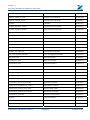
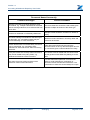
For premium accounting as processing
required, policy type must be blank
No value can be entered for a premium only entry
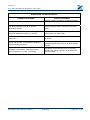
For XpressCheck at processing
required, policy type cannot be blank
No value can be entered for a premium only entry
If Premium and Policy, or Policy only (at
processing required) policy type cannot
be blank
No value can be entered for a premium only entry
For policy only at processing required,
policy type cannot be blank
A value must be selected from the drop-down list
For premium accounting at processing
required, number of LPAN must be
entered
A value must be entered for either No. of OP LPANs or for No. of
AP/RP LPANs, or for both
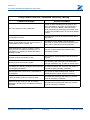
Please select one or more items
At least one document must be selected from the contents folder
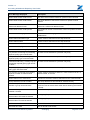
Group Reference format is invalid
The Group Reference field should be entered correctly
When a Group Reference is entered
Number in group cannot be blank.
If the Group Reference field has been entered correctly and
technician tries to submit Work Order without entering the Number
in Group.
Number in Group must be a number
between 1 and 99.
Number in Group is not valid.
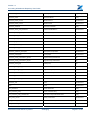
When Simultaneous Reinstatement is
selected then UCR must be entered.
Sim Signing Required is ticked and UCR is not filled.
When Simultaneous Reinstatement is
selected then TR must be entered.
Sim Signing Required is ticked and TR is not filled.
UCR format invalid.
The UCR format is not correct.
TR format is invalid.
The TR format is not correct.
Document uncontrolled once printed
Xchanging
Page 59 of 120