1
Chronology
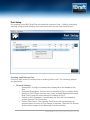
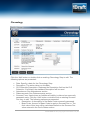
Click the ‘Add’ button or double-click an existing Chronology Step to edit. The
following options are presented:
•
•
•
•
•
•
Date: Specify a date for the Chronology Step.
Description: The action taken on this date.
CLS Schedule Description: Replaces the Description field on the CLS
Schedule. If left blank, the standard Description will be used.
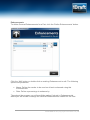
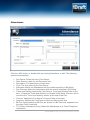
Attendances: See Attendances section.
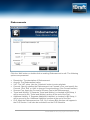
Disbursements: See Disbursements section.
Success Fees: Used where an Additional Liability is claimed on summarily
assessed costs. Click the ‘Add’ button or double-click an existing Success
Fee Item to edit. The following options are presented:
o Description: A description of the Base Costs summarily assessed.
o Base Costs: Amount of Base Costs to apply a Success Fee to. The
final value of this item will be calculated based on the Success Fee
value entered in the Part’s Rates section.
www.idraft.co.uk | Copyright 2012 iDraft LLP | 21