1
TECHNICAL BULLETIN G16/86
MODEL ELECTRONIC RAILWAY GROUP
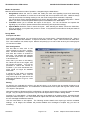
Points to Move must list any points which are required Normal or Reverse for this move to occur. You
should include any points needed for flank protection.
Additional Route Setting Conditions are optional. You may reference Miscellaneous devices as required. A
common use may be if an Acceptance Slot is wanted.
An Auto Button may be referenced to work with this Route. If provided, Train Operated Route Release
(TORR) will not occur for this Route if the Auto Button has been pressed.
Early Release Condition – Somewhat simplified from the prototype operation, this condition allows a Route
to release early once a particular track circuit clears or occupies.
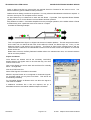
Consider the following example:-
Train x is signalled from Signal 1 to Signal 2 at the end of a station platform. The train stops at the station.
As the train has not cleared all the track circuits within the Route, the Route stays set. Train y is now
waiting at Signal 1 and wants to go to Signal 3. This Route is clear but the original Route is still set.
There must be a method for the initial Route to timeout once the train arrives at the platform so a second
Route can be set.
Rather than a timeout, the Early Release Condition allows it to release when clear, or if the train reaches
the far end of the platform.
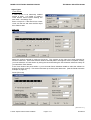
Aspect Conditions
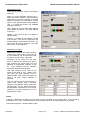
Once Routes are entered and all the necessary interlocking
details entered, the signals need to be told that they can clear
when a Route is Set.
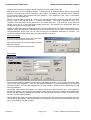
Click on the Signal you want to work with and Press F3 or Modify
Menu – Change Data.
Now click, Edit Route List.
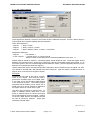
Select if the Signal is Controlled or Automatic.
MRCCC requires Routes to be configured for Automatic Signals.
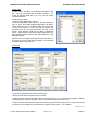
An Automatic signal can only have one Route. This will be set
automatically at startup.
For Controlled Signals, all Routes which can allow the signal to
clear must be entered.
If additional conditions like a Slot are required, set up a
Miscellaneous device and add an additional Aspect Condition.
G16/86/1/8
Page 8 of 14
© 2005
Stephen Parascandolo & MERG