1
Customising the software
115
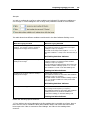
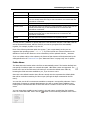
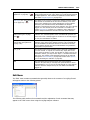
%PRODUCTID
The product identifier (part number) for the LogTag used to record the data.
%SERIALNUM
The unique serial number of the LogTag.
%START
The date and time the LogTag was started to record information. If the LogTag
was not actually started and only pre-start information was recorded then this
information will be blank.
%START-COUNT
The number of times the LogTag has been started since manufacture.
%START-DATE
The date the LogTag was started to record information. If the LogTag was not
actually started and only pre-start information was recorded then this
information will be blank.
%START-TIME
The time the LogTag was started to record information. If the LogTag was not
actually started and only pre-start information was recorded then this
information will be blank.
%TIME
The time when the LogTag information was originally retrieved.
%USERID
The user defined identifier for the set of information recorded by the LogTag.
You may use the \ character to specify that a file name definition includes a sub folder name as
well as the actual file name, which is useful if you want to group/sort files automatically
together, for example, by date or by User Id.
Each of the following elements within the quotes (") are not permitted, as they are not
supported the operating system ": * ? < > |". If you do include one of these elements in the
definition of how the file names are to be created they will be replaced with the _ character.
If you use a date and/or a time element, the format of that element will be determined by the
settings defined in the "Date and Time (see "Dates and Times" on page 118)" set of options.
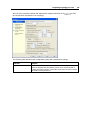
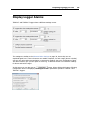
Folder Name
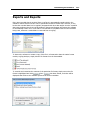
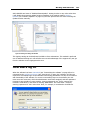
This determines the location where the files are automatically stored. The location defined here
can specify a local drive path or a network drive path. UNC folder names are supported. The
button at the end of the edit control will assist you to locate the default store folder by
browsing the folder structure available to you, if you choose to use it.
Since this is the default location where files are stored, this also represents the default folder
that will be used when searching for files to open (through the Open command in the File
menu).
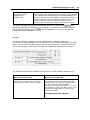
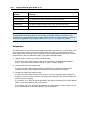
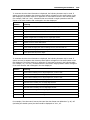
You can also use the PC's environment variables to compose a user specific pathname. This is
particularly of interest to network administrators who wish to create silent installations and
create generic UserProfile.dat files to direct the data to a location on the local PC or a domain
server.
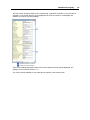
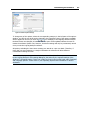
You can insert these variables at any location in the path name, provided the final resulting
button to insert following variables at the cursor:
name is a valid UNC folder name. Use the