1
Section 1: GBFM User Guide
1.3
Page 2
Familiarisation
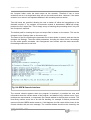
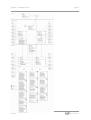
On loading GBFM 5.0 you should see something like Figure U1 (below).
Fig. U1: GBFM Interface.
The main area of the interface allows the user to see which scenarios are available, and
which base matrices. To start a model run, the user must specify one international base
matrix, one domestic (pdms) matrix, and at least one scenario.
Scenarios are selected by clicking the boxes next to each entry. The base matrices are
selected by clicking the drop-down lists as indicated in the diagram. The path and parameter
settings can be changed via the 'Settings' item on the menu strip.
The user can use the check boxes at the bottom left of the screen to switch off either the
international or domestic modules. This can be used to save time, if, for example, only
international flows are to be modelled.
The red button launches GBFM. As the procedure executes it will update the status bar to
tell you which scenario is running. If you activate the button, you will notice that the software
also launches a console window. In many cases this can be ignored, but it provides more
feedback, indicating what the software is currently doing. If there are errors during the model
run, the details of the problem can be found here. Do not close the console window
Printed on 31/03/08
Our Ref:
16:28