1
Brick-2 Videowall Processor Advanced User Guide
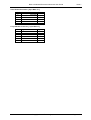
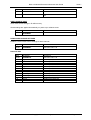
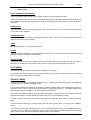
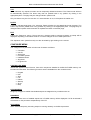
Byte
Parameter
Comment
Code
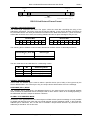
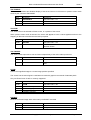
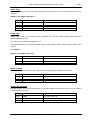
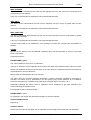
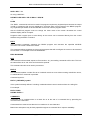
SLIMIT
Function code = 99
1
2
3
4
5
6
7
8
X1 low byte
X1 high byte
X2 low byte
X2 high byte
Y1 low byte
Y1 high byte
Y2 low byte
Y2 high byte
Left Limit
Issue 7
Right Limit
Top Limit
Bottom Limit
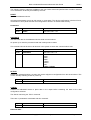
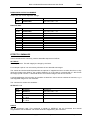
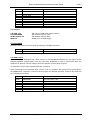
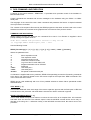
For example…
COLOUR 0 0 0
CLEARSCREEN
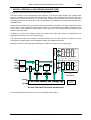
SLIMIT 0 350 5 287
MINIFY 2
; Set colour in RGB colour space to black
; Set overscan area to colour
; Set blanked overscan area
; Display four minified images
CLEARSCREEN
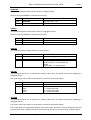
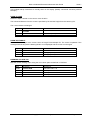
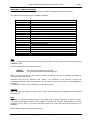
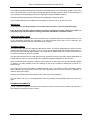
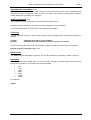
Clears the overscan area to the colour set using the COLOUR command.
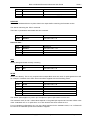
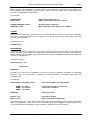
Byte
Parameter
Comment
Code
CLEARSCREEN
Function code = 94
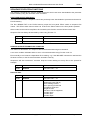
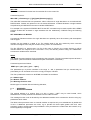
COLOUR CYCLE
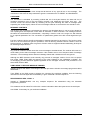
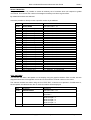
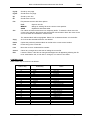
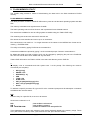
Any wash colour associated with each monitor is incremented/decremented by the signed R,G,B
amounts specified, approximately once per video field. Repeating for each of R,G,B until either the
maximum or minimum value is reached, when the direction for that colour reverses.
To terminate a colour wash cycle send the KILL command.
Other commands can be executed while a colour cycle is in progress, but will need to be preceeded by
the IMMEDTATE command. If not they will be queued for deferred execution, and then lost when the
KILL command is received.
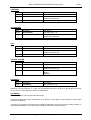
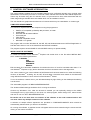
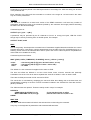
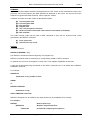
Byte
Parameter
Comment
Code
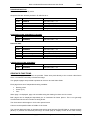
CLRCYCLE
Function code = 105
1
2
3
4
5
6
R speed low byte
R speed high byte
G speed low byte
G speed high byte
B speed low byte
B speed high byte
Signed Red cycle rate +/- 32
Signed Green cycle rate +/- 32
Signed Blue cycle rate +/- 32
Copyright Media Technologies, 1999 – 2006
Page 25 of 61