1
3
In this guide
Getting started
Directory
Location
5
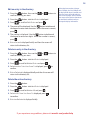
Store a name and number in the directory
13
Connect the mains power adaptor
5
View/dial an entry in the directory
13
Connect the telephone line
5
Insert a pause in a number
13
Set the time and date on the display
6
Edit an entry in the directory
14
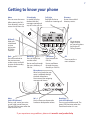
Getting to know your phone
7
Delete an entry in the directory
14
Delete the entire directory
14
Using your phone
Make a call
9
Call timer
9
Preparatory dialling
9
End a call
9
Receive a call
9
Caller Display and the calls list
Calls list
15
New calls
15
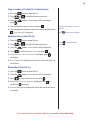
View the Calls list
15
Dial an entry in the Calls list
15
Copy a number in the Calls list to the directory 16
Handsfree
10
Make a call in handsfree mode
10
Answer a call in handsfree mode
10
Switch to handsfree mode during a call
10
1571 Voice mail indication
Adjust the handsfree volume
10
To access your voice mail messages
17
Redial
10
Turn 1571 on/off
17
View numbers in the redial list
10
Redial a number from the redial list
11
Save a redial number to the directory
11
Delete a number in the redial list
11
Delete the entire redial list
12
Mute
12
Delete an entry in the Calls list
16
Delete the entire Calls list
16
BT Services
Pre-stored BT Services numbers
18
View and dial a pre-stored BT Service
18
Add a new service
18
Edit a service
19
Delete a service
19
Restore all services
19
If you experience any problems, please visit www.bt.com/producthelp