1
Zinstall Migration Suite User Guide
Transferring profiles, settings and data but NOT applications
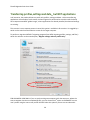
In all scenarios, the product allows to transfer only profiles, settings and data – without transferring
applications. An example of such transfer is when migration is performed to a machine which already
has a corporate standard “golden image”, where applications are already installed, but data and settings
are missing. This option is toggled by a switch on the main Scenario Selection screen on the Target
computer. It is available in all scenarios.
Selective Migration
In all of the scenarios above, the product allows to perform a selective migration: transferring only
chosen parts of the source system, instead of all of its applications, settings and files.
Command Line Execution
Zinstall Migration Suite may also be executed from a command line interface, instead of manual GUI
selection.
11