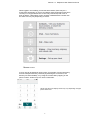
1
Version 1.2 Softphone User Guide for iPhone
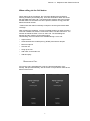
When calling via the Call button
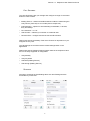
When calling via the Call button, the Call button displays the text field for
entering numbers (and the dial pad). There are two buttons either side of the
dial pad: Call and Video Call*. The Delete button appears above the keypad
and will delete one character at a time if pressed, however a long press will
delete the whole number.
* Please note that video functionality is subject to licencing and mobile data
coverage.
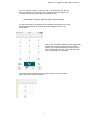
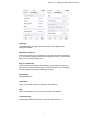
After pressing the call button, you’ll be prompted whether you want to make a
VoIP call or Mobile call, select a VoIP call in order to use the Soft Phone. You
will then be asked for either a voice or video call. The Call dialog box
appears and the contact’s phone starts ringing.
The following call control actions are available during a voice call:
•
Adjust volume
•
Generate dual-tone multi-frequency (DTMF) tones with a dial pad
•
Mute microphone
•
Hold the call
•
Hang up the call
•
Add video* to the audio call
•
Add third party
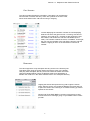
RECEIVING A CALL
An incoming call is indicated with a ring tone and the application if not
already, will open automatically, with an answer or reject button visible at the
bottom of the screen
3