1
Version 1.2 Softphone User Guide for iPhone
CALL HISTORY
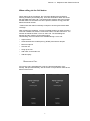
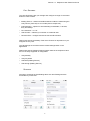
The client includes Call History integration. Call History can be filtered to
show all calls or missed calls only. There are symbols on the list of calls,
which show whether each call was incoming or outgoing.
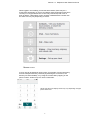
The list displaying the call items consists of icons displaying
what kind of call it was (green arrow = incoming, blue arrow =
outgoing, and a red arrow = missed). It also shows the name,
the number, and whether the call was unavailable (for the
caller). The number is below the name, if available. To the right,
the user can see the date of the call and the time the call was
initiated. Tapping an item on the list initiates a call to that
number.
DIRECTORY
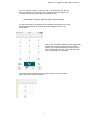
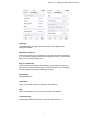
The client supports a Unity enterprise directory search in the Directory tab.
This takes place using the search field in the Directory tab. In the default
view (All), both enterprise directory and local contact list results are shown.
(See the examples below) There are different result icons depending on
whether the contact is in the native address book or the enterprise directory.
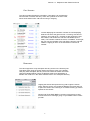
Tapping the search field opens the key pad to type the search
string. After the search, the results list displays the name and icon
to open the contact card. Clicking on a contact will bring up further
options for the contact.
Please note Send SMS/ MMS is currently unsupported on Unity
and will result in the message going via your Mobile Phone carrier
provider.
5