1
ClickCartPro Version 6.0.6 User Manual
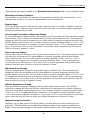
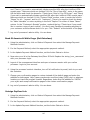
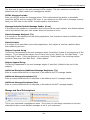
Application: Profile and Namespaces................................................................................................................................ 61
Application Profile .......................................................................................................................................................... 61
Application Name And Description ................................................................................................................................ 62
Front End Display Name ............................................................................................................................................ 62
Application Defaults/Application Interface.................................................................................................................. 62
Manage Program Namespaces ..................................................................................................................................... 62
Catalog: Categories, Products and Options ...................................................................................................................... 64
Manage Online Store Categories .................................................................................................................................. 65
Working With HTML Code................................................................................................................................................. 67
Manage Online Store Products...................................................................................................................................... 72
Manage Product Option Selection Items ....................................................................................................................... 85
Manage Product Options ............................................................................................................................................... 87
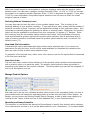
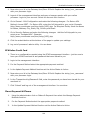
Commerce: Orders and Checkout..................................................................................................................................... 91
Decrypt Offline Order Data ............................................................................................................................................ 92
Manage Checkout Form Fields...................................................................................................................................... 92
Manage Custom Sale Methods ..................................................................................................................................... 94
Manage Discount Codes................................................................................................................................................ 95
Manage Online Orders (Completed and Processing).................................................................................................... 96
Manage Online Orders (Pending and Cancelled).......................................................................................................... 97
Manage Processing Gateways ...................................................................................................................................... 97
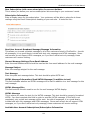
ClickCartPro Supported Payment Methods and Instructions For Installation.............................................................. 100
PayPal Website Payments Pro Management .......................................................................................................... 100
Online Processing Setup.......................................................................................................................................... 101
Setting Up Specific Online Processors .................................................................................................................... 103
Authorize.Net AIM & Wells Fargo (Authnet Interface) ............................................................................................. 104
Authorize.Net SIM .................................................................................................................................................... 104
2CheckOut ............................................................................................................................................................... 105
WorldPay .................................................................................................................................................................. 105
Cardservice Linkpoint (API Only) ............................................................................................................................. 106
Cardservice Linkpoint HTML .................................................................................................................................... 106
Bank Of America & Wells Fargo (BoA Interface) ..................................................................................................... 107
Verisign Payflow Link ............................................................................................................................................... 107
ECHOnline Credit Card ............................................................................................................................................ 108
Planet Payment & RTware ....................................................................................................................................... 108
SkipJack ................................................................................................................................................................... 109
PSiGate .................................................................................................................................................................... 110
NetBilling .................................................................................................................................................................. 110
CyberSource ............................................................................................................................................................ 111
Recurring Billing ....................................................................................................................................................... 113
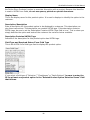
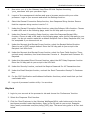
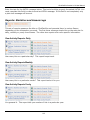
Displays: Skins, Menus, XHTML Includes and Messages .............................................................................................. 114
Manage Catalog Category Displays: Online Store View ............................................................................................. 114
Manage Catalog Product Displays: Category View..................................................................................................... 114
Manage Catalog Product Displays: Detail View .......................................................................................................... 115
Manage Custom Menu................................................................................................................................................. 116
Manage Display Skins ................................................................................................................................................. 117
Manage FrontEnd Menus ............................................................................................................................................ 118
Manage Online Store Menu ......................................................................................................................................... 119
Manage System Messages.......................................................................................................................................... 120
Manage XHTML Includes ............................................................................................................................................ 121
Upload and Install A New Skin .................................................................................................................................... 122
Skin Installation ........................................................................................................................................................ 122
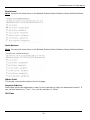
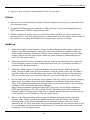
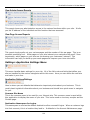
Exports: Data Export Modules......................................................................................................................................... 122
Peachtree Accounting Export ...................................................................................................................................... 123
Export File Names/Export File Name: Customers File ............................................................................................ 123
Quickbooks Accounting Export.................................................................................................................................... 123
Export File Name...................................................................................................................................................... 123
Forms: Application Forms and Form Fields .................................................................................................................... 123
3