1
Dell™ 4310WX Projector
User’s Guide
Notes, Notices, and Cautions
NOTE: A NOTE indicates important information that helps you
make better use of your projector.
NOTICE: A NOTICE indicates either potential damage to
hardware or loss of data and tells you how to avoid the problem.
CAUTION: A CAUTION indicates a potential for property
damage, personal injury, or death.
____________________
Information in this document is subject to change without notice.
© 2009 Dell Inc. All rights reserved.
Reproduction of these materials in any manner whatsoever without the written
permission of Dell Inc. is strictly forbidden.
Trademarks used in this text: Dell and the DELL logo are trademarks of Dell
Inc.; DLP and DLP logo are trademarks of TEXAS INSTRUMENTS INCORPORATED;
Microsoft and Windows are either trademarks or registered trademarks of
Microsoft Corporation in the United States and/or other countries.
Other trademarks and trade names may be used in this document to refer to either
the entities claiming the marks and names or their products. Dell Inc. disclaims
any proprietary interest in trademarks and trade names other than its own.
Model 4310WX
February 2009
Rev. A00
Contents
1
Your Dell Projector .
. . . . . . . . . . . . . . . . .
About Your Projector
2
. . . . . . . . . . . . . . . . .
Connecting Your Projector .
Connecting to a Computer
6
7
. . . . . . . . . . .
9
. . . . . . . . . . . . . . . .
10
Connecting a Computer Using a VGA Cable
. . . .
10
Monitor Loop-Through Connection Using VGA
Cables . . . . . . . . . . . . . . . . . . . . . .
. .
11
Connecting a Computer Using an RS232 cable .
. .
12
. . . .
13
. . . . . . . . . . . . . . . .
14
Connecting a Computer Using a DisplayPort
cable . . . . . . . . . . . . . . . . . . . .
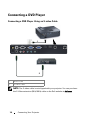
Connecting a DVD Player
Connecting a DVD Player Using an S-video
Cable . . . . . . . . . . . . . . . . . . . .
. . . .
14
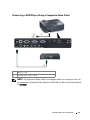
Connecting a DVD Player Using a Composite Video
Cable . . . . . . . . . . . . . . . . . . . . . . . . 15
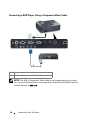
Connecting a DVD Player Using a Component Video
Cable . . . . . . . . . . . . . . . . . . . . . . . . 16
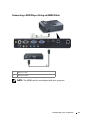
Connecting a DVD Player Using an HDMI
Cable . . . . . . . . . . . . . . . . . . .
Connecting to Local Area Network
. . . . .
17
. . . . . . . . . . .
18
To control the projector that is connected to a
network through an RJ45 cable. . . . . . . . .
. .
Professional Installation Options: Installation for
Driving Automatic Screen . . . . . . . . . . . .
.
Contents
18
19
3
Connection With Commercial RS232 Control
Box . . . . . . . . . . . . . . . . . . . . . .
3
. . .
20
Using Your Projector
. . . . . . . . . . . . . . . .
21
Turning Your Projector On
. . . . . . . . . . . . . . . .
21
Turning Your Projector Off .
. . . . . . . . . . . . . . .
Adjusting the Projected Image
. . . . . . . . . . . . .
Raising the Projector Height
. . . . . . . . . . . .
Lowering the Projector Height
. . . . . . . . . . .
24
. . . . . . . . . . . . . . . . .
25
. . . . . . . . . . . . . . . .
28
. . . . . . . .
31
. . . . . . . . .
32
. . . . . . . . . . . . . .
33
. . . . . . . . . . . . . . . . . . . . .
33
Installing the Remote Control Batteries
Operating Range With Remote Control
Using the On-Screen Display
AUTO-ADJUST
. . . . . . . . . . . . . . . . . . .
33
INPUT SELECT
. . . . . . . . . . . . . . . . . . .
34
PICTURE (in PC Mode)
. . . . . . . . . . . . . . .
PICTURE (in Video Mode)
DISPLAY (in PC Mode)
LAMP
35
. . . . . . . . . . . . .
36
. . . . . . . . . . . . . . .
37
DISPLAY (in Video Mode)
. . . . . . . . . . . . .
39
. . . . . . . . . . . . . . . . . . . . . . . .
40
SET UP
. . . . . . . . . . . . . . . . . . . . . . .
INFORMATION
Contents
22
. . . . . . . . . . . .
Using the Remote Control
4
22
23
Adjusting Projection Image Size
Main Menu
22
. . . . . . . .
Adjusting the Projector Zoom and Focus
Using the Control Panel
21
. . . . . . . . . . . . . . . . . . .
40
43
OTHERS
. . . . . . . . . . . . . . . . . . . . . . .
. . . .
50
. . . . . . . . . .
50
. . . . . . . . . . .
50
. . . . . . . . . . . . . . . .
51
Managing the Projector From Web Management
Configuring the Network Setting
Accessing Web Management
Managing Properties
4
Troubleshooting Your Projector
Guiding Signals
43
. . . . . . . .
63
. . . . . . . . . . . . . . . . . . . . .
67
Changing the Lamp .
. . . . . . . . . . . . . . . . . . .
69
. . . . . . . . . . . . . . . . . . . . .
71
. . . . . . . . . . . . . . . . . . . .
76
5
Specifications
6
Contacting Dell
7
Appendix: Glossary
. . . . . . . . . . . . . . . . .
Contents
77
5
Your Dell Projector
1
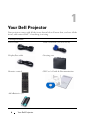
Your projector comes with all the items shown below. Ensure that you have all the
items, and contact Dell™ if anything is missing.
Package Contents
Power cable
1.8m VGA cable (VGA to VGA)
DisplayPort cable
Carrying case
Remote control
CD User’s Guide & Documentation
AAA Batteries (2)
6
Your Dell Projector
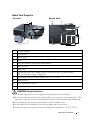
About Your Projector
Top View
Bottom View
1
10
6
12
8
2
3
9
5
4
7
11
1
Control panel
2
Zoom tab
3
Focus ring
4
Lens
5
Elevator button for height adjustments
6
IR receivers
7
Lens cap
8
Mounting holes for ceiling mount: Screw hole M3 x 6.5mm depth.
Recommended torque <8kgf-cm
9
Mounting hole for tripod: Insert nut 1/4"*20 UNC
10
Lamp cover
11
Tilt adjustment wheel
12
Elevator foot
CAUTION: Safety Instructions
1 Do not use the projector near appliances that generate a lot of heat.
2 Do not use the projector in areas where there is an excessive amount of dust. The
dust may cause the system to fail and the projector will automatically shutdown.
3 Ensure that the projector is mounted in a well-ventilated area.
4 Do not block the ventilation slots and openings on the projector.
5 Ensure the projector operates between ambient temperatures (5ºC to 35ºC).
Your Dell Projector
7
6 Do not try to touch the ventilation outlet as it can become very hot after the
projector has been turned on or immediately after it is turned off.
7 Do not look into the lens while the projector is on as it may cause injury to your
eyes.
8 Do not place any objects near or in front of the projector or cover its lens while the
projector is on as the heat may cause the object to melt or burn.
NOTE:
• Do not attempt to ceiling mount the projector yourself. It should be
installed by a qualified technician.
• Recommended Projector Ceiling Mount Kit (P/N: C3505). For more
information, see the Dell Support website at support.dell.com.
• For more information, see the Safety Information that shipped with your
projector.
8
Your Dell Projector
2
Connecting Your Projector
1
2
18 17 16
3
15
4
5
6
7
8
9
10
14 13 12 11
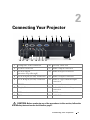
1
Composite video connector
10
Security cable slot
2
S-video connector
11
Audio output connector
3
VGA-A output
(monitor loop-through)
12
Audio-B input connector
4
VGA-A input (D-sub) connector
13
Audio-A input connector
5
VGA-B input (D-sub) connector
14
Audio-C right-channel input
connector
6
HDMI connector
15
Power cord connector
7
DisplayPort connector
16
Audio-C left-channel input
connector
8
USB remote connector
17
RS232 connector
9
RJ45 connector
18
+12V DC out connector
CAUTION: Before you begin any of the procedures in this section, follow the
Safety Instructions as described on page 7.
Connecting Your Projector
9
Connecting to a Computer
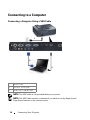
Connecting a Computer Using a VGA Cable
1
2
3
1
Power cord
2
VGA to VGA cable
3
USB-A to USB-B cable
NOTE: The USB cable is not provided with your projector.
NOTE: The USB cable must be connected if you want to use the Page Up and
Page Down features on the remote control.
10
Connecting Your Projector
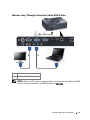
Monitor Loop-Through Connection Using VGA Cables
1
2
1
Power cord
2
VGA to VGA cable
2
NOTE: Only one VGA cable is shipped with your projector. An additional VGA
cable can be purchased on the Dell website at dell.com.
Connecting Your Projector
11
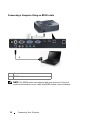
Connecting a Computer Using an RS232 cable
1
2
1
Power cord
2
RS232 cable
NOTE: The RS232 cable is not shipped with your projector. Consult a
professional installer for the cable and RS232 remote control software.
12
Connecting Your Projector
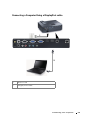
Connecting a Computer Using a DisplayPort cable
1
2
1
Power cord
2
DisplayPort cable
Connecting Your Projector
13
Connecting a DVD Player
Connecting a DVD Player Using an S-video Cable
1
2
1
Power cord
2
S-video cable
NOTE: The S-video cable is not shipped with your projector. You can purchase
the S-Video extension (50 ft/100 ft) cable on the Dell website at dell.com.
14
Connecting Your Projector
Connecting a DVD Player Using a Composite Video Cable
1
2
1
Power cord
2
Composite video cable
NOTE: The Composite Video cable is not shipped with your projector. You can
purchase the Composite Video Extension (50 ft/100 ft) cable on the Dell website
at dell.com.
Connecting Your Projector
15
Connecting a DVD Player Using a Component Video Cable
1
2
1
Power cord
2
VGA to Component Video cable
NOTE: The VGA to Component Video cable is not shipped with your projector.
You can purchase the VGA to Component Video Extension (50 ft/100 ft) cable on
the Dell website at dell.com.
16
Connecting Your Projector
Connecting a DVD Player Using an HDMI Cable
1
2
1
Power cord
2
HDMI cable
NOTE: The HDMI cable is not shipped with your projector.
Connecting Your Projector
17
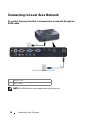
Connecting to Local Area Network
To control the projector that is connected to a network through an
RJ45 cable.
1
2
Local Area Network (LAN)
1
Power cord
2
RJ45 cable
NOTE: The RJ45 cable is not shipped with your projector.
18
Connecting Your Projector
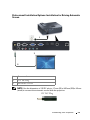
Professional Installation Options: Installation for Driving Automatic
Screen
1
3
2
1
Power cord
2
12V DC Plug
3
Automatic Screen
NOTE: Use the dimension of 12V DC plug in 1.7 mm (ID) x 4.00 mm (OD) x 9.5 mm
(shaft) to connect the automatic screen with the projector.
12V DC Plug
Connecting Your Projector
19
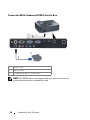
Connection With Commercial RS232 Control Box
1
3
2
1
Power cord
2
RS232 cable
3
Commercial RS232 control box
NOTE: The RS232 cable is not shipped with your projector. Consult a
professional technician to obtain the cable.
20
Connecting Your Projector
3
Using Your Projector
Turning Your Projector On
NOTE: Turn on the projector before you turn on the source (computer, DVD
player, etc.). The Power button light blinks blue until pressed.
1 Remove the lens cap.
2 Connect the power cord and appropriate signal cables. For information about
connecting the projector, see "Connecting Your Projector" on page 9.
3 Press the Power button (see "Using the Control Panel" on page 25 to locate the
Power button).
4 Turn on your source (computer, DVD player, etc.)
5 Connect your source to the projector using the appropriate cable. See
"Connecting Your Projector" on page 9 for instructions to connect your source to
the projector.
6 By default, the input source of projector is set to VGA-A. Change the input source
of projector if necessary.
7 If you have multiple sources connected to the projector, press the Source button
on the remote control or control panel to select the desired source. See "Using the
Control Panel" on page 25 and "Using the Remote Control" on page 28 to locate
the Source button.
Turning Your Projector Off
NOTICE: Unplug the projector after properly shutting down as explained in the
following procedure.
1 Press the Power button.
NOTE: The "Press Power Button to Turn off Projector" message will appear
on the screen. The message disappears after 5 seconds or you can press the
Menu button to clear it.
2 Press the Power button again. The cooling fans continue to operate for 120
seconds.
Using Your Projector
21
3 To power off the projector quickly, press the Power button and hold for 1 second
while the projectors cooling fans are still running.
NOTE: Before you turn on the projector again, wait for 60 seconds to allow the
internal temperature to stabilized.
4 Disconnect the power cord from the electrical outlet and the projector.
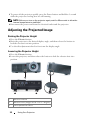
Adjusting the Projected Image
Raising the Projector Height
1 Press the Elevator button.
2 Raise the projector to the desired display angle, and then release the button to
lock the elevator foot into position.
3 Use the tilt adjustment wheel to fine-tune the display angle.
Lowering the Projector Height
1 Press the Elevator button.
2 Lower the projector, and then release the button to lock the elevator foot into
position.
1
2
3
3
1
Elevator button
2
Elevator foot (Angle of tilt: 0 to 9.5 degree)
3
Tilt adjustment wheel
22
Using Your Projector
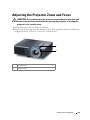
Adjusting the Projector Zoom and Focus
CAUTION: To avoid damaging the projector, ensure that the zoom lens and
elevator foot are fully retracted before moving the projector or placing the
projector in its carrying case.
1 Rotate the zoom tab to zoom in and out.
2 Rotate the focus ring until the image is clear. The projector focuses at distances
ranging between 3.94 ft to 32.81 ft (1.2 m to 10 m).
1
2
1
Zoom tab
2
Focus ring
Using Your Projector
23
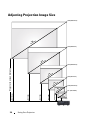
Adjusting Projection Image Size
358"(909.32cm)
(
8 " m)
2 9 92c
6.
5
7
325"(825.5cm)
24
253"(642.62cm)
(
)
8"
2 0 2cm
.3
8
52
(
180"(457.2cm)
)
9"
1 4 6cm
.4
8
37
108"(274.32cm)
)
"
8 9 6cm
.0
Using Your Projector
9.8'(3.0m)
16.4'(5.0m)
23.0'(7.0m)
(
29.5'(9.0m)
32.8'(10.0m)
Projector to screen distance
(
8 " m)
2 6 72c
.
0
68
6
22
36"
(91.44cm)
3.9'(1.2m)
43 "(109.22cm)
Screen
(Diagonal)
Max.
43"
(109.22cm)
108"
(274.32cm)
180"
(457.2cm)
253"
(642.62cm)
325"
(825.50cm)
358"
(909.32cm)
Min.
36"
(91.44cm)
89"
(226.06cm)
149"
(378.46cm)
208"
(528.32cm)
268"
(680.72cm)
298"
(756.92cm)
91.73" X
57.48"
153.15" X
95.67"
214.17" X
133.86"
275.20" X
172.05"
303.54" X
189.76"
(233cm X
146cm)
(389cm X
243cm)
(544cm X
340cm)
(699cm X
437cm)
(771cm X
482cm)
75.59" X
47.24"
126.38" X
78.74"
176.77" X
110.24"
227.17" X
142.13"
252.36" X
157.87"
(77cm X
48cm)
(192cm X
120cm)
(321cm X
200cm)
(449cm X
280cm)
(577cm X
361cm)
(641cmX
401cm)
Max.
25.98"
(66cm)
64.57"
(164cm)
107.48"
(273cm)
150.39"
(382cm)
193.31"
(491cm)
213.39"
(542cm)
Min.
21.26"
(54cm)
53.15"
(135cm)
88.58"
(225cm)
124.02"
(315cm)
159.45"
(405cm)
177.17"
(450cm)
Max.
36.61" X
(WxH) 22.83"
Screen
Size
Hd
Distance
(93cm X
58cm)
Min.
30.31" X
(WxH) 18.90"
3.94' (1.2m) 9.8' (3.0m)
16.4' (5.0m) 23.0' (7.0m) 29.5' (9.0m) 32.81'
(10.0m)
* This graph is for user reference only.
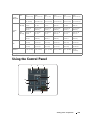
Using the Control Panel
1
2
3
4
10
9
5
6
8
7
Using Your Projector
25
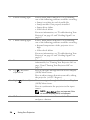
1
LAMP warning light
If the LAMP amber indicator is on or blinking,
one of the following problems could be occurring:
• Lamp is reaching its end of usable life
• Lamp module is not properly installed
• Lamp driver failure
• Color wheel failure
For more information, see "Troubleshooting Your
Projector" on page 63 and "Guiding Signals" on
page 67.
2
TEMP warning light
If the TEMP amber indicator is on or blinking,
one of the following problems could be occurring:
• Internal temperature of the projector is too
high
• Color wheel failure
For more information, see "Troubleshooting Your
Projector" on page 63 and "Guiding Signals" on
page 67.
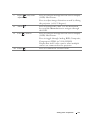
3
Power
Turns the projector on or off. For more
information, see "Turning Your Projector On" on
page 21 and "Turning Your Projector Off" on
page 21.
4
Up
/ Keystone
adjustment
Press to navigate through the On-Screen Display
(OSD) Menu items.
Press to adjust image distortion caused by tilting
the projector (+40/-35 degrees).
5
Right
/ Auto Adjust
Press to navigate through the On-Screen Display
(OSD) Menu items.
Press to synchronize the projector to the input
source.
NOTE: Auto Adjust does not operate if the
on-screen display (OSD) is displayed.
6
26
IR Receiver
Using Your Projector
Point the remote control towards the IR receiver
and press a button.
7
Down
/ Keystone
adjustment
Press to navigate through the On-Screen Display
(OSD) Menu items.
Press to adjust image distortion caused by tilting
the projector (+40/-35 degrees).
8
Menu
9
Left
Press to activate the OSD. Use the directional
keys and the Menu button to navigate through
the OSD.
/ Source
Press to navigate through the On-Screen Display
(OSD) Menu items.
Press to toggle through Analog RGB, Composite,
Component (YPbPr via VGA), HDMI,
DisplayPort and S-video sources when multiple
sources are connected to the projector.
10
Enter
Press to confirm the selection item.
Using Your Projector
27
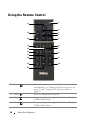
Using the Remote Control
1
11
2
12
3
4
13
5
14
15
6
7
16
8
17
18
9
19
10
20
1
Power
2
Enter
Press to confirm the selection.
3
Right
Press to navigate through the On-Screen Display
(OSD) Menu items.
4
Down
Press to navigate through the On-Screen Display
(OSD) Menu items.
28
Turns the projector on or off. For more
information, see "Turning Your Projector On" on
page 21 and "Turning Your Projector Off" on
page 21.
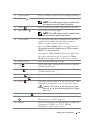
Using Your Projector
5
Aspect Ratio
Press to change aspect ratio of a displayed image.
6
Page up
Press to move to previous page.
NOTE: The USB cable must be connected if
you want to use the Page Up feature.
7
Mute
Press to mute or un-mute the projector speaker.
8
Page down
Press to move to next page.
NOTE: The USB cable must be connected if
you want to use the Page Down feature.
9
Video mode
The projector has preset configurations that are
optimized for displaying data (presentation
slides) or video (movies, games, etc.).
Press the Video Mode button to toggle between
Presentation mode, Bright mode, Movie mode,
sRGB, or Custom mode.
Pressing the Video Mode button once will show
the current display mode. Pressing the Video
Mode button again will switch between modes.
10 Blank screen
Press to hide/unhide the image.
11 Up
Press to navigate through the On-Screen Display
(OSD) Menu items.
12 Left
Press to navigate through the On-Screen Display
(OSD) Menu items.
13 Menu
Press to activate the OSD.
14 Volume up
Press to increase the volume.
15 Laser
Point the remote control at the screen, press and
hold the laser button to activate the laser light.
Caution: Do not look into the laser point
when it is on. Avoid shining the laser light
into eyes.
16 Volume down
Press to decrease the volume.
17 Keystone adjustment
Press to adjust image distortion caused by tilting
the projector (+40/-35 degrees).
18 Source
Press to switch between Analog RGB, Composite,
Component (YPbPr, via VGA), HDMI,
DisplayPort and S-video sources.
Using Your Projector
29
19 Auto adjust
Press to synchronize the projector with the input
source. Auto adjust does not operate if the OSD
is displayed.
20 Keystone adjustment
Press to adjust image distortion caused by tilting
the projector (+40/-35 degrees).
30
Using Your Projector
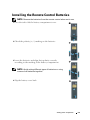
Installing the Remote Control Batteries
NOTE: Remove the batteries from the remote control when not in use.
1 Press the tab to lift the battery compartment cover.
1
2 Check the polarity (+/-) marking on the batteries.
2
3 Insert the batteries and align their polarity correctly
3
according to the marking in the battery compartment.
NOTE: Avoid mixing different types of batteries or using
new and old batteries together.
4 Slip the battery cover back.
4
Using Your Projector
31
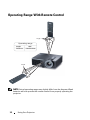
Operating Range With Remote Control
Distance
Angle
Operating range
Angle
±30°
Distance
10m/32.8feet
Angle
e
nc
sta
Di
NOTE: Actual operating range may slightly differ from the diagram. Weak
batteries will also prevent the remote control from properly operating the
projector.
32
Using Your Projector
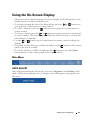
Using the On-Screen Display
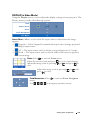
• The projector has a multi-language On-Screen Display (OSD) Menu that can be
displayed with or without an input source.
• To navigate through the tabs in the Main Menu, press the
or
buttons on
your projectors control panel or remote control.
• To select a submenu, press the
button on your projector’s control panel or
remote control.
• To select an option, press the
or
buttons on your projector’s control panel
or remote control. The color changes to dark blue. When an item is selected, the
color changes to dark blue.
• Use the
or
buttons on the control panel or remote control to adjust the
settings.
• To go back to Main Menu, go to Back tab and press the
button on the control
panel or the remote control.
• To exit the OSD, go to EXIT tab and press the
button or press the Menu
button directly on the control panel or the remote control.
Main Menu
AUTO-ADJUST
Auto Adjust automatically adjusts the projector's Frequency and Tracking in PC
mode. While Auto Adjustment is in progress, the following message appears on
the screen:.
Using Your Projector
33
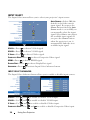
INPUT SELECT
The Input Select menu allows you to select your projector’s input source.
AUTO SOURCE—Select Off (the
default) to lock the current
input signal. If you press the
Source button when the Auto
Source mode is set to Off, you
can manually select the input
signal. Select On to auto detect
the available input signals. If
you press the Source button
when the projector is on, it
automatically finds the next
available input signal.
VGA-A—Press
to detect VGA-A signal.
VGA-B—Press
to detect VGA-B signal.
S-VIDEO—Press
to detect S-Video signal.
COMPOSITE VIDEO—Press
HDMI—Press
to detect HDMI signal.
DISPLAYPORT—Press
ADVANCED—Press
to detect Composite Video signal.
to detect DisplayPort signal.
to activate Input Select Advanced menu.
INPUT SELECT ADVANCED
The Input Select Advanced menu allows you to enable or disable input sources.
VGA-A—Use
and
to enable or disable VGA-A input.
VGA-B—Use
and
to enable or disable VGA-B input.
S-VIDEO—Use
and
COMPOSITE VIDEO—Use
34
to enable or disable S-Video input.
and
Using Your Projector
to enable or disable Composite Video input.
HDMI—Use
and
DISPLAYPORT—Use
to enable or disable HDMI input.
and
to enable or disable DisplayPort input.
NOTE: You cannot disable your current input source. At anytime, a minimum of
two input sources have to be enabled.
PICTURE (in PC Mode)
Using the Picture menu, you can adjust the display settings of your projector. The
Picture menu, provides the following options:
VIDEO MODE—Allows you to optimize the display image: Presentation, Bright,
Movie, sRGB (provides more accurate color representation), and Custom (set
your preferred settings). If you adjust the settings for Brightness, Contrast,
Saturation, Sharpness, Tint, and Advanced, the projector automatically switches
to Custom.
NOTE: If you adjust the settings for Brightness, Contrast, Saturation,
Sharpness, Tint, and Advanced the projector automatically switches to Custom.
BRIGHTNESS—Use
CONTRAST—Use
and
and
to adjust the brightness of the image.
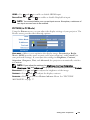
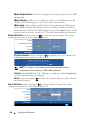
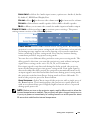
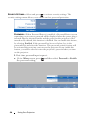
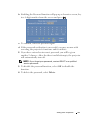
to adjust the display contrast.
to activate Picture Advance Menu. See "PICTURE
ADVANCED—Press
ADVANCED" on page 37.
Using Your Projector
35
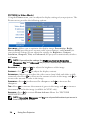
PICTURE (in Video Mode)
Using the Picture menu, you can adjust the display settings of your projectors. The
Picture menu, provides the following options:
VIDEO MODE—Allows you to optimize the display image: Presentation, Bright,
Movie, sRGB (provides more accurate color representation), and Custom (set
your preferred settings).If you adjust the settings for Brightness, Contrast,
Saturation, Sharpness, Tint, and Advanced, the projector automatically switches
to Custom.
NOTE: If you adjust the settings for Brightness, Contrast, Saturation,
Sharpness, Tint, and Advanced, the projector automatically switches to
Custom.
BRIGHTNESS—Use
CONTRAST—Use
and
and
to adjust the brightness of the image.
to adjust the display contrast.
SATURATION—Allows you to adjust the video source from black and white to fully
saturated color. Press
to decrease the amount of color in the image and
to
increase the amount of color in the image.
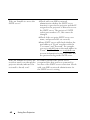
SHARPNESS—Press
sharpness.
to decrease the sharpness and
to increase the
TINT—Press
to increase the amount of green in the image and
the amount of red in the image (available for NTSC only).
to increase
to activate Picture Advance Menu. See "PICTURE
ADVANCED—Press
ADVANCED" below.
NOTE: Saturation, Sharpness, and Tint are only available when input source is
from Composite or S-Video.
36
Using Your Projector
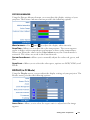
PICTURE ADVANCED
Using the Picture Advanced menu, you can adjust the display settings of your
projector. The Picture Advanced menu provides the following options:
WHITE INTENSITY—Use
and
to adjust the display white intensity.
COLOR TEMP—Allows you to adjust the color temperature. The screen appears
cooler at higher color temperatures and warmer at lower color temperatures.
When you adjust the values in the Color Adjust menu, the Custom mode is
activated. The values are saved in the Custom mode.
CUSTOM COLOR ADJUST—Allows you to manually adjust the colors red, green, and
blue.
COLOR SPACE—Allows you to select the color space, options are: RGB, YCbCr, and
YPbPr.
DISPLAY (in PC Mode)
Using the Display menu, you can adjust the display settings of your projector. The
Picture menu, provides the following options:
ASPECT RATIO—Allows you to select the aspect ratio to adjust how the image
appears.
Using Your Projector
37
•
Original — Select Original to maintain the aspect ratio of image projected
according to input source.
•
•
4:3 — The input source scales to fit the screen and projects a 4:3 image.
Wide — The input source scales to fit the width of the screen to project a
wide screen image.
ZOOM—Press
to activate Zoom menu.
Select the area to zoom and press
to view zoomed image.
Adjust the image scale by pressing
press
to view.
ZOOM NAVIGATION—Press
menu.
Use
HORIZONTAL POSITION—Press
image to the right.
VERTICAL POSITION—Press
up.
or
and
to activate Zoom Navigation
to navigate projection screen.
to move the image to the left and
to move the image down and
to move the
to move the image
FREQUENCY—Allows you to change the display data clock frequency to match the
frequency of your computer graphics card. If you see a vertical flickering wave, use
Frequency control to minimize the bars. This is a coarse adjustment.
TRACKING—Synchronize the phase of the display signal with the graphic card. If you
experience an unstable or flickering image, use Tracking to correct it. This is a fine
adjustment.
38
Using Your Projector
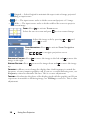
DISPLAY (in Video Mode)
Using the Display menu, you can adjust the display settings of your projector. The
Picture menu, provides the following options:
ASPECT RATIO—Allows you to select the aspect ratio to adjust how the image
appears.
•
Original — Select Original to maintain the aspect ratio of image projected
according to input source.
•
•
4:3 — The input source scales to fit the screen and projects a 4:3 image.
Wide — The input source scales to fit the width of the screen to project a
wide screen image.
ZOOM—Press
to activate Zoom menu.
Select the area to zoom and press
Adjust the image scale by pressing
view.
to view zoomed image.
or
and press
to
Adjust the image scale by pressing
press
to view.
ZOOM NAVIGATION—Press
menu.
Use
or
and
to activate Zoom Navigation
to navigate projection screen.
Using Your Projector
39
LAMP
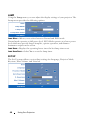
Using the Lamp menu, you can adjust the display settings of your projector. The
Lamp menu provides the following options:
LAMP MODE—Allows you to select between Normal and ECO mode.
Normal mode operates at full power level. ECO Mode operates at a lower power
level which may provide longer lamp life, quieter operation, and dimmer
luminance output on the screen.
LAMP HOUR—Displays the operating hours since the last lamp timer reset.
LAMP HOUR RESET—Select Yes to reset the lamp timer.
SET UP
The Set Up menu allows you to adjust settings for Language, Projector Mode,
Keystone, Alert Volume, and Network.
40
Using Your Projector
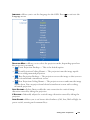
LANGUAGE—Allows you to set the language for the OSD. Press
Language menu.
to activate the
PROJECTOR MODE—Allows you to select the projector mode, depending upon how
the projector is mounted.
•
Front Projection-Desktop — This is the default option.
•
Front Projection-Ceiling Mount — The projector turns the image upside
down for ceiling-mounted projection.
•
Rear Projection-Desktop — The projector reverses the image so that you can
project from behind a translucent screen.
•
Rear Projection-Ceiling Mount — The projector reverses and turns the image
upside down. You can project from behind a translucent screen with a ceilingmounted projection.
AUTO KEYSTONE—Select On to enable the auto correction for vertical image
distortion caused by tilting the projector.
V. KEYSTONE—Manually adjust the vertical image distortion caused by tilting the
projector.
ALERT VOLUME—Allows you to set buzzer alert loudness (Off, Low, Mid or High) for
power on/off, warning and command keys.
Using Your Projector
41
NETWORK—Select On to activate network connection. Select Off to disable
network connection. Press
to activate Network menu. See "NETWORK" on
page 42.
NETWORK
The Network menu allows you to configure the network connection settings.
DHCP—If a DHCP server exists in the network to which the projector is
connected, the IP address will automatically be acquired when you select DHCP
On. If DHCP is Off, manually set the IP Address, Subnet Mask, and Gateway. Use
to select the number of IP Address, Subnet Mask, and Gateway. Key in
Enter to confirm each number and then use
to set the next item.
IP ADDRESS—Automatically or manually assigns the IP address to the projector
connected to the network.
SUBNET MASK—Configure the Subnet Mask of the network connection.
GATEWAY—Check the Gateway address with your network/system administrator if
you configure it manually.
DNS—Check the DNS Server IP address with your network/system administrator
if you configure it manually.
STORE—Press
to save the changes made in network configuration settings.
RESET NETWORK—Select Yes to reset network configuration.
42
Using Your Projector
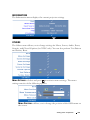
INFORMATION
The Information menu displays the current projector settings.
OTHERS
The Others menu allows you to change settings for Menu, Screen, Audio, Power,
Security, and Closed Caption (for NTSC only). You can also perform Test Pattern
and Factory Reset.
MENU SETTINGS—Select and press
to activate menu settings. The menu
settings consists of the following options:
MENU POSITION—Allows you to change the position of the OSD menu on
the screen.
Using Your Projector
43
MENU TRANSPARENCY—Select to change the transparency level of the OSD
background.
MENU TIMEOUT—Allows you to adjust the time for an OSD timeout. By
default, the OSD disappears after 20 seconds of non-activity.
MENU LOCK—Select On to enable Menu Lock and hide the OSD menu.
Select OFF to disable the Menu Lock. If you want to disable the Menu
Lock function and have the OSD disappear, press the Menu button on the
control panel or remote control for 15 seconds, then disable the function.
SCREEN SETTINGS—Select and press
to activate screen settings. The screen
settings menu consists of the following options:
CAPTURE SCREEN—Select and press
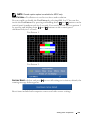
to capture the screen display, the
following message appears on the screen.
NOTE: To capture a full image, ensure the input signal that is
connected to the projector is 1280 x 800 resolution.
SCREEN—Select Dell to use the Dell logo as wallpaper. Select Captured to
set the captured image as wallpaper.
RESET—Select and press
the default setting.
AUDIO SETTINGS—Select and press
to delete the captured picture and set back to
to change audio settings. The audio
settings menu consists of the following options:
44
Using Your Projector
AUDIO INPUT—Select the Audio input source, options are: Audio-A, AudioB, Audio-C, HDMI and DisplayPort.
VOLUME—Press
to decrease the volume and
to increase the volume.
SPEAKER—Select On to enable speaker. Select Off to disable speaker.
MUTE—Allows you to mute the sounds for audio input and audio output.
POWER SETTINGS—Select and press
to activate power settings. The power
settings menu consists of the following options:
POWER SAVING—Select Off to disable Power Saving mode. By default, the
projector is set to enter power saving mode after 120 minutes of no activity.
A warning message appears on screen showing a 60-second countdown
before switching to power saving mode. Press any key buttons during
countdown period to stop power saving mode.
You can also set a different delay period to enter power saving mode. The
delay period is the time you want the projector to wait without an input
signal. Power saving can be set to 30, 60, 90, or 120 minutes.
If an input signal is not detected during the delay period, the projector
turns off the lamp and goes into power saving mode. If an input signal is
detected within the delay period, the projector automatically turns on. If
an input signal is not detected within two hours during power saving mode,
the projector switches from Power Saving mode to Power Off mode. To
turn on the projector press the Power button.
QUICK SHUTDOWN—Select Yes to turn off the projector with a single press of
the Power button. This function allows the projector to quick power off
with an accelerated fan speed. Slightly higher acoustic noise is expected
during quick power off.
NOTE: Before you turn on the projector again, wait for 60 seconds to allow the
internal temperature to stabilize. The projector will take a longer time to turn on
if you try to power on immediately. Its cooling fan will run at full speed for about
30 seconds to stabilize the internal temperature.
Using Your Projector
45
SECURITY SETTINGS—Select and press
to activate security settings. The
security settings menu allows you to enable and set password protection.
PASSWORD—When Password Protect is enabled, a Password Protect screen
requesting you to enter a password will be displayed when the power plug is
inserted into the electrical outlet and the power for the projector is first
turned on. By default, this function is disabled. You can enable this feature,
by selecting Enabled. If the password has been set before, key in the
password first and select the function. This password security feature will
be activated the next time you turn on the projector. If you enable this
feature, you will be asked to enter the projector's password after you turn
on the projector:
1 First time password input request:
a Go to Others menu, press
the password setting.
46
Using Your Projector
and then select Password to Enable
b Enabling the Password function will pop up a character screen, key
in a 4-digit number from the screen and press
.
c To confirm, enter the password again.
d If the password verification is successful, you may resume with
accessing the projector's functions and its utilities.
2 If you have entered an incorrect password, you will be given
another 2 chances. After the three invalid attempts, the projector
will automatically turn off.
NOTE: If you forget your password, contact DELL™ or a qualified
service personnel.
3 To disable the password function, select Off to disable the
function.
4 To delete the password, select Delete.
Using Your Projector
47
CHANGE PASSWORD—Key in the original password, then enter the new
password and confirm the new password again.
CLOSED CAPTION—Select On to enable close caption and activate the closed
caption menu. Select an appropriate closed captions option: CC1, CC2, CC3, and
CC4.
48
Using Your Projector
NOTE: Closed caption option is available for NTSC only.
TEST PATTERN—Test Pattern is used to test focus and resolution.
You can enable or disable the Test Pattern by selecting Off, 1 or 2. You can also
invoke the Test Pattern 1 by pressing and holding down
and
buttons on the
control panel simultaneously for 2 seconds. You can also invoke the test pattern 2
by pressing and holding down
and
buttons on the control panel
simultaneously for 2 seconds.
Test Pattern 1:
Test Pattern 2:
FACTORY RESET—Select and press
warning message below appears.
to reset all settings to its factory default, the
Reset items include both computer sources and video source settings.
Using Your Projector
49
Managing the Projector From Web
Management
Configuring the Network Setting
If the projector is connected to a network, you can access the projector using a web
browser by configuring the network setting (TCP/IP). When using the network
function, the IP address should be unique. For configuring the network setting,
refer to "NETWORK" on page 42.
Accessing Web Management
Use Internet Explorer 5.0 and above or Netscape Navigator 7.0 and above and
enter the IP address. You can now access Web Management and manage the
projector from a remote location.
50
Using Your Projector
Managing Properties
Home
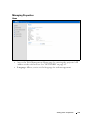
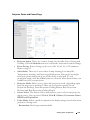
•
Access the Web Management Home page by entering the projector’s IP
address at the web browser. See "NETWORK" on page 42.
•
Language: Allows you to set the language for web management.
Using Your Projector
51
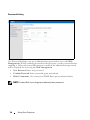
Network Settings
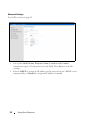
See OSD section on page 42.
•
Set up the Model Name, Projector Name, Location and Contact
information (up to 21 characters for each field). Press Save to store the
settings.
•
Choose DHCP to assign an IP address to the projector from a DHCP server
automatically, or Manual to assign an IP address manually.
52
Using Your Projector
Projector Status and Control Page
•
Projector Status: There are 4 status: Lamp On, Standby, Power Saving and
Cooling. Click the Refresh button to refresh the status and control settings.
•
Power Saving: Power Saving can be set to Off, 30, 60, 90, or 120 minutes.
Refer to page 45.
•
Alert Status: There are 4 error status: Lamp warning, Low lamp life,
Temperature warning, and Non-original lamp error. Your projector might
lock up in protection mode if any of the alerts is activated. To exit
protection mode, click the Clear button to clear the Alert Status before you
could Power ON your projector.
•
Projector Mode: Allows you to select the projector mode, depending upon
how the projector is mounted. There are 4 projection modes: Front
Projection-Desktop, Front Projection-Ceiling Mount, Rear ProjectionDesktop and Rear Projection-Ceiling Mount
•
Source Select: The Source Select menu allows you to select your projector
input source. You can select VGA-A, VGA-B, S-VIDEO, COMPOSITE VIDEO,
HDMI and DisplayPort.
•
Video Mode: Select a mode to optimize the display image based on how the
projector is being used:
- Presentation: Best for presentation slides.
Using Your Projector
53
- Bright: Maximum brightness and contrast.
- Movie: For viewing movie & photo.
- sRGB: Provide a more accurate color representation.
- Custom: User preferred settings.
•
Blank Screen: You can select On or Off.
•
Aspect Ratio: Allows you to select the aspect ratio to adjust how the image
appears.
•
Brightness: Select value to adjust the brightness of the image.
•
Contrast: Select value to adjust the display contrast.
•
Audio Input: You can select Audio-A, Audio-B, Audio-C, HDMI and
DisplayPort for the input source
•
Volume: You can select the value (0~20) for the audio volume
•
Speaker: You can select On to enable the audio function or select Off to
disable the audio function.
•
Alert Volume: Set the alert loudness (Off, Low, Mid, or High) for power
on/off, warning and command keys.
54
Using Your Projector
E-mail Alert
•
E-mail Alert: You can set whether to be notified by email (Enable) or not
(Disable).
•
To/CC/From: You can enter email address of sender (From) and recipients
(To/Cc) to receive notification when an abnormality or warning occurs.
•
Alert Condition: You can select the abnormalities or warnings to be notified
by email. When any of the alert conditions occur, an email will be sent to
the recipients (To/Cc).
•
Out going SMTP server, User name and Password should be provided by
your network administrator or MIS.
Using Your Projector
55
Password Setting
Use Password Setting to set up an administrator password to access the Web
Management. When enabling password for the first time, set the password before
enabling it. When the password function is enabled, the administrator password
will be required for accessing the Web Management.
•
New Password: Enter new password
•
Confirm Password: Enter password again and submit
•
Write Community: Set security for SNMP. Enter password and submit.
NOTE: Contact Dell if you forget your administrator password.
56
Using Your Projector
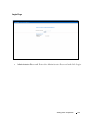
Login Page
•
Administrator Password: Enter the Administrator Password and click Login.
Using Your Projector
57
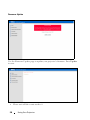
Firmware Update
Use the Firmware Update page to update your projector’s firmware. Press Update
to start.
•
58
Please wait till the count reaches 0.
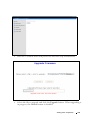
Using Your Projector
•
Wait for 3 seconds and it will proceed to the next step automatically.
•
Select the file to upgrade and click the Upgrade button. When upgrading is
in progress, the Cancel button is disabled.
Using Your Projector
59
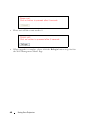
•
Please wait till the count reaches 0.
•
When upgrade is complete, please click the ReLogin button to go back to
the Web Management Home Page.
60
Using Your Projector
TIPS:
I would like remote access the
projector via Internet. What is
the better setting for the
browser?
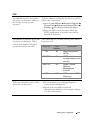
To have a better setting for the browser, please
follow the steps below:
1 Open Control Panel
Internet Options
General tab
Temporary Internet Files
Settings
Tick Every visit to the pages.
2 Some firewall or anti-virus may block the
HTTP application, if possible turn off the
firewall or anti-virus.
I would like to remote access the The following are TCP/IP socket ports which
projector via Internet. What
projector uses.
socket port number should I
UDP/TCP
Port
Description
open for it in the firewall?
Number
Why am I unable to access the
projector via Internet?
TCP
80
Web configuration
(HTTP)
UDP/TCP
25
SMTP: used for email
routing between mail
servers
UDP/TCP
161
SNMP: Simple
Network
Management
Protocol
UDP
9131
AMX: used for AMX
discovery
1 Check whether your computer/laptop is
connected to the Internet.
2 Check with your MIS or network
administrator whether your computer/laptop
is in the same subnet.
Using Your Projector
61
Why am I unable to access the
SMTP server?
Why am I unable to receive the
test alert email even though the
projector already indicates the
test mail is already sent?
62
Using Your Projector
1 Check with your MIS or network
administrator whether the SMTP server
function is open for the projector and the IP
assigned to the projector is allowed to access
the SMTP server. The projector’s SMTP
socket port number is 25, this cannot be
changed.
2 Check if the out going SMTP server, user
name, and password are set correctly.
3 Some SMTP servers will check whether the
mail address of "From" correlates with the
"User name" and "Password". For example,
you use [email protected] as the mail address in
"From". You should also use [email protected]
account information for the User name and
the password to log in the SMTP server.
It could be because the SMTP server
recognized the alert mail as a spam mail or
because of the SMTP server restriction. Check
with your MIS or network administrator for
the SMTP server’s setting.
Troubleshooting Your Projector
4
If you experience problems with your projector, see the following troubleshooting
tips. If the problem persists, contact Dell™. See Contacting Dell™ on page 76.
Problem
Possible Solution
No image appears on the
screen
• Ensure that the lens cap is removed and the
projector is turned on.
• Ensure that the INPUT SELECT is set
correctly in the OSD menu.
• Ensure the external graphics port is enabled.
If you are using a Dell™ portable computer,
press
(Fn+F8). For other
computers, see your respective
documentation. The output signal from the
computer is not according to industry
standards. Should this happen, upgrade the
video driver of the computer. For Dell
computer, see support.dell.com.
• Ensure that all the cables are securely
connected. See "Connecting Your Projector"
on page 9.
• Ensure that the pins of the connectors are
not bent or broken.
• Ensure that the lamp is securely installed
(see "Changing the Lamp" on page 69).
• Use Test Pattern in the Others menu.
Ensure that the colors of the test pattern are
correct.
Missing Input Source.
Cannot switch to particular
Input Source.
Go to Advanced Enable/Disable Sources,
ensure that particular Input Source is set to
Enable.
Troubleshooting Your Projector
63
Problem (continued)
Partial, scrolling, or
incorrectly displayed image
Possible Solution (continued)
1 Press the Auto Adjust button on the remote
control or the control panel.
2 If you are using a Dell™ portable computer,
set the resolution of the computer to WXGA
(1280 x 800) or XGA (1024 x 768):
a Right-click the unused portion of your
Microsoft® Windows® desktop, click
Properties and then select Settings tab.
b Verify that the setting is 1280x800 or 1024
x 768 pixels for the external monitor port.
c Press
(Fn+F8).
If you experience difficulty in changing
resolutions or your monitor freezes, restart all
the equipment and the projector.
If you are not using a Dell™ portable
computer, see your documentation. The
output signal from the computer may not be
according to industry standards. Should this
happen, upgrade the video driver of the
computer. For a Dell computer, see
support.dell.com.
The screen does not display
your presentation
If you are using a portable computer, press
(Fn+F8).
Image is unstable or flickering Adjust the tracking in the OSD Display submenu (in PC Mode only).
Image has vertical flickering
bar
Adjust the frequency in the OSD Display submenu (in PC Mode only).
Image color is incorrect
• If the display receives the wrong signal
output from the graphics card, please set the
signal type to RGB in the OSD Display tab.
• Use Test Pattern in the Others menu.
Ensure that the colors of the test pattern are
correct.
Image is out of focus
1 Adjust the focus ring on the projector lens.
2 Ensure that the projection screen is within
the required distance from the projector
(3.94 ft [1.2 m] to 32.81 ft [10 m]).
64
Troubleshooting Your Projector
Problem (continued)
Possible Solution (continued)
The image is stretched when
displaying a 16:9 DVD
The projector automatically detects the input
signal format. It will maintain the aspect ratio
of the projected image according to input
signal format with an Original setting.
If the image is still stretched, adjust the aspect
ratio in the Set Up menu in the OSD.
Image is reversed
Select Set Up from the OSD and adjust the
projector mode.
Lamp is burned out or makes
a popping sound
When the lamp reaches its end of life, it may
burn out and may make a loud popping sound.
If this occurs, the projector does not turn back
on. To replace the lamp, see "Changing the
Lamp" on page 69.
LAMP light is solid amber
If the LAMP light is solid amber, replace the
lamp.
LAMP light is blinking amber
If the LAMP light is blinking amber, Lamp
module connection may be disrupted. Please
check the lamp module and ensure that it is
properly installed.
If the LAMP light and the Power light are
blinking amber, the lamp driver has failed and
the projector will automatically shut down.
If the LAMP and TEMP light are blinking
amber and the Power light is solid blue, the
color wheel has failed and the projector will
automatically shut down.
To clear the protection mode, press and hold
the POWER button for 10 seconds.
TEMP light is solid amber
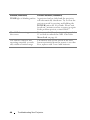
The projector has overheated. The display
automatically shuts down. Turn the display on
again after the projector cools down. If the
problem persists, contact Dell™.
Troubleshooting Your Projector
65
Problem (continued)
Possible Solution (continued)
TEMP light is blinking amber A projector fan has failed and the projector
will automatically shut down. Try to clear the
projector mode by pressing and holding the
POWER button for 10 seconds. Please wait
for about 5 minutes and try to power up again.
If the problem persists, contact Dell™.
The OSD does not appear on
the screen
Try to press the Menu button on the panel for
15 seconds to unlock the OSD. Check the
Menu Lock on page 44.
The remote control is not
operating smoothly or works
only within a limited range
The battery may be low. Check if the laser
beam transmitted from the remote is too dim.
If so, replace with 2 new AAA batteries.
66
Troubleshooting Your Projector
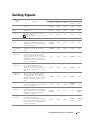
Guiding Signals
Projector
Status
Control Buttons
Description
Indicator
Power
Menu
Others
TEMP
(Amber)
LAMP
(Amber)
Standby mode
Projector in Standby mode. Ready to
power on.
BLUE
Flashing
OFF
OFF
OFF
OFF
Warming up
mode
Projector takes some time to warm up
and power on.
BLUE
BLUE
BLUE
OFF
OFF
Lamp on
Projector in Normal mode, ready to
display an image.
Note: The OSD menu is not accessed.
BLUE
BLUE
OFF
OFF
OFF
Cooling mode
Projector is cooling to shutdown.
BLUE
OFF
OFF
OFF
OFF
Power Saving
mode
Power Saving mode has been activated.
The projector will automatically enter
standby mode, if an input signal is not
detected in two hours.
AMBER
Flashing
OFF
OFF
OFF
OFF
Cooling before
Power Saving
mode
The projector takes 60 seconds to cool
down before entering Power Saving
mode.
AMBER
OFF
OFF
OFF
OFF
Projector
overheated
Air vents might be blocked or ambient
temperature may be above 35ºC. The
projector automatically shuts down.
Ensure that the air vents are not blocked
and that the ambient temperature is
within operational range. If the problem
persists, contact Dell.
OFF
OFF
OFF
AMBER
OFF
The lamp is overheated. The air vents
may be blocked. The projector
automatically shuts down. Turn the
display on again after the projector cools
down. If the problem persists, contact
Dell.
BLUE
OFF
OFF
AMBER
OFF
The lamp driver is overheated. The air
vents may be blocked. The projector
automatically shuts down. Turn the
display on again after the projector cools
down. If the problem persists, contact
Dell.
AMBER
OFF
OFF
AMBER
OFF
Fan breakdown
One of the fans has failed. The projector
automatically shuts down. If the problem
persists, contact Dell.
ÒFF
OFF
OFF
AMBER
Flashing
OFF
Lamp driver
breakdown
The lamp driver has failed. The projector
automatically shuts down. Unplug the
power cord after three minutes then turn
the display on again. If this problem
persists, contact Dell.
AMBER
Flashing
OFF
OFF
OFF
AMBER
Flashing
Color Wheel
breakdown
Color wheel cannot start. The projector
has failed and the projector
automatically shuts down. Unplug the
power cord after three minutes and then
turn on the projector. If this problem
persists, contact Dell.
BLUE
OFF
OFF
AMBER
Flashing
AMBER
Flashing
Lamp
overheated
Lamp driver
overheated
Troubleshooting Your Projector
67
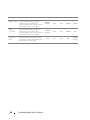
Lamp failure
Lamp is defective. Replace the lamp.
OFF
OFF
OFF
OFF
AMBER
Fault - DC
supply (+12V)
Power supply has been interrupted. The
projector automatically shuts down.
Unplug the power cord after three
minutes and then turn on the projector. If
this problem persists, contact Dell.
AMBER
Flashing
OFF
OFF
AMBER
AMBER
Fault - DC
supplies
(secondary)
Power supply has been interrupted. The
projector automatically shuts down.
Unplug the power cord after three
minutes and then turn on the projector. If
this problem persists, contact Dell.
AMBER
Flashing
OFF
OFF
AMBER
OFF
Lamp module
connection
failed
Lamp module connection may be
disrupted. Check the lamp module and
ensure that it is properly installed. If the
problem persists, contact Dell.
OFF
OFF
OFF
OFF
AMBER
Flashing
68
Troubleshooting Your Projector
Changing the Lamp
CAUTION: Before you begin any of the procedures in this section, follow the
Safety Instructions as described on page 7.
Replace the lamp when the message "Lamp is approaching the end of its useful
life in the operation. Replacement suggested! www.dell.com/lamps" appears
on the screen. If this problem persists after replacing the lamp, contact Dell™. For
more information, see Contacting Dell™on page 76.
CAUTION: Use an original lamp to ensure safe and optimal working condition
of your projector.
CAUTION: The lamp becomes very hot when in use. Do not attempt to replace
the lamp until the projector has been allowed to cool down for at least 30
minutes.
CAUTION: Do not touch the bulb or the lamp glass at any time. Projector
lamps are very fragile and may shatter if touched. The shattered glass pieces
are sharp and can cause injury.
CAUTION: If the lamp shatters, remove all broken pieces from the projector
and dispose or recycle according to state, local, or federal law. For more
information see www.dell.com/hg.
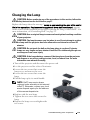
1 Turn off the projector and disconnect the power cord.
2 Let the projector cool for at least 30 minutes.
3 Loosen the two screws that secure the
lamp cover, and remove the cover.
4 Loosen the two screws that secure the
lamp.
5 Pull the lamp up by its metal handle.
NOTE: Dell™ may require lamps
replaced under warranty to be returned
to Dell™. Otherwise, contact your local
waste disposal agency for the address
of the nearest deposit site.
6 Replace with the new lamp.
7 Tighten the two screws that secure the
lamp.
8 Replace the lamp cover and tighten the
two screws.
Troubleshooting Your Projector
69
9 Reset the lamp usage time by selecting "Yes" for Lamp Reset in the OSD Lamp
tab (see Lamp menu on page 40). When a new lamp module has been changed,
the projector will automatically detect and reset the lamp hours.
CAUTION: Lamp Disposal (for the US only)
LAMP(S) INSIDE THIS PRODUCT CONTAIN MERCURY AND MUST BE
RECYCLED OR DISPOSED OF ACCORDING TO LOCAL, STATE OR FEDERAL
LAWS. FOR MORE INFORMATION, GO TO WWW.DELL.COM/HG OR CONTACT
THE ELECTRONIC INDUSTRIES ALLIANCE AT WWW.EIAE.ORG. FOR LAMP
SPECIFIC DISPOSAL INFORMATION CHECK WWW.LAMPRECYCLE.ORG.
70
Troubleshooting Your Projector
5
Specifications
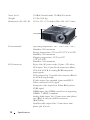
Light Valve
0.65" WXGA DMD Type A, DarkChip2™
Brightness
3500 ANSI Lumens (Max.)
Contrast Ratio
2000:1 Typical (Full On/Full Off)
Uniformity
80% Typical (Japan Standard - JBMA)
Number of Pixels
1280x800 (WXGA)
Displayable Color
16.7M colors
Color Wheel Speed
2X
Projection Lens
F-Stop: F/ 2.55~2.83
Focal length, f=18.2~21.8 mm
1.2X manual Zoom Lens
Throw ratio =1.28~1.56 wide and tele
Projection Screen Size
36~358 inches (diagonal)
Projection Distance
3.94~32.81 ft (1.2 m~10 m)
Video Compatibility
Composite Video / S-Video: NTSC (J, M, 4.43), PAL
(B, D, G, H, I, M, N, Nc, 60), SECAM (B, D, G, K,
K1, L)
Component Video via VGA & HDMI: 1080i/p,
720p, 576i/p, 480i/p
Power Supply
Universal AC90-264 50/60 Hz with PFC input
Power Consumption
Normal mode: 370W ± 10% @ 110Vac
(Network On)
Eco mode: 330W ± 10% @ 110Vac (Network On)
Power saving mode: <24W (Network On, fan speed
at minimum)
Standby mode: 1.75W ± 10% @ 110Vac (Network
On)
< 1W (Network Off)
Audio
2 speakers x 5watt RMS
Specifications
71
Noise Level
35 dB(A) Normal mode, 32 dB(A) Eco mode
Weight
6.35 lbs (2.88 kg)
Dimensions (W x H x D)
11.26 x 4.33 x 9.76 inches (286 x 110 x 247.8 mm)
11.26"(2
86mm)
9.
76
"(
24
7.
8m
m
)
4.33"(110mm)
Environmental
Operating temperature: 5oC - 35oC (41oF- 95oF)
Humidity: 80% maximum
Storage temperature: 0oC to 60oC (32oF to 140oF)
Humidity: 90% maximum
Shipping temperature: -20oC to 60oC
(-4oF to 140oF)
Humidity: 90% maximum
I/O Connectors
Power: One AC power socket (3-pins - C14 inlet)
VGA input: Two 15-pins D-sub connectors (Blue),
VGA-A & VGA-B, for analog RGB/Component
input signals.
VGA output: One 15-pins D-sub connector (Black)
for VGA-A loop through.
S-Video input: One standard 4-pins min-DIN SVideo connector for Y/C signal.
Composite video input: One Yellow RCA jack for
CVBS signal.
HDMI input: One HDMI connector for supporting
HDMI 1.3. HDCP compliant.
Analog Audio input: Two 3.5mm stereo mini phone
jack (Blue) & one pair of RCA connector
(Red/White).
Variable audio output: One 3.5mm stereo mini
phone jack (Green).
72
Specifications
USB port: One USB slave for remote support.
RS232 port: One mini-DIN 6-pins for RS232
communication.
RJ45 port: One RJ45 connector for control of
projector through network.
12V output: One 12V DC / 200mA max. relay
output for driving automatic screen.
DisplayPort: One DisplayPort (1.0) connector.
Lamp
Philips 280W user-replaceable lamp (up to 2500
hours in eco mode)
NOTE: The lamp life rating for any projector is a measure of brightness
degradation only, and is not a specification for the time it takes a lamp to fail
and cease light output. Lamp life is defined as the time it takes for more than 50
percent of a lamp sample population to have brightness decrease by
approximately 50 percent of the rated lumens for the specified lamp. The lamp
life rating is not guaranteed in any way. The actual operating life span of a
projector lamp will vary according to operating conditions and usage patterns.
Usage of a projector in stressful conditions which may include dusty
environments, under high temperatures, many hours per day and abrupt
powering-off will most likely result in a lamp’s shortened operating life span or
possible lamp failure.
Specifications
73
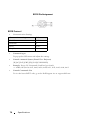
RS232 Pin Assignment
RS232 Protocol
•
Communication Settings
Connection settings
Value
Baud Rate:
19200
Data Bits:
8
Parity
None
Stop Bits
1
•
Command types
To pop up the OSD menu and adjust the settings.
•
Control command Syntax (From PC to Projector)
[H][AC][SoP][CRC][ID][SoM][COMMAND]
•
Example: Power ON Command (Send low byte firstly)
--> 0xBE, 0xEF, 0x10, 0x05, 0x00, 0xC6, 0xFF, 0x11, 0x11, 0x01, 0x00, 0x01
•
Control Commands List
To view the latest RS232 code, go to the Dell Support site at: support.dell.com.
74
Specifications
Compatibility Modes (Analog/Digital)
Resolution
Refresh Rate (Hz)
Hsync Frequency
(KHz)
Pixel Clock (MHz)
640 x 350
70.087
31.469
25.175
640 x 480
59.940
31.469
25.175
640 x 480 p60
59.940
31.469
25.175
720 x 480 p60
59.940
31.469
27.000
720 x 576 p50
50.000
31.250
27.000
720 x 400
70.087
31.469
28.322
640 x 480
75.000
37.500
31.500
848 x 480
60.000
31.020
33.750
640 x 480
85.008
43.269
36.000
800 x 600
60.317
37.879
40.000
800 x 600
75.000
46.875
49.500
800 x 600
85.061
53.674
56.250
1024 x 768
60.004
48.363
65.000
1280 x 720 p50
50.000
37.500
74.250
1280 x 720 p60
60.000
45.000
74.250
1920 x 1080 i50
50.000
28.125
74.250
1920 x 1080 i60
60.000
33.750
74.250
1280 x 720
59.855
44.772
74.500
1024 x 768
75.029
60.023
78.750
1280 x 800
59.810
49.702
83.500
1366 x 768
59.790
47.712
85.500
1360 x 768
60.015
47.712
85.500
1024 x 768
84.997
68.677
94.500
1440 x 900
59.887
55.935
106.500
1152 x 864
75.000
67.500
108.000
1280 x 960
60.000
60.000
108.000
1280 x 1024
60.020
63.981
108.000
1152 x 864
85.000
77.095
119.651
1400 x 1050
59.978
65.317
121.750
1280 X 800
84.880
71.554
122.500
1280 x 1024
75.025
79.976
135.000
1440 X 900
74.984
70.635
136.750
1680 x 1050
59.954
65.290
146.250
1280 x 960
85.002
85.938
148.500
1920 x 1080
60.000
67.500
148.500
1400 X 1050
74.867
82.278
156.000
1280 x 1024
85.024
91.146
157.000
1440 X 900
84.842
80.430
157.000
1600 x 1200
60.000
75.000
162.000
Specifications
75
Contacting Dell
For customers in the United States, call 800-WWW-DELL (800-9993355).
NOTE: If you do not have an active Internet connection, you can find contact
information on your purchase invoice, packing slip, bill, or Dell product catalog.
Dell™ provides several online and telephone-based support and service
options. Availability varies by country and product, and some services may
not be available in your area. To contact Dell for sales, technical support,
or customer service issues:
1
Visit support.dell.com.
2
Verify your country or region in the Choose A Country/Region dropdown menu at the bottom of the page.
3
Click Contact Us on the left side of the page.
4
Select the appropriate service or support link based on your need.
5
Choose the method of contacting Dell that is convenient for you.
76
Contacting Dell
Appendix: Glossary
ANSI LUMENS — A standard for measuring the brightness. It is calculated by
dividing a square meter image into nine equal rectangles, measuring the lux (or
brightness) reading at the center of each rectangle, and averaging these nine
points.
ASPECT RATIO — The most popular aspect ratio is 4:3 (4 by 3). Early television and
computer video formats are in a 4:3 aspect ratio, which means that the width of
the image is 4/3 times the height.
Brightness — The amount of light emitting from a display or projection display
or projection device. The brightness of projector is measured by ANSI lumens.
Color Temperature — The color appearance of white light. Low color
temperature implies warmer (more yellow/red) light while high color temperature
implies a colder (more blue) light. The standard unit for color temperature is
Kelvin (K).
Component Video — A method of delivering quality video in a format that
consists of the luminance signal and two separate chrominance signals and are
defined as Y'Pb'Pr' for analog component and Y'Cb'Cr' for digital component.
Component video is available on DVD players.
Composite Video — A video signal that combines the luma (brightness), chroma
(color), burst (color reference), and sync (horizontal and vertical synchronizing
signals) into a signal waveform carried on a single wire pair. There are three kind of
formats, namely, NTSC, PAL and SECAM.
Compressed Resolution — If the input images are of higher resolution than the
native resolution of the projector, the resulting image will be scaled to fit the
native resolution of the projector. The nature of compression in a digital device
means that some image content is lost.
Contrast Ratio — Range of light and dark values in a picture, or the ratio between
their maximum and minimum values. There are two methods used by the
projection industry to measure the ratio:
1 Full On/Off — measures the ratio of the light output of an all white image (full
on) and the light output of an all black (full off) image.
2 ANSI — measures a pattern of 16 alternating black and white rectangles. The
average light output from the white rectangles is divided by the average light
output of the black rectangles to determine the ANSI contrast ratio.
Full On/Off contrast is always a larger number than ANSI contrast for the same
projector.
Glossary
77
dB — decibel — A unit used to express relative difference in power or intensity,
usually between two acoustic or electric signals, equal to ten times the common
logarithm of the ratio of the two levels.
Diagonal Screen — A method of measuring the size of a screen or a projected
image. It measures from one corner to the opposite corner. A 9FT high, 12FT
wide, screen has a diagonal of 15FT. This document assumes that the diagonal
dimensions are for the traditional 4:3 ratio of a computer image as per the example
above.
DisplayPort — A digital display interface standard developed by the Video
Electronics Standards Association (VESA). DisplayPort is designed for broad
application in PCs, monitors, TV displays, projectors, and other sources of display.
DHCP — Dynamic Host Configuration Protocol — A network protocol that
enables a server to automatically assign a TCP/IP address to a device.
DLP® — Digital Light Processing™ — Reflective display technology developed by
Texas Instruments, using small manipulated mirrors. Light passes through a color
filter is sent to the DLP mirrors which arrange the RGB colors into a picture
projected onto screen, also known as DMD.
DMD — Digital Micro-Mirror Device — Each DMD consists of thousands of
tilting, microscopic aluminum alloy mirrors mounted on a hidden yoke.
DNS — Domain Name System — An internet service that translates domain
names into IP addresses.
Focal Length — The distance from the surface of a lens to its focal point.
Frequency — It is the rate of repetition in cycles per seconds of electrical signals.
Measured in Hz (Hertz).
HDCP — High-Bandwidth Digital-Content Protection — A specification
developed by Intel™ Corporation to protect digital entertainment across digital
interface, such as DVI, HDMI.
HDMI — High-Definition Multimedia Interface — HDMI carries both
uncompressed high definition video along with digital audio and device control
data in a single connector.
Hz (Hertz) — Unit of frequency.
Keystone Correction — Device that will correct an image of the distortion
(usually a wide-top narrow-bottom effect) of a projected image caused by
improper projector to screen angle.
Maximum Distance — The distance from a screen the projector can be to cast an
image that is usable (bright enough) in a fully darkened room.
Maximum Image Size — The largest image a projector can throw in a darkened
78
Glossary
room. This is usually limited by focal range of the optics.
Minimum Distance — The closest position that a projector can focus an image
onto a screen.
NTSC — National Television Standards Committee. North American standard for
video and broadcasting, with a video format of 525 lines at 30 frames per second.
PAL — Phase Alternating Line. A European broadcast standard for video and
broadcasting, with a video format of 625 lines at 25 frames per second.
Reverse Image — Feature that allows you to flip the image horizontally. When
used in a normal forward projection environment text, graphics, etc. are
backwards. Reverse image is used for rear projection.
RGB — Red, Green, Blue — typically used to describe a monitor that requires
separate signals for each of the three colors.
S-Video — A video transmission standard that uses a 4-pin mini-DIN connector
to send video information on two signal wires called luminance (brightness, Y) and
chrominance (color, C). S-Video is also referred to as Y/C.
SECAM — A French and international broadcast standard for video and
broadcasting, closely related to PAL but with a different method of sending color
information.
SVGA — Super Video Graphics Array — 800 x 600 pixels count.
SXGA — Super Extended Graphics Array, — 1280 x 1024 pixels count.
UXGA — Ultra Extended Graphics Array — 1600 x 1200 pixels count.
VGA — Video Graphics Array — 640 x 480 pixels count.
XGA — Extended Video Graphics Array — 1024 x 768 pixels count.
WXGA — Wide Extended Graphics Array — 1280x800 pixels count.
Zoom Lens — Lens with a variable focal length that allows operator to move the
view in or out making the image smaller or larger.
Zoom Lens Ratio — Is the ratio between the smallest and largest image a lens can
projector from a fixed distance. For example, a 1.4:1 zoom lens ratio means that a
10 foot image without zoom would be a 14 foot image with full zoom.
Glossary
79
Index
A
Adjusting the Projected Image 22
Adjusting the Projector Height
22
lower the projector
Elevator button 22
Elevator foot 22
Tilt adjustment wheel 22
Adjusting the Projector Zoom and
Focus 23
Focus ring 23
Zoom tab 23
Audio Input 45
Audio Settings 44
Audio-B 9
Audio-C 9
audio-C 9
C
Capture Screen 44
Changing the Lamp 69
Closed Caption 48
Connecting the Projector
Composite video cable 15
Connecting a Computer Using a
DisplayPort cable 13
Connecting a Computer with a
RS232 cable 12
80
Index
Connecting with a Component
Cable 16
Connecting with a Composite
Cable 15
Connecting with an HDMI
Cable 17
Connecting with an S-video
Cable 14
DisplayPort cable 13
HDMI cable 17, 18, 20
Power cord 10, 11, 12, 13, 14,
15, 16, 17, 18, 19, 20
RS232 cable 12
S-video cable 14
To Computer 10
USB to USB cable 10
VGA to VGA cable 10, 11
VGA to YPbPr cable 16
Connection Ports
Audio input connector 9
Audio output connector 9
Composite video connector 9
DisplayPort connector 9
Power cord connector 9
RS232 connector 9
S-video connector 9
USB remote connector 9
VGA-A input (D-sub) connector
9
VGA-A output (monitor
loop-through) 9
VGA-B input (D-sub) connector
9
Display (in Video Mode) 39
Input Select 34
Lamp 40
Main Menu 33
Others 43
Picture (in PC Mode) 35
Picture (in Video Mode) 36
Set Up 40
Contact Dell 6, 65, 69
Control Panel 25
D
DC Adapter 9
Dell
contacting 76
H
HDMI 9
M
Main Unit 7
Control panel 7
Elevator button 7
Focus ring 7
IR receiver 7
Lens 7
Zoom tab 7
Menu Position 43
Menu Settings 43
Menu Timeout 44
Menu Transparency 44
Mute 45
O
On-Screen Display 33
Auto-Adjust 35
Display (in PC Mode) 37
P
Password 46
phone numbers 76
Power Saving 45
Power Settings 45
Powering On/Off the Projector
Powering Off the Projector 21
Powering On the Projector 21
Q
Quick Shutdown 45
R
Remote Control 28
IR receiver 26
Reset 44
Reset, Factory 49
RJ45 9
S
Screen 44
Index
81
Screen Settings 44
V
Security Settings 46
Volume 45
Speaker 45
Specifications
Audio 71
Brightness 71
Color Wheel Speed 71
Contrast Ratio 71
Dimensions 72
Displayable Color 71
Environmental 72
I/O Connectors 72
Lamp 73
Light Valve 71
Noise Level 72
Number of Pixels 71
Power Consumption 71
Power Supply 71
Projection Distance 71
Projection Lens 71
Projection Screen Size 71
RS232 Protocol 74
Uniformity 71
Video Compatibility 71
Weight 72
support
contacting Dell 76
T
telephone numbers 76
Test Pattern 49
Troubleshooting 63
Contact Dell 63
82
Index