1
Xtags User’s Guide 62
Chapter 10 Working with Translation Tables and Macros
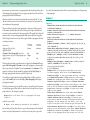
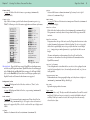
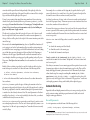
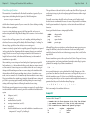
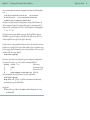
!d
†
dagger¶
!dd
‡
double dagger¶
; Only allow explicit [ep] tags to denote end of paragraph,¶
; not returns.¶
\r
<\#32>
return becomes a space¶
[ep]\r
<\#13>
ep tag at end of line becomes¶
;
paragraph end¶
\\[ep]
[ep]
\[ep] becomes literal version¶
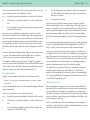
;¶
; Define some tag bracketing pairs for “logical”¶
; tagging.¶
[a]
<B>
author begin¶
[/a]
<B>
author end¶
[t]
<I>
title begin¶
[/t]
<I>
title end¶
; Following is a source string that turns into nothing.¶
[empty]
gets deleted¶
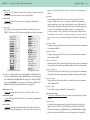
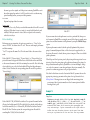
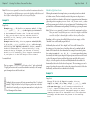
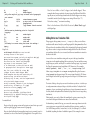
Xtags Code:
<&tt2”Example TT”>@$:First note how the¶
carriage returns in the input¶
are turned into spaces, and only the explicit <B>\[ep]¶
<B>tag becomes an end of paragraph.[ep]¶
Also note how the literal end paragraph¶
tag target is not re-scanned, once¶
it is substituted, or else we’d have an end¶
of paragraph after “the explicit” above.[ep]¶
Now, let’s use a bullet !b, a beta !B,¶
a dagger !d and a double dagger !dd.¶
These examples show the case sensitivity of¶
source strings (the bullet and beta¶
differing only in case), and the longest-match¶
rule (the double dagger source¶
string is matched, instead of just the dagger¶
source string, followed by a “d”).[ep]¶
Notice how a string “[empty]” can¶
turn into nothing.[ep]¶
Here’s a book reference, [t]Gilbert Keith¶
Chesterton[/t] by [a]Maisie Ward[/a], tagged¶
with logical tags.[ep]¶
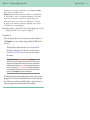
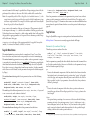
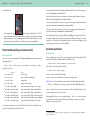
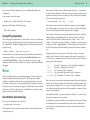
Formatted Result:
First note how the carriage returns in the input are turned into spaces, and
only the explicit [ep] tag becomes an end of paragraph.
Also note how the literal end paragraph tag target is not re-scanned, once it is
substituted, or else we’d have an end of paragraph after “the explicit” above.
Now, let’s use a bullet •, a beta ß, a dagger † and a double dagger ‡. These
examples show the case sensitivity of source strings (the bullet and beta differing only in case), and the longest-match rule (the double dagger source string
is matched, instead of just the dagger source string, followed by a “d”).
Notice how a string “” can turn into nothing.
Here’s a book reference, Gilbert Keith Chesterton by Maisie Ward, tagged
with logical tags.
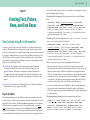
Adding Entries to a Translation Table
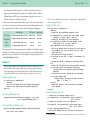
Xtags supports the tag &tte(“source”, “target”) to allow you to add new
translation table entries directly in your Xtags input file, taking immediate effect.
If there is already a translation table in effect (instantiated by the &tt or the &tt2
tag), the new source-to-target translation is simply added to the table. If there is
no translation table in effect, one is created, and the new translation is entered as
the first in the table.
Source is the source translation string, and target is the target translation
string just as in the &tt2 translation file invocation tag. You can include as many
target strings as you like, and they’ll be considered one long target (to get around
the Xtags list parameter string length limit of 255 characters). For example,
&tt2e(“%param1%”, “This ”, “is ”, “a ”, “target string”) will
define a target string This is a target string that will replace the source
string %param1% in subsequent input. The source string is limited to 255 characters in length, but the built-up target string can be as long as 16,383 characters in
length.
The intent of this tag—though you can use it for whatever you desire—is to allow you
to easily parameterize subsequent Xtags code (which can thus be “boilerplate” with
parameters of your own devising, though the more obscure the parameter name, the
less likely that the boilerplate will be disturbed by Xtags’ blind source-to-target string
translations).
Unfortunately, you can’t re-define the translation for a given source string (the
second and subsequent definitions are entered but ineffectual).
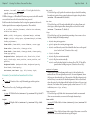
In the &tt2e() variant of this tag, you can use the same escape characters in the
source string as are supported in the translation file invocation tag, namely, \r
(for ASCII carriage return), \n (new line), \t (tab), \b (backspace), \\ (a literal
backslash) (anything else after a backslash is ignored). For example, to trans-