1
Creating a LonMaker Drawing
To create a network using the LonMaker tool, you add Device, Functional Block, Connection,
Router, i.LON, Channel, and Subsystem shapes to your drawing. You add these LonMaker shapes
by dragging shapes from a LonMaker stencil to your LonMaker drawing. The LonMaker tool
starts the appropriate wizard that guides you through the process of creating each object. The
following sections provide an overview of the LonMaker Basic Shapes stencil, and then describe
how to use each of the shapes.
You can add LonMaker shapes to your LonMaker drawing at any time. You may be in a different
physical location than the actual network, not attached to the network, and doing network design
as described in the Engineered System Scenario. Or, you may be attached to the network as
described in the Ad-hoc Scenario for the commissioning and maintenance of an engineered
system.
Using The LonMaker and NodeBuilder Basic
Shapes Stencils
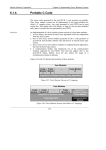
The LonMaker tool includes LonMaker Basic Shapes Visio stencil. This stencil contains the basic
shapes needed to create a LonMaker network as shown in the following figure:
If you have licensed the LonMaker tool as part of the NodeBuilder tool, the NodeBuilder Basic
Shapes stencil will also be included. This stencil contains all the shapes contained in the
LonMaker Basic Shapes stencil plus the Release Target Device and Development Target Device
shapes that allow you to create NodeBuilder device shapes (see the NodeBuilder User’s Guide for
more information). The appropriate stencil opens automatically when you create a new LonMaker
drawing.
4-2
Creating Networks