1
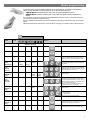
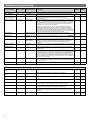
Advanced programming Parameter Name Default Value CMD/ REM2/V2 CMD/ REM4/V2 * * If the detector measures the lux level and decides that the output needs switching on or off as a consequence, the lux time must elapse first. If at any time during the timed delay the lux change reverses then the process is cancelled. Select No for a 30 second delay on start up. If Yes is selected, there will be no delay on start up and the detector will always power up detecting. Range / Options Description When set to On this causes a red LED to flash on the sensor when it detects movement. Use this feature to check for adequate sensitivity levels. Once the detector is turned on, this value sets how long the lights will stay on once movement has ceased. Select 0 for 10 second delay – use for commissioning only. When a manual operation occurs, either via the switch input or the infrared, it invokes the timeout period. Example 1: a detector in presence mode has a detector timeout of 15 minutes and a manual timeout of 3 minutes. When the user leaves the room they press the off button. The sensor will revert to automatic after 3 minutes, and then walking back in the room will turn the lights on. Example 2: using the settings above, the user turns the lights off (say for a presentation) but stays in the room. Every time a movement is detected, the manual timeout period is re-triggered, but when it doesn’t pick up for the short timeout period, the sensor will timeout and revert to automatic. This means the lights may turn on inadvertently during the presentation, if the occupants are still for the manual timeout period, so adjust the timing carefully. Sensitivity level for detecting movement when the detector is already on. *CMD/REM2/V2 sets Sensitivity On and Off to the same value. Detector Parameters Walk Test LED Off On or Off Time Out (Time adjustment) 20 minutes 0-99 minutes Manual Time Out 10 minutes 0-99 minutes Sensitivity On 9 1 (min) to 9 (max) Sensitivity Off 9 1 (min) to 9 (max) Sensitivity level for detecting movement when the detector is off. *CMD/REM2/ Lux time 0 0 (disabled) 1-99 minutes Power Up State On On or Off Disable Detector N Y or N Disables detection, leaving the relay output permanently off with the dimming output operational. This mode is used when the unit is for maintained illuminance only. On Delay 0 minutes 0-99 minutes Inhibit 4 seconds 1 to 999 seconds The On Delay to allows the first channel to switch on after the second channel. A typical application for this would be where a detector is controlling lighting and air conditioning in an area. When the occupant is detected, the lighting will be turned on immediately, whereas the air conditioning may be turned on after 15 minutes. If the area is vacated and the detector times out before the delay, then the air conditioning would never go on. The delay can be set only for channel 1 using the on delay parameter. When the detector turns off, a delay is instigated to prevent retriggering. In certain circumstances this delay may not be enough. This parameter allows the delay to be changed. V2 sets Sensitivity On and Off to the same value. - - Restores factory default settings Raise (PIR/INT-D only) - - Increase light level. Reverts when occupancy cycle complete. Lower (PIR/INT-D only) - - Decrease light level. Reverts when occupancy cycle complete. Scene up - - Steps up between 6 pre-defined scenes. Factory default User Modes Scene down - - Steps down between 6 pre-defined scenes. Scene # - - Select the individual scene, between 0 and 6. (1 = min. output; 2 = 10%; 3 = 25%; 4 = 50%; 5 = 75%; 6 = 100%) Override On - - If the lights are off, sending the IR command will turn them on immediately and revert to automatic operation using the manual timeout period. Override Off - - If the lights are on, sending the IR command will turn them off immediately. After the manual timeout period (described above), the sensor will revert to automatic. Cancel - - Cancels the on or off override, returning the detector to normal operation. 8