1
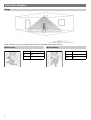
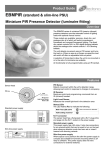
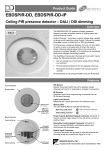
Installation The product is designed to be mounted directly to the outside of a luminaire. The detector should be sited so that the occupants of the room fall inside the detection pattern (shown opposite), at a recommended ceiling height of 2.8m. Note that the lower the sensor is installed the smaller the detection range will be, subject to the parameters shown on the detection diagram. For optimum operation of the lux sensor, the lens must shielded as much as possible from the light source. Avoid direct sunlight entering the sensor. Do not site within 1m of forced air heating or ventilation. Do not fix to a vibrating surface. Sensor functionality Detection mode Presence When movement is detected the load will automatically turn on. When the area is no longer occupied the load will automatically switch off after an adjustable time period. Sensitivity to movement of the PIR sensor can be adjusted using the Sensitivity parameter. HINT: To assist in setting the Sensitivity, turn on the Walk Test LED which will flash red when movement is detected. Switch Level On/Off Occupancy detection can be made dependant on the ambient light level using the Lux On Level and Lux Off Level parameters. Maintained Illuminance (daylight harvesting) - PIR/INT-D only The detector measures the overall light level in the detection area and calculates the correct output for the luminaires, to achieve a preset lux level (maintained illuminance or daylight harvesting). Burn-in - PIR/INT-D only Burn-in - PIR/INT-D variant only Overview It is a requirement of many fluorescent lamp manufacturers to have the lamps on at maximum output for a period of time to guarantee lamp life (refer to the manufacturer’s datasheet for details). As the PIR/INT-D is able to dim the lamps using DALI/DSI, the products provide a facility to disable this for a given period of time. Operation By setting the “Burn in” parameter, you can select a time during which the lamps are not allowed to deviate from maximum output. The unit counts the time, and even remembers how long has elapsed in the event of a power failure. To cancel the burn in function, simply select a time of 0. Note that when the lamps are changed, the burn in time should be set again. 3