1
2
SUPPORTING USERS AND TROUBLESHOOTING DESKTOP APPLICATIONS ON WINDOWS XP
■
Embed and link objects in Office 2003
■
Recover documents and configure backup and recovery settings in Office 2003
Estimated lesson time: 90 minutes
EXERCISE 7.1: RESTORING DEFAULT MENU
SETTINGS IN WORD 2003
Estimated completion time: 5 minutes
An employee has been assigned to a new department, but is keeping the same office and
computer. The old department customized the menus in Microsoft Office Word 2003, but the
new department uses the default menus. You need to reset the menus to their default
settings.
1.
Log on to the Computer02 virtual machine with the Student account (the password
is Pa$$w0rd).
2.
From the Start menu, select All Programs, Microsoft Office, and select Microsoft
Office Word 2003.
3.
In Microsoft Word, from the Tools menu, select Customize.
4.
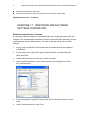
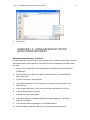
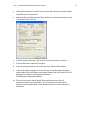
In the Customize dialog box, in the Commands tab, in the Categories list, select
File, as shown below.
5.
In the Commands list, drag Web Page Preview into the File menu and drop it under
Close.
6.
In the Customize dialog box, click Close.