Transcript
OPERATING INSTRUCTIONS W1560
ZERO CALIBRATION
1.0
1.1
1.2
1.3
1.4
1.5
1.6
Weigh the Vehicle empty.
Lift the body into the weighing position.
( This is when the body is clear of the chassis )
Undo the four screws and remove the front cover.
Press and Hold the CH1 switch on the side of the indicator upwards.
Adjust Zero (CH1) inside the display until display shows 00.0
Release the CH1 switch.
Press and Hold the CH2 switch on the side of the indicator upwards.
Adjust Zero (CH2) inside the display until display shows 00.0
Release the CH2 switch.
The display will show the total weight 00.0
Replace the front cover.
SPAN CALIBRATION
2.0
2.1
2.2
2.3
2.4
2.5
Apply the load.
Calculate the payload from the weight on the weighbridge.
Lift the body to the weighing position.
Undo the four screws and remove the front cover.
Adjust the Span inside the indicator until the display shows the payload.
Replace the front cover.
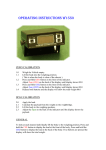
Picture shows adjustment
screws inside indicator.
GENERAL
To look at each channel individually lift the body to the weighing position, Press and
hold the CH1 switch upwards to display the load at the front of the body, Press and
hold the CH2 switch upwards to display the load at the back of the body. If no buttons
are pressed the display will show the total weight.