1
06 0789732769 CH03
8/31/04
12:54 PM
Page 179
179
. . . . . . . . . . . . . . . . . . . . . . . . . . . .Hardware
. . . . . Troubleshooting
. . . . . . . . . Techniques
. . . . . .
tem’s resource needs and a configuration error occurs. In these cases, the user
must manually resolve the configuration problem.
When you are installing new hardware or software options, be aware of the
possibility of configuration errors occurring. If you encounter configuration
(or setup) errors, refer to the installation instructions found in the new component’s installation/user documentation.
If you cannot confirm a configuration problem, you most likely have a defective component. The most widely used repair method involves substituting
known-good components for suspected bad components. Other alternatives
for isolating and correcting a hardware failure that appears before the bootup depend on how much of the system is operable.
Normally, symptoms can be divided into three sections: configuration problems, bootup problems, and operational problems.
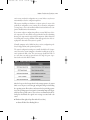
The system’s configuration settings are normally checked first. It is important to observe the system’s symptoms to determine in which part of the system’s operation the fault occurs. The error messages described in Table 3.1
are errors that occur and are reported before the single beep tone is produced at the end of the POST routines.
Table 3.1 Common Configuration Error Codes
After the beep tone has been produced in the startup sequence, the system
shifts over to the process of booting up and begins looking for and loading
the operating system. Errors that occur between the beep and the presentation of the operating system’s user interface (command prompt or GUI) generally have three possible sources. These sources are summarized in the following list that includes the typical error messages associated with each
source.
➤ Hardware failure (physical problem with the boot drive)
➤ General Failure Error Reading Drive x