1
Zero:
This defines the starting point for weight. If you use the scales without starting at 0 the weights &
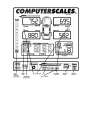
% will not be correct. The ZERO button by the ON switch will zero all 4 pads. (This is slightly
different from the 1996 and earlier models.) To zero individual pads see next paragraph.
To “Zero” individual pads only or with car still on scales:
Lift the car off the pad to be zeroed. Push the “Zero this wheel only” button just above or below
the individual wheel weight display – RF, LR, etc. No other pads will be zeroed.
To Temporary Zero or “Tare”:
Push this button and all 4 pads go to 0. However, the original zero is kept in memory. Push the
button again to go back to normal zero. This will make it easier to add or subtract weight to the
car. You can see exactly what you have done without adding.
Mode:
This takes you to the other functions such as Center of Gravity and Goal.
Recharge Battery:
When Low Battery light flashes plug charger in front of enclosure. Charging light should come
on and will stay on as long as the charger is connected. Full recharge takes 12 to 24 hours. The
scale can be used during this time. It is normally best to run off battery power to cycle the
battery. This extends battery life. Recharge once a month during the off season.
NOTE: This system has a “Universal Charging Circuit” which will let you charge the battery from
almost any type charger – from 6 to 18 volts, 500ma or more, any polarity. You can also connect
to an external battery.
Indicator Lights (near ON button):
Power: Indicates power is on to the circuit board. If this does not come on when ON is pushed
battery is probably dead and the scale will not work. See Recharge Battery above.
Low Batt: Indicates battery is nearly drained. When it first comes on you have approximately
45 minutes left. The scale can be operated with the charger plugged in if the battery is low.
Charging: Indicates power is going into the battery. If the charger is plugged in and this light is
not on the battery is not charging. Check the wall plug and the charger.