1
MAN0905_Issue 3_07/12
Searchpoint Optima Plus including HART® version
Operating Instructions
2108M0550
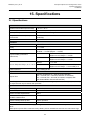
14. Problem Solving
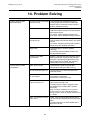
W / F – Obscured
Optics (error 8)
Warning / Fault
Obscured optics
Contamination in the optical
path.
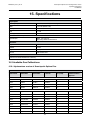
F – Signal Quality
(error 16)
Fault
Optical signal is low, noisy or
Poor signal quality unstable
1. Remove the weather protection and dust
barrier. Replace the dust barrier if required.
2. Clean optics and carry out a Soft Reset (see
Maintenance, Inspection).
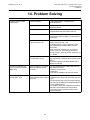
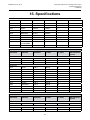
W / F– Lamp Output
(error 11)
Warning / Fault
Lamp output
1. Clean optics and carry out a Soft Reset (see
Maintenance, Inspection).
2. If the Fault / Warning does not clear, return unit
for repair.
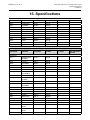
W / F – Internal Failure
(error 22)
Note: this error will
LATCH the 4-20
mA output
Internal hardware fault
Warning / Fault
Hardware failure
Note: this error
will LATCH
the 4-20 mA
output
1. Cycle the power or carry out a Reset to restart
the unit. See Maintenance, View and Clear Faults
or Warnings
2. If the fault persists return the unit for repair.
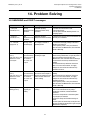
F - Hardware Fault
(error 13)
Fault
Hardware Fault
1. This error may occur following Self Test.
2. Check for any active Faults or Warnings.
3. If none present, cycle the power or carry out a
Reset to restart the unit. See Maintenance, View
and Clear Faults or Warnings.
4. Repeat Self Test to confirm that the Fault has
cleared.
5. If the Fault does not clear, return unit for repair.
Lamp signal is low.
The latched faults or
warnings flag has been set
1. Remove the weather protection and dust
barrier. Replace the dust barrier if required.
2. Clean optics and carry out a Soft Reset (see
Maintenance, Inspection).
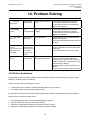
14.3 Further Assistance
If the problem is still unresolved, please contact Honeywell Analytics technical support using the contact
details on the back page of this manual.
Please have the following information to hand: • A description of the problem, including the steps taken to try to resolve it
• The serial number of the Searchpoint Optima Plus
For Searchpoint Optima Plus units with HART®, please also locate the following information by selecting
Device Info from the Device Setup menu: •
•
•
•
Dev id (unique Searchpoint Optima Plus identification number)
Fld dev rev (revision number of the HART® DD file)
Software rev (Searchpoint Optima Plus software revision number)
Hardware rev (Searchpoint Optima Plus hardware revision number)
72