1
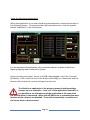
Using the HitecFocus Application When the application is run you should be presented with a minimised version of the following screen. To expand to the fully featured version, click the expand button (Labeled 11 in the screenshot) For the purposes of explanation, the screenshot above has been divided into logical groupings and numbered in yellow. Once you have your power, motor, and USB cable plugged in click the ‘Connect’ (6) Button. If all is well, the text of the button will change to ‘Connected’ and the focuser will retrieve the current settings from the unit. The HitecFocus application is the primary means of making settings changes on your controller. From v1.2 of the application onwards it is not possible to use the features of the application at the same time the ASCOM driver is connected. When the ASCOM driver is connected the main features of the software are disabled. These will automatically re‐enable once the ascom driver is disconnected. Page 7