1
MORLEY-IAS
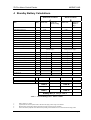
3.4.2.3
ZX Fire Alarm Control Panels
ZX5Se Arrangement
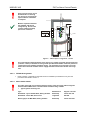
•
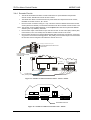
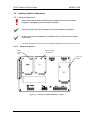
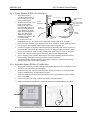
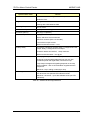
Included in the packing is a battery
cable kit. Use the cable included in
this kit to connect the negative
terminal of battery No.1 to the
positive terminal of battery No.2.
•
Connect the red wire from the Power
Supply to the positive terminal of
battery No.1.
•
Connect the black wire from the
Power Supply to the negative
terminal of battery No.2.
•
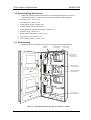
The standby batteries should be
located in the enclosure as shown in
the diagrams opposite. The chassis
provides fixing points to allow a strap
to be fitted.
FS1 T 3.15A H 250V
N
L
12Ah
12Ah
Battery stop
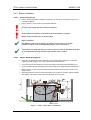
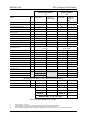
•
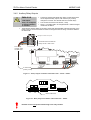
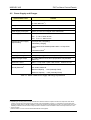
For battery sizes greater then 12Ah, it
may be necessary to cut off the
spade terminals connected to the
battery cables. These should be
replaced by connector fixings
appropriate to the installed batteries.
17Ah
17Ah
Battery stop
•
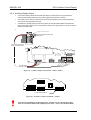
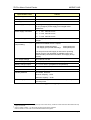
When 24Ah batteries are used it will
necessary to cut the cable ties that
secure the wiring from the PSU below
the Base PCB. Carefully re-route the
wiring around the batteries after they
have been installed.
24Ah
24Ah
Battery stop
Figure 8 – ZX5Se Battery Installation
•
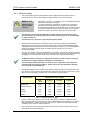
3.4.2.4
NOTE: When fitting 17Ah or 24Ah batteries there is insufficient space for fitting the internal printer
module. In such cases the batteries should be fitted in a separate battery box (797-078) installed
adjacent to the ZX Series FACP.
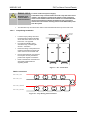
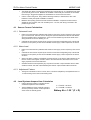
General Battery Connection
Black
Wire
Charger
Output
+
Red
Wire
Link Wire
-
Page 12
2
+
-
Document No. 996-174-000-1, Revision: 01
1
+
Installation Manual