1
ENG
9.
STOPPING HUMISET
On completion of the controller programming, Internet Explorer can
be exited. However, it is worth noting that the icon below is still in the
application bar:
.
As long as the icon is there, just trigger Internet Explorer and enter http://
localhost + ENTER to restart humiSet.
When humiSet is exited, we suggest closing the icon as well. To do this,
draw the pointer arrow on the icon in the application bar
.
then:
• Press the right button of the mouse
• Select “Close”
Note: humiSet cannot remain active non-stop for more than 20 hours.
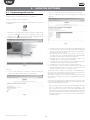
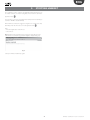
If this limit is exceeded, the page below might be displayed (Fig. 9.a):
Fig. 9.a
Just stop humiSet and start it up again.
21
humiSet +030220311 - rel. 2.2 - 01.09.2014