1
User Manual
User Manual
CONTENT Safety Instruction ..........................................................................................................................................................4 Chapter 1 Features............................................................................................................................................................1 Chapter 2: Overview........................................................................................................................................................2 2.1 Front Panel............................................................................................................................................................2 2.1.1、4Channel DVR Front Panel ....................................................................................................................2 2.1.2、8Channel DVR Front Panel ....................................................................................................................3 2.1.3、16Channel DVR Front Panel ..................................................................................................................4 2.2 Rear Panel.............................................................................................................................................................9 2.2.1、4Channel DVR Back Panel.....................................................................................................................9 2.2.2、8Channel DVR Back Panel.....................................................................................................................9 2.2.4、16Channel DVR Back Panel.................................................................................................................10 2.3 4/8-CH Remote Controller .................................................................................................................................13 2.4 16-CH Remote Controller...................................................................................................................................14 Chapter 3 DVR INSTALLATION ....................................................................................................................................16 3.1 HDD Installation (Applicable to the model with HDD drawer).................................................................16 3.2 Camera and Monitor Connection......................................................................................................................16 3.3 Power Supply connection .................................................................................................................................16 Chapter 4: DVR Boot up ..................................................................................................................................................17 4.1 System Initialization ...........................................................................................................................................17 4.2 Live Interface......................................................................................................................................................17 Chapter 5: DVR Menu......................................................................................................................................................17 5.1 Pop-up Menu ......................................................................................................................................................17 5.2 Main Menu Guide...............................................................................................................................................18 5.3 Main Menu .........................................................................................................................................................19 5.3.1 Display.....................................................................................................................................................19 5.3.2 Record set ................................................................................................................................................21 5.3.3 Search ......................................................................................................................................................23 5.3.4 Network ...................................................................................................................................................27 5.3.5 Alarm .......................................................................................................................................................30 5.3.6 Device ......................................................................................................................................................32 5.3.7 System .....................................................................................................................................................34 5.3.8 Advanced .................................................................................................................................................36 5.4 Menu Lock..........................................................................................................................................................37 5.5 Split mode...........................................................................................................................................................37 5.6 PTZ Control........................................................................................................................................................37 5.7 PIP Mode ............................................................................................................................................................38 5.8 Record search......................................................................................................................................................38 5.9 Mute....................................................................................................................................................................39 5.10 Manual Record..................................................................................................................................................39 5.11 Stop record ........................................................................................................................................................39 5.12 Start Sequence ..................................................................................................................................................39 5.13 Start Cruise .......................................................................................................................................................39 User Manual
Chapter 6: Web Application Manager .........................................................................................................................40 6.1 Plug-in download and installation ......................................................................................................................40 6.2 Web Application Manager Log-in.......................................................................................................................41 6.3 Live interface ......................................................................................................................................................41 6.3.1 Menu Bar .................................................................................................................................................41 6.3.2 Playback...................................................................................................................................................43 6.3.3 Configuration...........................................................................................................................................46 6.3.4 Local setting.............................................................................................................................................55 6.3.5 Logout......................................................................................................................................................55 Chapter 7: Appendix ......................................................................................................................................................56 7.1 Operation Function Table ...................................................................................................................................56 7.2 Record Alarm setting ..........................................................................................................................................57 7.3 Mail box server List............................................................................................................................................57 7.4 Troubleshooting ..................................................................................................................................................58 7.5 Usage Maintenance.............................................................................................................................................59 7.6 System Connection Diagram ..............................................................................................................................59 7.7 Accessories .........................................................................................................................................................61 User Manual
Safety Instruction
1. Read Instruction
All the safety and operating instruction should be read before the equipment is operated.
2. Power sources
This equipment should be operated only from the type of power source indicated on the marking label.
If you are not sure of the type of power, please consult your equipment dealer.
3. Objects and Liquid
Never push objects of any kind through openings of this equipment and / or spill liquid of any kind on
the equipment as they may touch dangerous voltage points or short out parts that could result in a fire or
electric shock.
4. Water and / or Moisture
Do not use this equipment near water or in contact with water.
5. Heat sources
Do not install near any heat sources such as radiators, heat registers, stoves or other apparatus
(including amplifier) that produce heat.
6. Dusty field
Never use this equipment near dusty or intense magnetic field.
7. Cleaning
Unplug this equipment from the wall outlet before cleaning it. Do not use liquid aerosol cleaners. Use
a damp soft cloth for cleaning.
8. Lightning
Unplug this equipment during lightning storm or when unused for long periods of time.
9. Accessories
Do not place this equipment on an unstable cart, stand or table. When a cart is used, use caution
when moving the cart / apparatus combination to avoid injury from tip-over.
10. Moving
Disconnect the power before moving the equipment. And the equipment should be moved with care.
11. Attachment
Never add any attachments and/or equipment without the approval of the manufacturer as such
additions may result in the risk of fire, electric shock and other personal injury.
12. Correct Batteries
Risk of explosion occurs if battery is replaced by an incorrect type. Therefore you must use the same
type of battery as the one being used in the product.
13. Ventilation.
Do not block any ventilation openings, installation of the equipment in the rack should be such that
the amount of airflow required for safe operation of the equipment is not compromised.
14. Overloading
Do not overload wall outlets and extension cords to avoid the risk of fire or electric shock.
15. Reliable Earthlings (Grounding)
Reliable grounding of rack mounted equipment should be maintained. Particular attention should be given to
supply connections other than direct connections to the branch circuit.
Chapter 1 Features
Function
Brief and Description
Real time
monitoring
Double video output; with monitor, VGA virtual output port or HDMI Output;
Support net-viewer and MP live surveillance and also support zoom in/out, auto
sequence and PIP display.
Record
H.264 video compression format; record quality/resolution/frame rate adjustable,
multiple record modes (Always, Scheduled, Manual, Alarm, Motion detection and
remote record)
Record
storage
Support SATA large capacity HDD and save real-time record image to HDD.
Playback
Support DVR single CH and multiple CH Search/Playback of recorded files.
Backup
Support DVR backup via USB flash drive, removable drive, Recorder and
network.
Alarm Setting
Supports HDD & video input alarm management and external alarm signal
inputs.
Network
operation
Supports remote surveillance by authority users to increase system security.
Mouse
Operation
Supports Mouse operation for faster menu navigation.
PTZ Control
Supports PTZ camera operations through RS-485.
List 1-1
Features:
H. 264 video compression format; supports D1 resolution;
ADPCM audio compression format
Windows Graphical interface; embedded real-time Linux2.6 operation system;
Friendly Menu reminder;
Multiple operation modes (Preview, record, playback, backup, network surveillance
and mobile phone monitoring);
Supports Double Encode bit network transmission;
Supports remote live surveillance via 3G mobile networks;
Supports Zoom in/out and sequence function;
The video package time is adjustable;
Multiple alarm record modes;
Rear USB2.0 ports for back-up, upgrade and mouse operation;
With IR remote control operation;
Multiple language OSD;
Support auto-maintain.
1
User Manual
Chapter 2: Overview
2.1 Front Panel
Reminder: DVR is the abbreviation of Digital Video Recorder Equipment.
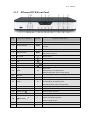
2.1.1 4Channel DVR Front Panel
Item
Key title
or Indicator
1
USB Port
2
Power Indicator
3
IR Receiver
4
HDD Indicator
5
Remark
Function & Description
Connect to USB2.0 port
PWR
If the “Green” indicator is on the system is getting power normally.
Receives IR signal from Remote Controller
HDD
CH select Key:
When the “Red” indicator flashes it means the hard drive is being read or written to.
CH select key
CH1\CH2\CH3\CH4
6
QUAD
On Live display or Playback mode, switch to Quad display.
7
REW
Left direction key, Rewind key;
Pressing the key to decrease PTZ rotation speed and parameter value.
8
PAUSE
Pause / play frame by frame manually
9
PLAY
Enter into [Record Search] Menu; Play record file.
10
FWD
Right direction key, Forward key;
Pressing the key to increase PTZ rotation speed and
Parameter value.
11
STOP
Stop Playing and/or manual recording.
12
13
14
REC
MENU/ESC
Up key
●
15
SEL/EDIT
16
17
Down key
PTZ:
Start manual record
Enter into Main menu or Exit
Move to up
Enter into pop-up menu; Select or Enter menu;
Edit menu.
Move to down
Enter into pop-up menu.
List 2-1
2
User Manual
2.1.2 8Channel DVR Front Panel
Item
Key title or Indicator
Remark
Function & Description
Connect to USB2.0 port
1
USB Port
2
Power Indicator
3
IR Receiver
4
HDD Indicator
5
SEARCH
Record search
6
MUTE
Mute on/off
7
CH-
Switch to previous channel
8
CH+
Switch to next channel
9
QUAD
On live mode, clicking the button will switch to Quad display.
PWR
If the “Green” indicator is on the system is getting power
normally.
Receives IR signal from Remote Controller
HDD
When the “Red” indicator flashes it means the hard drive is
being read or written to.
Move to left;
10
REW
Rewind playing at multiple speeds;
Decrease parameter value of image setting.
11
PAUSE
Pause/play frame by frame manually
12
PLAY
Enter into pop up menu; Play recording file
Move to right;
13
FWD
Forward playing at multiple speeds;
Increase parameter value of image setting
14
STOP
Stop playing; Stop manual record
15
REC
●
Start manual record
16
MENU/ESC
Up direction key
Enter into Main menu/Exit
Move to up
17
Enter into pop-up menu;
18
SEL/EDIT
Confirm the selected operation
Enter into [Edit] function
19
Down direction key
20
PTZ:
Move to down
Enter into pop up menu.
List 2-2
3
User Manual
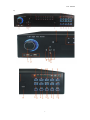
2.1.3 16Channel DVR Front Panel
a)
Item
Type
1
Key title
/Indicator
Marks
HDD indicator
HDD
Power indicator
PWR
Indicator
2
3
4
5
IR Receiver
Complex
Key
6
When the “Red” indicator flashes it means the
hard drive is being read or written to.
If the “Green” indicator is on the system is
getting power normally.
Receives IR signal from Remote Control
Menu
MENU/ESC
PTZ
PTZ
UP
7
Direction
RIGHT
/
8
Key
DOWN
LEFT
/
9
Function
Enter into main menu / Exit
Enter into PTZ control, select [Enter] / [Edit]
operation
Move up
Move right / FWD
Move down
Move left / RWD
1.
Number 1~9 stand for numeric 1~9 and
CH 1~9.
Channel
10
Select &
Single Channel
numeric
and numeric key
input
Numeric key
2.
CH11-CH16 select method: press firstly
numeric key 1 and then other numeric
0,1-9 and CH
key. For example CH16 select firstly
key CH1~9
press 1, and then press 6.
3.
Holding press key 0 for three seconds
may convert current output device
11
Manual record
●
Press the button to start manual record.
12
Stop
Stop playing and stop manual record
13
Mute
14
Rec.
Play
Control
Open or close audio input
Live display Quad mode, 9-split and 16-split
Multi Display
mode
15
By frame
Play frame by frame
16
Play
Convert to play status
17
USB Port
Connect to USB2.0 port
List 2-3
4
User Manual
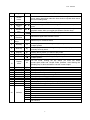
b)
Item
Type
1
2
3
Direction Key
4
5
Complex Key
6
7
8
Record
Key title
/Indicator
Marks
Function
Left arrow key
Move left
Up arrow key
Move up
Right arrow key
Move right
Down arrow key
Move down
Enter key
ENTER
Menu key
MENU/ESC
Press the [Menu] key to enter into or exit Main menu.
Manual Record key
REC
Press the key to activate manual record function.
Stop key
STOP
Press the key the stop record.
Press the [Enter] key to enter into PTZ control, confirm the processing or
start editing.
9
Audio Control
Mute key
MUTE
Press the key to open or close audio input/output.
10
Search
Search key
SEAR
Press the key to start record search.
11
PTZ Control
PTZ key
PTZ
Allow you set preset point or proceed PTZ control.
12
Zoom in
Z+ key
Z+
Press the key to zoom in live monitoring area.
13
Focus
F+ key
F+
Press the key to extend focus close
14
Iris
I+ key
I+
Press the key to increase the brightness of camera with PTZ control.
15
Lock
Lock key
LOCK
Press the key to lock system.
16
Zoom out
Z- key
Z-
Press the key to zoom out live monitoring area.
17
Focus
F- key
F-
Press the key to extend focus far.
18
Iris
I- key
I-
Press the key to decrease the brightness of camera with PTZ control
19
IR Receiver
Receive IR signal remotely.
20
PWR Indicator
POWER
If the indicator is in green the system is getting power normally.
21
Rec. Indicator
REC
If the indicator flashes in red, that means the DVR is recording.
List 2-4
5
User Manual
Item
Type
Key title
/Indicator
Marks
Function
22
1
CH1;Numeric key1
CH11-CH16 select method:
23
2
CH2;Numeric key2
press key 1 plus other
24
3
CH3;Numeric key3
numeric key. Such as CH16
4
CH4;Numeric key4
display, firstly press 1, then
CH select and
5
CH5;Numeric key5
press 6.
Numeric key
6
CH6;Numeric key6
28
7
CH7;Numeric key7
29
8
CH8;Numeric key8
30
9
CH9;Numeric key9
31
0
25
Channel Display
26
27
Numeric Input
32
Multiple display
DISPLAY
Multiple display modes include 4-split mode, 9-split
Mode
33
mode, 16-split mode and full screen display
PIP mode
PIP
IP display mode
2x2 key
2×2
Quad display mode
35
3X3 key
3×3
9-split mode
36
4X4 key
4×4
16-split mode
37
Auto key
AUTO
Dwell time display
38
REW key
Rewind (X2、X4、X8)
39
Pause key
34
40
41
Display mode
Play Control
42
43
FWD key
Pause / play frame by frame
Forward (X2、X4、X8)
Slow Play key
Play key
Manual Slow Play
Switch to Play mode
Connect USB device (Flash Drive, Hard Drive and
USB Port
Recorder etc)
44
DVD-Control
Push Key
Control DVD-RW output and inside
List 2-5
6
User Manual
c)
7
User Manual
NO.
Key title
1
Shuttle
button
2
3
4
5
6
7
USB Port
Up/Down
direction
key
Left/Right
direction
key
Enter
IR
Receiver
Numeric
Keys
Marks
On the menu mode, rotate the outside circle to right-and-left move
menu setting items and rotate the inner circle to up-and-down move
the menu setting items.
S、T
W、X
Receive IR signal from Remote Control
0-16
RW Key
9
Slow key
f│
10
Play key
►
11
Stop key
│►
12
FF Key
13
Display
mode
14
15
16
17
18
19
20
21
22
23
PIP Key
Search key
Stop key
Rec key
PWR
Mute key
PTZ
ESC Key
Menu
Recorder
Indicator
Left: Port for Mouse; Right: Port for storage device.
Allow you change numbers and settings etc. in edit boxes or pull-down
menu
On the main/sub-menu mode, allow you move curse freely; on the
playback mode, allow you toggle with different function keys.
Enter into main menu and select [Enter] operation
8
24
Function
Number input / Channel switch
On the playback mode, clicking the key allow you rewind the record at
multiple speeds.
On the playback mode, clicking the key allows you play the record
manually frame by frame.
Clicking the key allows you switch to play mode.
Clicking the key allows you pasue/play the record you selected.
On the playback mode, clicking the key allow you forward the record at
multiple speeds.。
DISPL
AY
On live mode, clicking the key allows you enter into Quad
mode,9-split mode and 16-split mode (Remark: Hold clicking the
[Display] key for three seconds to convert current output.
PIP
SEAR
STOP
●REC
Allow you enter into PIP mode.
Allow you search the recording file
Allow you stop the current record.
Allow you manually record the images.
MUTE
PTZ
ESC
MENU
Allow you open or close the audio
Allow you enter into PTZ interface.
Exit the previous menu or cancel the menu command.
On the display mode, click the [menu] key to pop up the main menu.
CD/DVD recorder (Optional)
Power indicator
HDD indicator
Run indicator
Status indicator
Recorder indicator
Backup indicator
Alarm indicator
Power on/off(holding to click the key for three seconds to close the device.)
PWR
HDD
READ
STAT
RECO
BACK
ALAR
LINK
Net indicator
List 2-6
8
User Manual
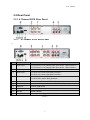
2.2 Rear Panel
2.2.1 4 Channel DVR Rear Panel
2.2.2 8 Channel DVR Rear Panel
a)
Item
Physical port
Connection method
1
Video input
4CH:Connect CH1-4 (Virtual) video input device(BNC interface)
8CH:Connect CH1-8 (Virtual) video input device(BNC interface)
2
Video output
Connect monitor output (BNC interface)
3
Audio Input
4CH DVR: 4CH audio input (BNC interface)
8CH DVR: 4CH audio input (BNC interface)
4
Audio Output
4CH DVR: 2CH output; BNC (interface)
8CH DVR:2CH output. BNC (interface)
5
Ethernet: Port
Connect LAN, Ethernet (RJ45 interface)
6
VGA Port
Connect to VGA monitor, such as PC monitor (Optional)
7
USB Port
Connect USB mouse
8
USB Port
Connect USB device (Flash Drive, Hard Drive and Recorder etc)
9
RS-485
RS485 interface
10
Power Port
Connect power supply - DC12V 3A/5A
List 2-7
9
User Manual
2.2.2 b)
Item
Physical port
Connection method
1
Video input
8CH:Connect CH1-8 (Virtual) video input device(BNC interface)
2
Video output
Connect monitor output (BNC interface)
3
Audio Output
8CH DVR:8CH output. BNC (interface)
4
Ethernet: Port
Connect LAN, Ethernet (RJ45 interface)
5
VGA Port
Connect to VGA monitor, such as PC monitor (Optional)
6
USB Port
Connect USB mouse
7
ALARM
RS-485 / Sensor / Alarm
8
Power Port
Connect power supply - DC12V 3A
9
Power Switch
Turn Power on and off
List 2-8
2.2.3 16 Channel DVR Rear Panel
a)
Item
Physical port
Connection method
1
Video input
Connect CH1-16 (Virtual) video input(BNC interface)
2
Video output
Connect monitor output(BNC interface)
3
Audio input
Connect CH1-4 audio signal input (BNC interface)
4
Audio output
2CH output; BNC (interface)
5
Ethernet: Port
Connect LAN, Ethernet (RJ45 interface)
6
Power Switch
Turn Power on and off
7
HDMI
HDMI Output
8
VGA Port
Connect to VGA monitor, such as PC monitor
9
USB Port
Connect USB mouse
10
RS-485/Sensor/Alarm
RS485/Sensor/Alarm interface (see pin outs below)
11
Power Port
Connect power supply - DC12V 5A
List 2-9
10
User Manual
b)
Item
Physical port
Connection method
1
Video input
Connect CH1-16 (Virtual) video input(BNC interface)
2
Video output
(UP) Main video output; (Down) Spot output (BNC interface)
3
Audio input
Connect CH1-4 audio signal input (BNC interface)
4
Audio output
Connect audio signal output, including spot main audio output
and sequence audio output (BNC interface)
5
Audio input
Connect (CH5~CH16) Audio input
6
Ethernet: Port
Connect LAN, Ethernet (RJ45 interface)
7
Power Switch
Turn Power on and off
8
VGA Port
Connect to VGA monitor, such as PC monitor
9
USB Port
Connect USB mouse
10
RS-485/Sensor/Alarm
RS485/Sensor/Alarm interface (see pin outs below)
11
Power Port
Connect power supply - DC12V 5A
c)
Item
List 2-10
Physical port
Connection method
1
Video input
Connect CH1-16 (Virtual) video input(BNC interface)
2
Audio input
Connect CH1-4 audio signal input (BNC interface)
3
Video output
(UP) Main video output; (Down) Spot output (BNC interface)
4
Audio output
Connect audio signal output, including spot main audio output
and sequence audio output (BNC interface)
5
Audio input
Connect (CH5~CH16) Audio input
6
HDMI
HDMI Output
7
Ethernet: Port
Connect LAN, Ethernet (RJ45 interface)
8
RS-232
Undefined
9
VGA Port
Connect to VGA monitor, such as PC monitor
10
RS-485/Sensor/Alarm
RS485/Sensor/Alarm interface (see pin outs below)
11
Power Port
Power Supply
11
User Manual
List 2-11
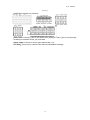
RS485/Sensor/Alarm port functions:
Alarm input: Connect [-] port of your sensor to G (GND) pin, and [+] port to channel input
according to the alarm device you purchased.
Alarm output: Connect to the two ports marked with “out”
PTZ Port:Connect your camera to RS-485A and RS485B accordingly.
12
User Manual
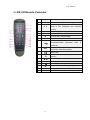
2.3 4/8-CH Remote Controller
Item
1
Key title
1-8
Key function
Channel select 1-8; Numeric key
9、0
Numeric key; Clicking numeric “0” allow you
switch to GUI (Graphical user Interface)
function
3
ALL
Multiple display mode
4
Menu
5
▲
Up arrow key, Volume adjust
6
▼
Down arrow key, Volume adjust
2
◄/
Left/Down key,
Decrease/increase
control bar
SEL
Select key/Edit key;
Confirm the selected operation.
7
8
Enter into Main menu/Exit
parameter
9
Rewind key
10
Enter into record search menu;
Play key
11
Forward key
12
●
Record key
Pause/Sequence key
13
14
■
15
Audio
Testing
16
Mute
Mute on/off
13
Stop manual record; stop playing
value
of
User Manual
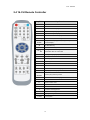
2.4 16-CH Remote Controller
Key Title
Key Function
REC
Press the button to enter into manual record.
SEARCH
Press the button to enter into record search menu
2×2
Enter into Quad display
3×3
Enter into 9-split display
4×4
Enter into 16-split display
AUTO
Enter into dwell time display
0~9
Channel select; numeric key
DISPLAY
Multiple CH display (Quad, 9-split, 16-split and full
MODE
screen display)
▲
Up direction key
▼
Down direction key
◄/
ENTER
Menu/ESC
PIP
MUTE
Left/right direction key; also decrease/increase
parameter value of control bar.
select [Enter] / [Edit] operation
Enter into/exit Main menu
PIP display mode
Mute key
FWD
Forward(x2、x4、x8)
REW
Rewind(x2、x4、x8)
PLAY
Enter into record search, play record event
STOP
Stop play / manual play
PAUSE/
FRAME
SLOW
Pause / play frame by frame
(1/2、1/4、1/8)Slow play
Z+
Zoom out video area
Z-
Zoom in video area
F+
Extend focus
F-
Extend focus
I+
Increase PTZ brightness
I-
Decrease PTZ brightness
PTZ
LOCK
Allow you set preset bit and control PTZ.
Lock system
14
User Manual
Mouse Operation
Except using buttons of front panel or remote controller, you also can use mouse to
perform system operation.
TYPE
Function
In menu lock mode, Enter into pop-up menu and clicking any sub menu to
pop up Log-in window; on menu unlock mode, enter into pop-up menu, and
then clicking left key to enter into any sub menu directly.
After entering into main menu, clicking left key could enter into any sub
menu; On [Detailed file] menu mode, clicking left key could playback one
recording file.
Change the status of check box and motion detection area.
Click left key of
Mouse
Clicking combo box to access pull-down menu; Click left key to stop dwell
time display when dwell time display is activated.
By clicking left key you can adjust Color control bar and volume control
bar.
Clicking combo box to access pull-down menu
By clicking left key you can select values in edit boxes or pull-down menu
and supports Chinese word input, special symbol, numeric and character input,
use instead of [Enter-
Click
right
key of Mouse
Double-click Left
key of Mouse
] or [Backspace
]
In live display mode, clicking right key will display pop-up menu (shown
as Picture 5-1).
In Main menu or sub menu mode, clicking right key will exit current menu.
In live display or playback mode, double-clicking left key will maximize
the screen.
Moving Mouse
Select menu item
Sliding Mouse
On motion mode, sliding mouse will select motion area; On [Color set]
menu mode, sliding mouse will adjust color control bar and volume control bar.
15
User Manual
Chapter 3 DVR INSTALLATION
3.1 HDD Installation
(Applicable to the model with HDD drawer)
Caution: Please do not Install or take out hard drive when DVR is running!
(1) The model has a HDD drawer. Please use provided key to take out the HDD
drawer and put HDD into the drawer correctly.
(2) Cut power firstly, and then remove screws and open DVR upper cover carefully;
(3) Insert Power Cord and data cable into Pin of hard drive securely;
(4) Remove the screws on the HDD bracket; fix the HDD to the bracket and then fix
the bracket with HDD to DVR body
(5) Put the upper cover back carefully, re-attach screws.
Note: If user requires higher performance HDD, strongly recommend you use special
hard driver for security and protection
3.2 Camera and Monitor Connection
Connect camera cable to video input of DVR, and from video output of DVR to
Monitor via BNC connector (Refer to section2.2-Rear Panel); or
If the camera is a PTZ speed dome, you could connect RS485 A & B to the according
port of DVR respectively (refer to system figuration on Chapter 8).
3.3 Power Supply connection
Please only use the power adapter supplied with the DVR.
After power on please make sure the video I/O connection well, audio device with
RCA cable.
16
User Manual
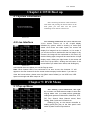
Chapter 4: DVR Boot up
4.1 System Initialization
After connecting the Power cable of DVR to
wall outlet and pressing the Power button on the
front panel, you will enter into the system
initializing screen shown as Picture 4-1
Picture 4-1
4.2 Live Interface
After finishing initialization the system will enter into
<Live> screen. Picture 4-2 is the 16-split display
defaulted by system, which is showing no video input
status. Once there are video inputs, the screen will
display live images from the cameras. In Live mode, if
you use the mouse to double-click the live image of any
channel, the image will be maximized to full screen, by
double-clicking again, image will be come back to 16-split
display mode; clicking the right button of the mouse will
enter into Pop-up Menu; clicking the left button of the
mouse allows you select menu items; and clicking any
Picture 4-2
area outside the menu allows you exit the Pop-up menu.
Note: When internal HDD is not connected or an error occurs, the character “H” will
appear on the first channel of the live screen and accompany buzzer alarm. If you want to
close the buzzer alarm, please enter into [Main menu Alarm] to set HDD loss, HDD
space not enough and alarm output to “off”
Chapter 5: DVR Menu
5.1 Pop-up Menu
After finishing system initialization, click right
key of mouse on main interface mode to enter into
Pop-up Menu. Now you could perform parameter
setting and operate on Main Menu, Multi-Pics, PTZ,
PIP, Rec. Search, Mute, Manual record, Start
Rolling, Start Cruise and Vo Switch etc.
Clicking [0] key on the remote controller or
holding press [Esc] key on the front panel could
switch system to other output device.
Picture 5-1
17
User Manual
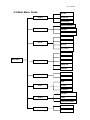
5.2 Main Menu Guide
Live set Output Set Display
Privacy Zone Record Parameters Record
Schedule Main Stream Record Search Event Search
Search
Backup
Log search
Network Set Sub stream Main Menu Email Set Network
Mobile Set DDNS Set Motion Alarm
Alarm set HDD PTZ set Device
Serial Set General System
Users System Information Maintain Advanced
18
Event User Manual
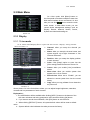
5.3 Main Menu
On <Live> mode, click [Menu] button on
the front panel or Remote controller to enter into
Main menu interface shown as Picture 5-2. And
Picture 5-2
also you can click [
] icon to enter the main
menu screen. In Main Menu mode, you can
control device management settings, such as
Display, Record, Network, Search, Device,
System and Advanced setting etc.
5.3.1 Display
5.3.1.1 Live mode
Go to <Main menu Display Live> option and enter into the <Display> setting interface
shown as Picture 5-3.
Channel: allow you setup the channel you
desired.
Name: allow you setup the channel name, and
system support up to eight characters or four
Chinese characters.
Position: allow you setup the display position
of each channel.
Color: Click [Setup] option to enter into the
[Color setup] interface shown as Picture 5-4.
Picture 5-3
Covert: allow you enable [Live] surveillance
screen
Show time: allow you enable system time
appear in the <Live> screen.
Record time: When set to “Enable”, you are
allowed to record system time into the record
history.
Copy: allow you copy all data of one channel to
any other one
Picture 5-4
Above picture 5-4 is the Color Menu where you can adjust image brightness, saturation,
contrast and hue parameters of each channel.
Explanation:
1、The modifications will be available after clicking [APPLY] button on the bottom of the
sub-menu windows and being prompted to save and then clicking [ok] button.
2、If you want to cancel the modification, click [Exit] button to exit the menu.
3、When clicking [DEFAULT] button, all system default values will be reset to default
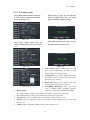
value.
4、System default value indicates the value pre-set at the factory.
19
User Manual
5.3.1.2 Output mode
Go to [Main menu Display Output]
to enter into the output set interface
shown as Picture 5-5.
Click [Live] to pop up the interface
shown as Picture 5-6. Now you could
perform channel sequence setting.
Picture 5-5
Picture 5-6
Click [Spot sequence] to enter into the
interface shown as Picture 5-8.
Click [Spot output] option and set
relative parameters shown as Picture
5-7.
Picture 5-7
Picture 5-9
Picture 5-8
Video output: Support CVBS output Live and
Spot mode simultaneously, and Live is main
output, and Spot is auxiliary output.
CH Sequence: the option is defaulted to “Off”
and sequence time is 5 second. User can activate
the option as per request.
Rotate time: allow you set sequence time, and
minimum time can be set to 3 seconds.
VGA/HDMI Resolution: allow you select
VGA or HDMI output, including 800x600,
1024x768, 1280x1024, 1440x900 and HDMI.
Display Mode:
Live output: display window will include Single, Quad, 9-split and 16-split mode;
Spot output: display window will include Single, Quad and 9-split mode.
Transparency: allow you adjust menu’s transparency, and its range is 1~128.
Margin: allow you adjust the whole screen’s margin. Details operations please refer to the
Picture 5-10.
Volume: allow you adjust the DVR volume shown as Picture 5-11.
20
User Manual
Picture 5-10
Picture 5-11
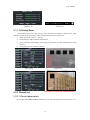
5.3.1.3 Privacy Zone
The function Allow you setup privacy zone parameters according to Picture 5-12. Each
channel could set up to four privacy zones, and please follow below steps to set:
1. Select the area no (Area 1 ~ Area 4);
2. Click [Setup] to adjust position of mask area;
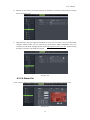
3. After finishing position adjust, click right key of mouse to return back [Privacy zone]
interface;
4. Click [Apply] to save the above setting.
Picture 5-12
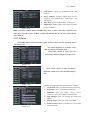
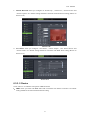
5.3.2 Record set
Picture 5-13
This figure is only for CIF model reference
5.3.2.1 Record parameters
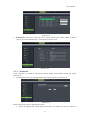
Go to [Main menu Record Record Para] to enter into the interface shown as Picture 5-14.
21
User Manual
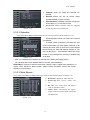
Channel: allow you setup the channel you
desired.
Record: allows you set up record status
(Enable/Disable) of each channel
Pack Duration: indicates maximum continuous
record time (15, 30, 45 and 60 min).
Pre-record: Motion detection and I/O triggered
record support Pre-record function.
Picture 5-14
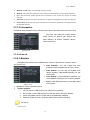
5.3.2.2 Schedule
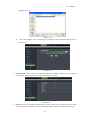
Click [Main Menu Record Schedule] to enter into the interface shown as Picture 5-15.
[Channel] option allows you select one channel
you desired.
To setup weekly schedules, tick-select the box
of the record status you want (Alarm, General, or No
Record) and then click on each box in the schedule
time line that you want this method to apply to. You
can use the [Copy – To] pull-down menus and Copy
button to copy settings from one day to another day
or all days.
Picture 5-15
After you complete the schedule you activate it by clicking the [Apply] button.
You can also click on the Default button to use the system defaults.
Explanation: Under the <record> menu and <search> menu, original color stands for no
record, “Red” stands for alarm record, “yellow” stands for Motion record and “Green”
stands for normal record.
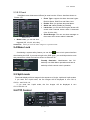
5.3.2.3 Main Stream
Go to [Main menu Record Main Stream] to enter into the interface shown as Picture 5-16.
Resolution: support D1, HD1 and CIF.
Frame rate: PAL: 1-25 f/s ; NTSC: 1-30
f/s.
Bit rate: user could select the relative
value by pull-down menu.
Audio: When tick-selecting the option,
system will record video stream with audio
simultaneously
Picture 5-16
22
User Manual
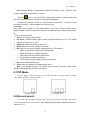
5.3.3 Search
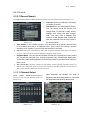
5.3.3.1 Record Search
Click [Main Menu Search Record Search] to enter into the interface shown as Picture 5-17.
Channel: allows you select the channel(s)
you desire to search.
Date Search: In the Video Search screen,
user can search for all the records in a
specific date. To execute a video search,
highlight and select the date numeric
field , and then click a detailed time
quantum of the specific date, system will
start the playback from the first record of
Picture 5-17
the time quantum.
Time Search: In the <Search screen>, user can search for a specific date and time
for a recording and view it in Playback mode. This is useful for hunting a specific
recording of an incident if you know the date and time it occurred.
File List: click [File List] button to enter into the [Event Search] screen shown as Picture
5-19, the video records for the time quantum will appear in the screen.
Playback Mode: You can use the Playback Control bar to operate the Fast Forward
(X2, X4 and X8), Slow play (1/2, 1/4 and 1/8 speed), Play, Pause/Frame, Rewind(X2,
X4 and X8). When ending playback, DVR will return back to previous menu shown as
Picture 5-20.
Play control Bar: the play control bar will display current playing processing shown as
Picture 5-20. When user click any time at the control bar and this point have not any record
file, system will auto return back to previous menu.
5.3.3.2 Channel Select
Click
[Main
Menu Search Record
search] to enter into the interface shown as
Picture 5-18
Then tick-select the channel you want to
playback; and click [Play] button to enter into
the playback mode shown as Picture 5-19
Picture 5-18
Picture 5-19
23
User Manual
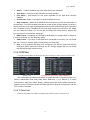
5.3.3.3 Event Search
Click [Main Menu Search Event Search] to enter into the interface shown as Picture 5-20.
You could highlight and double-click the desired record for playback. And you also can filter
the records you want to view based on date, time, and channel and record mode search.
(First Page): go to the first page on the list.
When you view other pages, clicking [First] button
brings you back to Page one.
Picture 5-20
(Previous page): go to the previous ones of
current page. Clicking [Pre] button will take you
back the previous ones of current page (except the
first page).
(Next page): go to the next ones of current
page. Clicking the [Next] button will take you to the
next ones of current page (except the last page)
(Last page): go to the last page. Clicking the [last] button will make you enter into last
page quickly.
ALL (Select All): Allows you to select all the events on the current page.
Inverse (Select Invert): Allows you to select other events on the current page except
those you have currently selected.
5.3.3.4 File Backup
You can back-up the record files based on event or time.
5.3.3.4.1 back-up file based on event
In the [File List] mode, if you wish to backup records, please tick-select the BAK
check-boxes which correspond to the records and click [Backup] button to enter into the
below windows illustrated in Picture 5-21
In the [File List] mode, if
Select DVD as backup
Select USB as backup
you wish to backup records,
device and click [Apply]
device and click [Apply]
please tick-select the BAK
button, and then enter
button, and then enter into
check-boxes which correspond
into the window shown as
the window shown as
to the records and click
Picture 5-23.
Picture 5-22.
[Backup] button to enter into the
below windows illustrated in
Picture 5-21
Picture 5-21
Picture 5-22
24
Picture 5-23
User Manual
Picture 5-24
After backup finished, please click [OK]
button shown as Picture 5-24.
Note:
File will be saved as *.264 format.
You could playback the record files via Dvr
Client player. When installing Dvrclient,
system will auto install the player.
Please make sure the back-up device
connect well before backup.
5.3.3.4.2 back-up file based on time
Also allow you back-up record files based on time. Please follow below steps to back up these
files (Details operations please refer to section 5.3.4.4.1.):
1. input start time and end time on the time edit box;
2. Click [Search] button;
3. Tick-select all the files you desire to backup;
4. Click the [Backup] on the bottom.
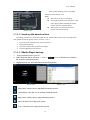
5.3.3.4.3 Media Player backup
1. Copy one backup file to your PC.
button to find/select the backup
2. Open Playback player and click “+” icon or
file, and then click [open] button.
3. Highlight the file you have selected and click [Play] button.
Picture 5-25
Picture 5-26
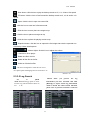
:Play button: click the icon to playback the backup record;
:Pause button: click the icon to pause the backup record;
:Stop button: click the icon to stop the backup record;
:Next: Click the icon to play next record;
:Prev.: Click the icon to play previous record
25
User Manual
:Slow button: click the icon to play the backup record at 1/2, 1/4, 1/8 and 1/16 speed.
:FF button: click the icon to fast forward the backup record at x2, x4, x8 and/or x16
speed.
:Open: click the icon to open one record file.
:click the icon to enter into full screen mode.
:Click the icon to never place one target to top.
:Click the icon to place one target to top.
:Click the icon to place the playing record to top.
:Snapshot button: click the icon to capture the live image and save the captured one
to directory:\\video client\capture.
:Volume Adjust: click the icon to adjust the volume.
:Add fold or file to player.
:Delete one file in the list
:Delete all the files in the list
:Unfold or fold the list files
:Advance Configuration: click the icon to set
one capture path and language shown as Picture 5-27.
Picture 5-27
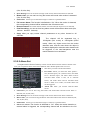
5.3.3.5 Log Search
Herein allow you preview the log
information you have searched. And click
[Backup] to export all the log information
which is listed. For other button functions
please refer to previous section 5.3.3.3-Event
Go
to
[Main
menu Search Log] option to enter
into the Log search interface shown as
Pi t
5 28
Picture 5-28
Picture 5-29
26
User Manual
5.3.4 Network
5.3.4.1 Network set
Click [Main menu
Network Network] to enter into the below interface shown as Picture 5-30.
Picture 5-30
After selecting network mode - such as
DHCP, PPPOE or static allocation- and setting
up web ports , you can visit DVR remotely
through a network or internet.
UPnP (Universal Plug and Play) function: If
router supports UPnP function and set <UPnP> to
“On”, system will automatically forward port to
router.
DNS: DNS server is generally provided by local ISP. Herein please enter the IP address of your DNS
When selecting DHCP from the Type, A router
will automatically allocate IP address for your DVR.
After restarting each time, the IP address captured
by your DVR may be different. So, port forwarding
is required when you visit a remote DVR.
1. Select DHCP and click [Save] button;
2. Exit and restart DVR;
3. Input media port and web port
Picture 5-31
4 Set IP address captured by DVR and web port to a router
5 Visit a remote DVR
http: // public net IP: web port (such as: 8080)
http: //intranet IP: web port (such as: 8080 - only use for Intranet)
6 Input the IP address of your domain name server
Friendly Reminder:
1.
All the parameters you set are available only when you click [Apply] and
after system are restarted.
2.
User need to change MAC address when there are multiple DVRs at the same
local area network. Details please refer to section 5.6.2.5 -System Information.
When selecting Static from the Type, user can
directly input IP address, Subnet Mask, Gateway
and DNS shown as below picture 5-33.
1. Set your net type to Static;
2. Set media port number (such as 9000), and
the port need to be forwarded to a router.
3. Input web port number (such as 8080), and
the port need to be forwarded to a router;
Picture 5-32
27
User Manual
4. Input a specified IP address to [IP address] column;
5. The Subnet Mask, gateway and DNS server should be consistent with your router’s
configurations.
6. Input DNS address. Please check router firstly. The setting should be consistent with router’s
7. Click [Apply] button
8. Now you could remotely visit the DVR via IP
http: // public net IP: web port (such as: 8080)
http: //intranet IP: web port (such as: 8080 - only use for Intranet)
When selecting PPPoE form the Type, user can
input user name and password provided by ISP
and set Media and Web port. And now you can
visit your remote DVR by using the IP address
captured after registering a domain name and
web port and connect to your DVR via public
network.
Picture 5-33
5.3.4.2 Router’s Port Forwarding
Port forwarding is required when you want to access the DVR connected to the router
from outside of the router’s network.
If PPPoE is selected, port forwarding is not required.
Picture 5-34
1. Input router’s IP address from IE-based browser
to open the Router configuration interface shown as
Picture 5-36;
2. Click [Transmittal rule] option to take you to the
port forwarding instructions for your router;
3. The DVR IP address for the intranet should be
<192.168.1.101>, you should forward server port and
web port to this IP address respectively.
4. Now user can visit the DVR remotely.
Friendly Reminder: The router’s port forwarding interface may be different, however,
when entering into virtual server, user will always need forward port (range: 1025~65535)
of router to IP address of DVR allocated or automatically captured, and select [All] or [Both]
in corresponding protocol column and save the above setting.
Above steps may differ from the router device depending on the manufacturer.
5.3.4.3 Sub stream
Go to [Main menu Network Sub Stream] to enter into the interface shown as Picture 5-35
28
User Manual
Video: allow you open or close the sub stream
output. If you select “Enable” system will select
sub-stream preview and guarantee image quality
once network is unstable.
Frame rate: allow you set net transmittal frame
rate. User could select the relative value by
pull-down menu.
Bit rate: allow you set net transmittal bit rate. User
Picture 5-35
could select the relative value by pull-down menu.
Audio: When tick-selecting the option, system will record video and audio simultaneously.
5.3.4.4 Email set
Click [Main Menu Network Email] option to enter into the email set interface
shown as Picture 5-36
SSL: is a security link transport protocol. You
can encrypt your communication info (including
your email) using SSL to prevent hackers from
monitoring your email or communication info
and even your password.
Please set SSL to “On” via Gmail.com
server, and set to “Off” via other mail server.
Picture 5-36
SMTP Port: indicate one kind of mail transmittal
port opened by Simple Message Transfer
Protocol (SMTP). The port number for most mails
is 25 except such as Gmail server (Port No.: 465).
Picture 5-37
SMTP server: indicates server address you used.
Sender address: indicates sender’s email
address. The email address should be consistent
with the server you use. That is to say, when you
use email address – [email protected], the
according server should be smtp.gmail.com.
Receiver address: indicates receiver’s email address. The email address is used to
receive image transmitted from DVR alarm. Please clear the images you have
received as soon as possible to avoid overloading your email account.
5.3.4.5 Mobile Set
The DVR is currently compatible with mobile phones running Andriod, Windows Mobile,
Symbian operating systems, Iphone and Black berry on 3G networks.
29
User Manual
Click [Main menu Network Mobile] to enter into the
[Mobile] interface shown as Picture 5-41.
User Name: indicate user name of DVR, and support
numbers and characters and 1~15 bits length
User password: indicate user password of DVR, and
also support numbers and characters and 1~15 bits
length
Server port: Mobile monitoring port. Setting range is
between 1024 and 65535.
Picture 5-38
Please note that the server port could not duplicate the port you have set to network set.
5.3.4.6 DDNS Set
DDNS (Dynamic DNS) is a service that register a domain name and the floating IP
address with the DDNS server so that the domain name can be routed to the IP address
even if the IP address is changed in a dynamic IP system.
User can visit a remote DVR by using DDNS on above three types (Static, DHCP and PPPoE)
You can apply for a DDNS account for free at the
web www.3322.org or www.dyndns.org.
You can register on DVR2009.3322.org or
dyndns.org website and get a domain name, user
name, and password.
Server: select DDNS provider
Host name: input the host domain name you
have registered at dynamic domain name system,
Picture 5-39
such as: DVR2009.3322.org;
User Name: Input a user name registered before applying for a domain name;
Password: Input a password you set when registering a user name.
Click [Apply] button and restart the DVR; and then enter the domain name (such as:
http://superdvr.3322.org:8080) to visit your remote DVR.
5.3.5 Alarm
5.3.5.1 Motion
Click [Main menu Alarm Motion] to enter into the interface shown as Picture 5-40
Channel: allow you enable/disable the motion
function for any channel.
Area: Click the [Setup] button to enter into area setup
interface shown as Picture 5-41.
Sensitivity: allow you to set sensitivity level of
motion detection from higher to low with 8 being
the most sensitive.
Alarm out: allow you connect external alarm
Latch time: you can set how long the buzzer
will sound when object move is detected
sensor.
Picture 5-40
30
User Manual
(10s, 20, 40s, 60s);
Show Message: You can set show message on the screen when motion alarm is detected.
Buzzer time: you can set how long the buzzer will sound when motion is detected
(10s, 20, 40s, 60s);
Send Email:Allows you set the alarm images is issued to a specified email.
Full screen Alarm: The function is defaulted to “On". When the motion is detected,
the corresponding channel will be switched to the full screen mode.
Record Channel: the record channel will be activated when the object move is detected.
Post Recording: you can set how long alarm record will last when alarm ends (30s,
1minute,2minute,5minute).
Copy: allow you copy current channel parameters to any other channel or all
channels.
The channel will be separated into a
15X12grids (PAL mode) or 15X10grids (NTSC
mode). When any object moves into the motion
detection area, and the area where the object is
located is displayed in red and motion detection will
be triggered. In the semi-transparent area the
motion detection is not activated.
Picture 5-41
5.3.5.2 Alarm Set
Click [Main Menu Alarm Alarm] to enter into the below window shown as Picture 5-42.
Now you can perform alarm set based on different status. Details please refer to List 5-1.
No: allow you select one desired channel
I/O Status: allows you select the three options –
NO (Normal Open), NC (Normal Close) and OFF.
Set to “Normal Open”, I/O status Alarm will be
activated while sensor is ON; set to “Normal
Close”, I/O status alarm will be activated while
sensor is OFF; set to “OFF”, I/O status alarm will
not be triggered.
Alarm out: allow you connect external alarm
Picture 5-42
sensor.
Latch time: you can set how long the buzzer will sound when external sensor alarm is
detected (10s, 20, 40s, 60s);
Show Message: You can set show message on the screen when sensor alarm is detected.
Buzzer time: you can set how long the buzzer will sound when sensor alarm is detected (Off,
10s, 20, 40s, 60s);
Send Email:Allows you set the alarm images is issued to a specified email.
Full screen Alarm: The function is defaulted to “On". When the motion detection or
external alarm is triggered, the corresponding channel will be switched to the full
31
User Manual
screen mode.
Record Channel: allow you select channels you want to record.
Post Recording: you can set how long alarm record will last when alarm ends (30s,
1minute,2minute,5minute);
Copy: allow you copy all the setting of one channel to other ones.
Alarm Type
Function
Sends alarm when DVR can’t receive video signal (such as camera damage, cable broken or
Video Loss
damaged or power supply malfunction).
Motion
When an object moves into motion detection area, alarm will be triggered. You can adjust
Detection
sensitivity level to suit the needs of your actual application environment.
I/O Status
System can convert alarm signal triggered by external sensor into signal identified by system.
When Hard Drive is not detected (HDD damage, power supply malfunction), or HDD
HDD loss
auto-overwrite is off, and free space is not enough, an alarm will be triggered.
List 5-1
5.3.6 Device
5.3.6.1 HDD Set
Click [Main menu Device HDD] to enter into the interface shown as Picture 5-43.
This figure is only for CIF model reference
Picture 5-43
When DVR is connected to a HDD, the system will automatically detect if HDD is normal
or not;
If the cable connected to HDD is loosen or HDD is abnormal, HDD status will be
shown as “No Disk”, or, If HDD need to be formatted, status will be shown as “no format”,
otherwise, the HDD status will be shown as “Normal”
Picture 5-44
This figure is only for CIF model reference
NO: indicate HDD no pre-seted by system.
32
User Manual
Status::It will be available only when HDD have been formatted.
Total Space – Total size of the hard drive currently installed.
Free Space – Total amount of free space available on the hard drive currently
installed.
Useable Rec. Time – Free space currently available in hours.
Auto-overwrite – When set to ENABLE the DVR will record over the oldest files on
the hard drive. The DVR will always be able to record events as they happen, however, it
does means that you’ll need to get important events off the HDD before they’re overwritten;
and if overwrite is set to DISABLE the DVR will stop record once the DVR is full. Whilst
you won’t lose old footage, you run the risk of missing new events as they happen. Be
sure you want to do this before selecting it.
HDD Format – Formatting the HDD will erase all data (i.e. footage) which is stored on
it, and re-create the FAT (file allocation table).
USB Format - If you have a USB flash drive connected to the DVR, you can format
that, too. To do this, click the [USB Format] button and click [OK].
Note: It is an important first step when configuring your DVR to make sure that the
hard drive (HDD) options are correctly set. So, strongly suggest that you do format
the HDD before start the first record.
5.3.6.2 PTZ Set
Click [Main Menu Device PTZ] to enter into the below window shown as Picture 5-45
Picture 5-45
This figure is only for CIF model reference
You could select the channel you desire to control and set PTZ protocol (Pelco-D or
Pelco-P), Baud Rate (1200, 2400, 4800, 9600), Data bit (8, 7, 6, 5), Stop bit (1, 2), Parity
Check (None, Odd, Even, Mark, Space), Address Code and Cruise status respectively.
Please note the PTZ device can be activated only when a channel in connection with the
PTZ camera is selected.
5.3.6.3 Serial Set
Enter into the [Main menu Device Serial Set] interface shown as Picture 5-46
33
User Manual
Picture 5-46
When operate DVR via keyboard, it is required to set
communication protocol.
Baud rate: set baud rate of serial
communication.
Data bit: set data bit of serial communication.
Stop bit: set stop bit.
Parity Check: set parity check to <None> or
other.
5.3.7 System
5.3.7.1 General
Click [Main Menu System General] to enter into the interface shown as Picture 5-47
You will be allowed to modify system date,
time, date/time format, language, video format
and auto logout.
And click [DST Setup] button to enter
into the below interface shown as Picture 5-48.
Picture 5-47
5.3.7.2 DST Set
Enter into the interface shown as Picture 5-48
and you are allowed to set DST status and mode.
Picture 5-48
5.3.7.3 Network Time Protocol (NTP) Service
Click [Main menu System General NTP] to enter into the interface shown as Picture 5-49
34
User Manual
Picture 5-50
NTP Service:Allow you enable/disable the NTP
function.
Server Address: currently support three servers,
including time.windows.com, time.nist.gov and
pool.ntp.org.
Time Zone: System supports thirty Time Zones.
Update now: Click [Update Now] button to change
the above NTP set.
Note: The above change will be available only when system connected to internet. And
When NTP function is set to “Enable”, system will calibrate the time at every 00:07:50 and
every start-up.
5.3.7.4 Users
Click [Main Menu System users] option and then enter into the interface shown
as Picture 5-51
The model supports up to seven users
with one Admin and seven users.
Click [Edit] button to enter into the
[User Edit] interface shown as Picture 5-52
Picture 5-51
User name consist of eight characters,
password consist of 0~9 and its fixed-length is
6 bit.
Picture 5-52
Picture 5-53
[Admin] is authorized to set common user’s authority.
Log Search: allow you check the entire system log.
Parameter: allow you set all the parameters.
Maintain: allow you update version, recover
ex-factory value, device reboot and shut down.
Disk Manage: allow you manage and control the
HDDs.
Remote Login: allow you remote login DVR.
Rotate Control: allow you sequence live screens for
all the channels.
35
User Manual
Manual record: allow you manually start/stop record.
Backup: Tick-select the option, the user is allowed to backup the record of all the channels.
Live: Tick-select the option and the user is allowed to view all the live images for all the
channels.
Playback: Tick-select the option and the user is allowed to playback the record you selected.
PTZ control: Tick-select the option and the user is allowed to perform the PTZ operation for
the selected channel.
5.3.7.5 Information
Click [Main Menu System Info] and then enter into the interface shown as Picture 5-54
Now user can check the current Device
name, Device ID, Device type, Device S/N,
MAC address, IE version, Software version,
Panel version etc.
Picture 5-54
5.3.8 Advanced
5.3.8.1 Maintain
Click [Main menu Advanced Maintain] to enter into the maintain interface shown
as Picture 5-55
Auto Maintain: You can enable the auto
maintain function regularly as per user’s need.
Auto Reboot: you can also set system auto
reboot regularly (daily/weekly/monthly) as per
user’s need.
Load Default: If [Load Default] is selected, you
can initialize the system to the ex-factory default.
Reboot: Click [Reboot] button to manually restart
DVR system.
Picture 5-55
Shutdown: Click the [Shutdown] button to shutdown the device.
System Upgrade:
1. You can insert a USB memory into USB port for updating;
2. Do not take out the USB memory or break the power during the update.
3. When the update is done, system will be automatically restarted.
4. Please manually recovery ex-factory default after system rebooting.
Picture 5-56
36
User Manual
5.3.8.2 Event
Click [Main menu Advanced Event] to enter into the <Event> interface shown as
Picture 5-57
Event Type: support the three abnormal types:
Disk No Space, Disk Error and Video Loss.
Enable: allow you activate abnormal alarm.
Alarm out: select [Enable] or [Disable]
Latch time: you can set how long the buzzer will
sound when external sensor alarm is detected
(10s, 20, 40s, 60s);
Picture 5-57
Show Message: You can set show message on
the screen when sensor alarm is detected.
Buzzer time: you can set how long the buzzer will sound when abnormal alarm is
triggered (Off, 10s, 20, 40s, 60s);
Send Email:Allow you issue the alarm images to a specified email.
5.4 Menu Lock
Considering a system safety feature you can click [
] icon to lock system interface
when leaving the DVR. If you want to login to the DVR again, you would input device code
and password to unlock the interface shown as Picture 5-58
Friendly Reminder: Administrator has full
authority over Main Menu operations and has an
authority to limit common user’s operation.
Picture 5-58
5.5 Split mode
The model displays 4/8 live images in the sequence of single, 4-split and 9-split modes.
If you enter into 4-split mode, the live images will be displayed in turn CH1~4,
CH5~8…and CH13~16.
If you enter into 9-split mode, the live images will be displayed in turn
CH1~9 CH10~16.
5.6 PTZ Control
Picture 5-59
37
User Manual
We introduced setting PTZ parameters previously in section 5.3.6.2 – PTZ Set. Here
we will discuss how to operate PTZ controls.
Click the [
] icon to enter into [PTZ control] menu shown as Picture5-60. Now
user can control the camera with Pan, Tilt and Zoom capabilities.
Click [Zoom-/+] button to zoom in / out the image; Click [Focus -/+] button to focus
the image; Click [Iris -/+] button adjust iris to open or close.
Cruise Set
Open auto cruise function on PTZ setting menu if you want to setup cruise function
(system default: off), and set up cruise channel, cur point and total quantity and stop time
etc
How to set pre-set point
Total: set up pre-set point quantity
Cur Point: indicates starting point cruised. System default point is 01. The model
support up to 255 pre-set points.
Stop time: sets the stop time at each point
GOTO: allow you go to a specific preset point.
Set: allow you set a set of specific preset points of a PTZ camera.
1. Select a camera you desire to set a preset point;
2. Adjust the camera in a desired direction;
3. Click [Set] to set the point as preset point;
4. Click [Save] to save the preset point;
5. Follow the above step to add one more preset point.
Save: save all the preset points
Clean: allow you delete one selected preset point.
Note: Up to 254pre-sets per one camera can be stored. However, actual preset
quantity differs depending on PTZ performance.
5.7 PIP Mode
You can display a Picture-in-Picture in live mode. PIP has two display modes, including
1X1 display mode and 1X2 display mode.
1x1 display mode
1x2 display mode
5.8 Record search
You could enter into [Record Search] menu from Pop-up menu conveniently and quickly
and search/playback the record histories. We introduced Record search details previously in
Section 5.3.3.1.
38
User Manual
5.9 Mute
Click the [ ] icon, or press <Mute> button on the front panel and Remote controller to
control the mute of DVR.
5.10 Manual Record
You can start manual record function, or you also can click [ ] button on the Front
panel or Remote controller to activate manual record. Please stop record manually once
you activate manual record.
5.11 Stop record
To stop record quickly, please click the icon [
remote controller.
] or [Stop] button on the front panel or
5.12 Start Sequence
In the single mode, when entering into [Start sequence] menu, auto-sequence will
be conducted at the set interval. Details please refer to section 5.3.1.2.
5.13 Start Cruise
If multiple presets are specified, the PTZ camera will automatically move to the entire
preset one at a time whilst user activates [Start Cruise
please click [
] icon on the [Tool] column.
39
] options. If you want to stop cruise,
User Manual
Chapter 6: Web Application Manager
6.1 Plug-in download and installation
Open your web browser and input the IP address and web port of DVR, such as:
http://172.18.6.202:8080/ . If your computer is connected to internet, it will download and install
“ActiveX” Plug-in automatically. If your computer system is Vista, you may need to setup the
user authority. Details please refer to the below picture: Start →setup→ control panel (Tick
“√” use UAC to help protect your computer and confirm OK).
Vista system:
Vista
Win-7 system:
WIN7-1
WIN7-2
Reminder: If the plug-in program is not downloaded successfully, please check if your
browser’s safety level or firewall setting is too advanced. Please run IE →Tools→Internet
options→Internet Custom level→Enable the options (details please refer to the below
Picture 6-2).
If running the web application for the first time, you
need about one minute to finish download and install
plug-in, please wait patiently.
Note: If you want to use the undated webcam
at one computer which you already login before,
please delete the old IE webcam and click
[Start Run] to input the command characters:
“regsvr32/u HiDvrOcx.ocx”, then login again.
Picture 6-1
40
User Manual
6.2 Web Application Manager Log-in
After plug-ins installation, please input user name, password and client port; and
select <Main stream> or <sub stream>, and then allow you tick-select <Open All
Channels Preview>;
Now you click [Log-in] button, and then you
are allowed to access a remote DVR and
monitor live video images using Web browser
anytime from virtually anywhere.
Noted that defaulted password is empty.
System allows Administrator to set new
password as per instructions in section 6.3.3 [System set User Configuration] menu.
Picture 6-2
6.3 Live interface
After successful logging-in web manager, you will enter into the Live interface shown as
Picture 6-3
Picture 6-3
6.3.1 Menu Bar
Menu bar include [Live], [Replay], [Configuration], [Path Configuration] and [Logout]
options
6.3.1.1 Live Display
After running the Web Application Manager on your local PC, system will be
defaulted to enter into <Live> interface shown as Picture 6-3. You can click [Play] button
to Open/close live images and enter into on-spot record and Capture, quad, 9-split or
16-split mode by operating the control bar on the bottom of screen.
41
User Manual
:Volume switch
:Record icon: record will be saved to a specified position after starting record.
:Snapshot function: allow you capture the live images and save it to a specified position.
The image should be saved as *.bmp format.
: clicking the icon will close/open the current channel’s live mode
Or click the right key of mouse on each <Live> window to pop up the interface shown as
Picture 6-4.
Show bit rate: show current bit rate;
Original Proportions: show original proportions.
Picture 6-4
:CH Display mode
:Allow you open all the <live> channels.
:Allow you close all the <live> channels.
:Display previous channels
:Display next channels
:Click the icon to enlarge current window to full screen; right-click to pop-up menu
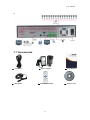
options, now allow you select <Exit full screen>
6.3.1.2 PTZ Control
① PTZ moving Direction control: allow you control PTZ
camera’s direction. And the middle button is called
[Auto-cruise] button.
PTZ speed control bar
②
③
: Iris, Focus and Zoom control
4
○
:Preset setting/clear; Start cruise /stop cruise
Picture 6-5
42
User Manual
6.3.1.3 Video control
:Adjust video Hue;
:Adjust video brightness;
:Adjust video Contrast;
:Adjust video saturation;
:Recover ex-factory default value.
Picture 6-6
6.3.2 Playback
Click [
] icon to enter into <playback> interface shown Picture 6-7.
Picture 6-7
The Web Application Manager supports up to 4 channels playback simultaneously.
6.3.2.1 Record search
Firstly, select one day you want to check and tick-select <synchronous Playback> and the
channels you desire to playback shown as Picture 6-8
43
User Manual
Picture 6-8
Secondly, select record type (Normal record, Alarm record and All) and then click <
>
button shown as Picture 6-9. On the time axis, red part stand for alarm record, yellow stand for
normal record and original part stand for no record during this period.
Picture 6-9
> option, that means the selected channel will playback
If you tick-select <
synchronously; otherwise, you could separately control the channels playback.
Thirdly, Click [ ] icon to start record playback. When mouse curse is moving on the time axis,
the current time will appear in the screen.
Click [ / ] icon to zoom in/out the time bar display ratio shown as Picture 6-12.
6.3.2.2 Playback control
Below Picture 6-13 is playback control bar
Picture 6-10
44
User Manual
Detail brief description is shown as below list
Key
Description
Key
Description
Play
Open/close audio
Pause
Volume adjust
Stop
Playback control bar (x1/2,1/4,1/8,
By frame
Stop all the play
Clip
Single channel mode
Capture
Quad mode
Download
Full screen
normal, x2, x4, x8)
Open all the channels
Stop all the channels
Record file clip
After opening playback, click [ ] icon to clip the selected file; and click again to stop the
clip function. Record clip file will be saved as *.264 format.
Snapshot function
Move the mouse curse to the channel you want to capture, and click [ ] icon to capture the live
images remotely. After capturing the images successfully, you are allowed to save it to a
specified path shown as Picture 6-11. The captured file will be saved as *.bmp format
Picture 6-11
Record file download
Click [ ] icon to enter into the below interface shown as Picture 6-12.
45
User Manual
Picture 6-12
Tick-select the record file you want to download and click [Start download]
System will download the record file in turn and save to local PC.
6.3.3 Configuration
Click [Configuration] option to enter into the [Config] interface shown as Picture 6-13
and allow you set Display configuration, Record, Network, Alarm, Device, System
parameters and Advance according to your actual request.
6.3.3.1 Display Configuration
Unfold [Display] option to find its sub-options: Live and Privacy zone
1、Live: Allow you modify channel name, Position, Show time and Record time. If show time is
set to <disable>, current system time will not appear on the screen on Live mode; and if record
time is set to <off>, system time can’t be found in the record file.
Picture 6-13
2、Privacy zone: Each channel could set up to four privacy zones shown as Picture 6-14. Details
parameters please refer to section 5.3.1.3. If you want to delete one privacy zone, please firstly
select one zone, and then click <Clear> button and click <Save> on the right corner
46
User Manual
Picture 6-14
6.3.3.2 Record
Click <Record> option to unfold its sub-options: Record parameter, Schedule and Main
stream.
1、 Record Parameters: Under [Record parameters] option, allow you set channel, record enable,
pack time and Pre-record status shown as Picture 6-1
Picture 6-15
2、 Schedule: Detailed parameters please refer to DVR local setting.
Green stand for Normal record; Yellow stands for Motion detection; Red stands for I/O
triggered record.
Picture 6-16
3、 Main Stream: detailed settings please refer to DVR local setting. Herein allow user modifies
the resolution, frame rate, Bit rate and audio of the record channel.
47
User Manual
Picture 6-17
This figure is only for CIF model reference
6.3.3.3 Network Parameters
Unfold <Network> option to enter into its sub-options: Network, sub stream, Email, mobile
and DDNS configuration.
1、 The model support three network type, including Static, DHCP and PPPoE
Static: System default <Static> as its network type. User could allocate IP and perform Port
forwarding for DVR according to different router. When set <UPNP> to “On”, user no needs
to perform port forwarding. Once you modify its network parameters successfully, DVR will
automatically restart.
Picture 6-18
DHCP: Set network type to “DHCP” shown as Picture 6-19. Relative parameters should be
consistent with DVR local setting.
Picture 6-19
48
User Manual
Set network type to “PPPoE” shown as Picture 6-20.
consistent with DVR local setting.
Its user name and password should be
Picture 6-20
2、 Sub stream (shown as Picture 6-21): Relative parameters should be consistent with DVR
local setting.
Picture 6-21
3、 Email setting: Click [Email setting] option to allow you set alarm email configuration
parameters shown as Picture 6-22. Detailed parameters should be consistent with DVR local
setting.
Picture 6-22
49
User Manual
4、 Mobile: Its user name, password and port No should be consistent with DVR local setting
shown as Picture 5-23.
Picture 6-23
5、 DDNS Setting: After user applies for DDNS service shown as Picture 6-24, you could enable
<DDNS> function under any one network type mode (Static, DHCP and PPPoE). Now you
remotely visit the DVR through domain name (http://domain name: port No). Details setting
should be consistent with DVR local setting.
Picture 6-24
6.3.3.4 Alarm Set
Click <Alarm> option to unfold its sub-options: Motion, I/O Alarm shown as Picture 6-25.
Picture 6-25
50
User Manual
1、 Motion Detection: allow you configure its <Sensitivity>, <Alarm out>, <Alarm record> and
<Alarm Capture> etc. Details setting should be consistent with DVR local setting (Shown as
Picture 6-26).
Picture 6-26
2、 I/O Alarm: allow you configure <I/O Status>, <Alarm output>, <I/O Alarm record> and
<Alarm email> etc. Details setting should be consistent with DVR local setting (Shown as
Picture 6-27).
Picture 6-27
6.3.3. 5 Device
Click <Device> to unfold its sub-options: HDD and PTZ.
1、 HDD: allow you check out HDD status and overwritten time shown as Picture 6-28. Detail
setting should be consistent with DVR local setting.
51
User Manual
Picture 6-28
2、 PTZ Configuration (shown as Picture 6-29): details setting should be consistent with DVR
local setting.
Picture 6-29
6.3.3. 6 System
Click <System> option to unfold its sub-options: General, Users and information.
1、 General: User could check DVR’s language and video system, and also set system time, date
format, DST and NTP shown as Picture 6-30. Details setting should be consistent with DVR
local setting.
Picture 6-30
2、 Users: Allow you configure user name and password shown as Picture 6-31. Details setting
should be consistent with DVR local setting.
52
User Manual
Picture 6-31
3、 Information: Allow you check out device name, number, type, MAC address, software
version, IE version and hardware version shown as Picture 6-32.
Picture 6-32
6.3.3. 7 Advanced
Click <Advance> to unfold its sub-options: System update, Load default, Events and system
maintain etc.
1、 System update: allow you upgrade DVR system remotely shown as Picture 6-33.
Picture 6-33
Please follow below steps to upgrade the system:
a. Select the upgrade file’s path shown as Picture 6-34. Please note that the format of
53
User Manual
upgrade file is *.sw.
Picture 6-34
b. Click <Start update>, now processing bar will display current upgrade status shown as
Picture 6-35.
Picture 6-35
2、 Load Default: allow you recover defaulted parameters of DVR remotely shown as Picture
6-36. Details setting should be consistent with DVR local setting.
Picture 6-36
3、 Events: allow you configure abnormal type, buzzer output time, and alarm email and show
message shown as Picture 6-37. Details setting should be consistent with DVR local setting.
54
User Manual
Picture 6-37
4、 Maintain: allow you set auto system maintain for DVR remotely shown as Picture 6-38.
Detail setting should be consistent with DVR local setting.
Picture 6-38
6.3.4 Local setting
Under <Local setting> option, user could set record path of record file (Live record and
Playback clip file), download path of remote file, Snapshot path, File type (H.264 and AVI) and
Internal shown as Picture 6-39.
Picture 6-39
6.3.5 Logout
Click the [
] icon to return back the log-in interface.
55
User Manual
Chapter 7: Appendix
7.1 Operation Function Table
Type
Title
Set system date/time, display format and day-light saving time
26
Language select
Set system language
27
Record search
Time based search, channel based search and rec. mode
based search.
12
Record Playback
Specified time playback, scheduled playback, file list playback
12
Playback mode
Play, play frame by frame, multi-speed forward and multi-speed rewind
13
File backup
U flash disk and removable HDD backup, DVD recorder
backup and network download
13
HDD Manage
Check HDD status, usage space, setting HDD auto-overwrite
15
Adjust VGA resolution, select system and volume control, set interval and
26
Motion detection
channel display
Set or modify user password
Set HDD loss, HDD space, video loss, I/O status, alarm management and Email
alarm
26
15
Set on/off status of MD; select sensitivity and set motion detection area.
25
PTZ setting
Select CH and set PTZ protocol, baud rate and PTZ address for the CH
19
Mobile surveillance
Set user name, password and server port.
19
System
maintenance
Set system auto maintenance, maintenance time regularly, system upgrade,
Display mode
Auxiliary
function
9
10
Alarm setting
Network
Function
display to ON / Off and time display/recording time overlaying to On/Off.
Set image quality, resolution, volume, record mode an pack
time
User password
Network
setting
Set CH title and position; adjust image color parameter value; set CH
Record setting
VID/AUD Setting
Advanced
Setting
Page
Time setting
Channel setting
Basic
setting
Description
ex-factory default value recovery and manual restart system
27
PIP display, Zoom in/out, split mode, auto sequence and cruise
display
Network and Port
setting
Select network mode and set net-viewer port, web port, DNS and DDNS
Live display
Rea-time video surveillance remotely
32
Remote record
Set record mode and status of DVR remotely
32
Remote playback
Check local record history via network
32
PTZ control
Remotely control PTZ camera, position, focus, zoom and iris etc.
37
parameter set of
DVR remotely
Set local CH display, record, alarm, PTZ control parameter value via
network
32
Network download
Backup record file via network
32
System info
Check device ID, software version and MAC address
27
()
parameters.
In addition to illustrating picture, Parenthesis generally indicate
optional parameter value of previous menu.
56
10
User Manual
Menu
button
Enter
Clicking the button will save current parameter.
Default Recovery
Clicking the button will recover current
parameters to system defaulted value.
after clicking [Enter] button
ESC
Clicking the button will exit the current menu.
1 Time setting
○
Adjust system time
26
Format HDD
15
Set network type and web port (except of
10
2 HDD Manage
○
Basic
application
Guide
The option will be effective
3 Net setting
○
PPPoE, other type need forward web port
to router of DVR.
The option will be
effective after restart.
4 System Info
○
Modify MAC address
27
5Mobile Monitoring
○
Set relative parameter
19
Other
PTZ setting, Record set and Language select etc
List 8-1
7.2 Record Alarm setting
Please refer the below matrix: “⊥” stand for “only alarm but no record”; “AMR” stand for
“alarm record”; “NLR” stand for “normal record”; and “NOR” stand for “ no record”. Once alarm
is triggered, alarm icon will occur, and when many alarms are triggered, alarm remarks will occur
on the screen.
Record Mode
Record alarm setting
Alarm icon
Record after
power on
Alarm
mode
Scheduled recording
AMR
NLR
NOR
Manual Record
MD alarm
AMR
AMR
NLR
⊥
NLR
I/O
alarm
AMR
AMR
NLR
⊥
NLR
⊥
⊥
⊥
⊥
⊥
⊥
⊥
⊥
⊥
⊥
triggered
HDD loss, HDD Full
Video
Loss
Video Loss
List 8-2
In the record mode, [ ] icon or [ ] icon will appear on the screen. But when [ ] icon and
[ ] icon appear on the screen that means a motion alarm is triggered. When [ ] icon appears on
the screen, that means HDD alarm has occurred.
7.3 Mail box server List
Web site
www.163.com
Mail box
Sender server(25)
Receiver server(110)
@163.com
smtp.163.com
pop3.163.com
@vip.163.com
smtp.vip.163.com
pop.vip.163.com
@188.com
smtp.188.com
pop.188.com
@126.com
smtp.126.com
pop3.126.com
@netease.com
smtp.netease.com
pop.netease.com
@yeah.net
smtp.yeah.net
pop.netease.com
57
User Manual
www.qq.com
@qq.com
smtp.qq.com
pop.qq.com
smtp.163vip.net
popx.163vip.net
@sina.com.cn
smtp.sina.com.cn
pop3.sina.com.cn
@yahoo.com.cn
smtp.mail.yahoo.com.cn
pop.mail.yahoo.com.cn
@yahoo.com
smtp.mail.yahoo.com
pop.mail.yahoo.com
google.com
@gmail.com
smtp.gmail.com(465/587)
pop.gmail.com(995)
www.china.com
@china.com
smtp.china.com
pop.china.com
www.sohu.com
@sohu.com
smtp.sohu.com
pop.sohu.com
smtp.163.net
pop.163.net
smtp.163vip.net
pop.163vip.net
163.net
www.sina.com
www.yahoo.com
Mail.163.com
Mail.163vip.com
Mail.tom.com
@tom.com
smtp.tom.com
pop.tom.com
Mail.263.com
@263.net
smtp.263.net
pop3.263.net
smtp.x263.net
pop.x263.net
smtp.263.net.cn
pop.263.net.cn
smtp.139.com
pop.139.com
smtp.21cn.com
pop.21cn.com
vip.21cn.com
vip.21cn.com
etang.com
smtp.etang.com
pop.etang.com
elong.com
smtp.elong.com
pop3.elong.com
x263.net
263.net.cn
139 mail box
@139.com
21cn.com
Vip.21cn.com
List 8-3
7.4 Troubleshooting
1.
2.
3.
4.
5.
6.
7.
Q: What can I do if the system does not detect the HDD?
A: Check if the power supply system is properly connected and data cord and power cables
are securely connected.
Q: We have changed the password but do not remember the new password, how can we
access the system?
A: If you forget system password, please consult with the service personnel.
Q: We are not getting any video signal on the DVR, what is wrong?
A: Check camera video cable and connections; or check monitor video cable and connections;
or confirm that the camera has the power and / or check camera lens setting.
Q: Why some channels display just a blank screen even if they receive video sources?
A: Check if the camera is connected to the system properly displays the image; check if the
camera is properly supplied with power.
Q: Can the DVR have problems if it gets too hot, how can I prevent this?
A: The DVR has a fan to help it dissipate heat while it is running. Please place the DVR in a
place where there is good air circulation and away from heat sources to increase stability and
life of the DVR.
Q: “Record” Can not work normally, how to deal with?
A: Check if the current screen is in Play mode, pressing [Stop] button to exit the Play mode
and then you can enter into the [Record] function.
Q: Why the Remote Controller can’t work normally?
58
User Manual
A: Check if the battery is power off; or check if the Remote Controller is broken.
8. Q: Can we records whilst playing-back?
A: Yeah, you can do it. The system support you records whilst playing-back.
9. Q: Can we erase some recorded file from DVR.
A: Considering the safety factor, you can’t delete the recorded file directly from the device.
When you actually erase all the recorded files, please select HDD format function
10. Q: Why does the Buzzer keep sounding?
A: Please check if motion detection is on and the system has detected motion, make sure the
HDD is being detected and has sufficient space available; check if video has lost etc.
11. Q: Why can’t stop [Stop] function?
A: Pressing [Stop] button only can stop manual record. If you want to stop Scheduled record,
please revise to [No Record] during this period.
7.5 Usage Maintenance
1.
2.
3.
4.
5.
Please make sure DVR keep away from heating source.
Clean the internal dust regularly, keep DVR aeration well and be easy to heat dissipate.
Please not plug in RS-232 and RS-485 when power is on to avoid any damage to the port.
Please check the HDD cable and data cable to avoid the cable aging.
Please avoid other electronics device interfere video/audio signal of DVR a.s.a.p., or static
electricity and induced voltage damage to DVR.
6. Suggest user replace BNC cable regularly to keep signal input stable.
7.6 System Connection Diagram
4Channel DVR
59
User Manual
8Channel DVR
a)
b)
16Channel DVR
a)
60
User Manual
c)
7 .7 Accessories
Power cord
USB Mouse
Power Adaptor
Remote Controller
61
User Manual
Software CD