1
6
2. OVERVIEW
BACK TO CONTENTS
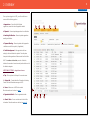
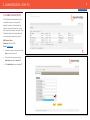
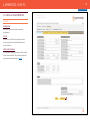
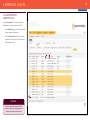
Once you have logged in to ACE, you will see this home
screen with the following options:
1. Apprentices – View, Add or Bulk Upload
1
apprentices, search for and edit apprentice details. 2
3
2. Rejected – View and update apprentices for certification.
3. Awaiting Certification – View and update apprentices
awaiting certification.
4. Payment Pending – View and update which apprentice
certificates are still to be paid for (if applicable).
5. Certificate Approved – View apprentices that are
waiting for their certificate to be printed. Once they have
been printed the apprentice will be removed from this folder.
NB:- The numbers in brackets, on each of the tabs,
indicates the number of records currently active within each of
the tabbed categories.
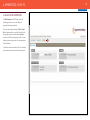
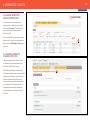
ADDITIONAL OPTIONS – along bottom of screen
6. Top – Takes you back to the top of the current screen.
7. Contact Us – Contact details for Federation for Industry
Sector Skills and Standards managers of ACE.
8. Users - Allows users of ACE to be created.
More information can be found on page 7
9. Organisation Details - Check organisation details
10. Search Tools - You can use the search tools to filter
information. More information can be found on page 14
10
6
7
8
9
4
5