1
GWSDAT User Manual v2.1
4
GWSDAT Main Menu
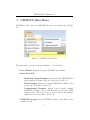
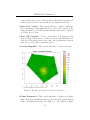
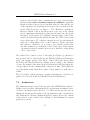
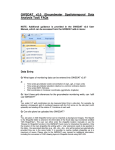
In MS Excel 2007 or later, the GWSDAT menu is located under the ’Add-Ins’
tab.
Figure 2: GWSDAT Main Menu.
The main menu options, as shown in Figure 2 , are as follows:
• User Manual: Displays this (pdf) GWSDAT user manual.
• Insert Data File:
– Blank Data Input Template: Inserts a blank GWSDAT Data
input template worksheet into the active Excel workbook.
– Basic Example: Inserts an example GWSDAT worksheet data
set into the active Excel workbook.
– Comprehensive Example: Inserts a more detailed example
GWSDAT worksheet data set which includes a site plan, NAPL
thickness data, ‘Electron Acceptor’ flagged solutes and multiple
aquifers into the active Excel workbook.
• GWSDAT Analysis: Begin GWSDAT analysis on the Excel active
worksheet data.
7