1
Infinitely expandable
3. Guidance for Users
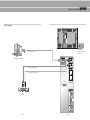
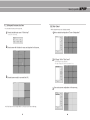
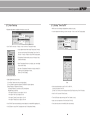
Input/Output Terminals
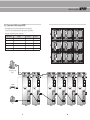
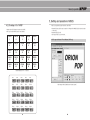
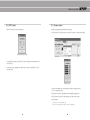
Set ID Switch Setting
yyExample of ID Switch setting
- You can set ID with 2 rotary switches as shown in the following figure.
[PDP ID 01]
23
23
901
901
10 digit
456
78
78
456
single digit
[PDP ID 15]
single digit
LED ON
OFF
1. RS-232C
7. ID Switch
AC 100V ~240V, 50/60Hz
9
M-STB
23
23
456
FAN
23
S-ON
S-ON
456
FAN
23
23
23
456
FAN
S-ON
456
FAN
S-ON
78
8. AC Input
❽
M-ON
78
Set ID Switch
M-STB
456
456
78
TMDS Signal
M-ON
S-ON
78
6. DVI-D
IN
IN
78
❻
Computer RGB Analog Signal, D-sub 15pin
M-STB
456
78
❺
5. PC
M-ON
FAN
23
OUT
OUT
M-STB
23
DVD Signal
DTV - YPbPr Signal
PC
456
23
DVI-D
M-ON
23
23
4. Component
S-ON
456
78
901
23
OUT
FAN
78
78
901
M-STB
78
M-ON
456
901
Y
IN
ID SELECT
456
M-STB
Description
901
S-Video Signal
NTSC, PAL, SECAM, 4pin Mini Din
456
78
❹
Pb
M-ON
78
3. S-Video
Pr
901
COMPONENT
LED Indication
901
Composite Signal
NTSC, PAL, SECAM
❸
OUT
901
IN
901
OUT
S-VIDEO
901
IN
OUT
901
2. Video
IN
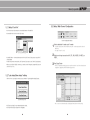
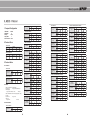
yy LED Indication
901
MPDP Control, Firmware Upgrade, 9pin D-sub
❷
VIDEO
RS-232C
901
❶
❼
10 digit
No Power.
Internal System Check after Power on.
System ready.
Power ON by MSCS Program.
(M-ON and S-ON blink simultaneously with 1
second interval)
Power Off by MSCS Program.
(System ready).
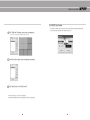
Remark)
M-ON(Master-ON) : IP Board Master Power On.
FAN : FAN Power On
M-STB(Master- Stand By) : IP Board Master Ready
S-ON(Slave-ON) : IP Board Slave Ready
10