1
9
9
9
www.ETSolar.com
For detailed information on optimal module orientation, refer to standard solar
photovoltaic installation guides or a reputable solar installer or systems integrator.
Shading on the module will reduce electricity production.
Do not install the module near equipment or in locations where flammable gases can be
generated or collected.
Selecting the proper mounting structure and hardware 9
9
9
9
9
9
Observe all instructions and safety precautions included with the mounting system to
be used with the module.
Do not drill holes in the glass surface of the module. Doing so will void the warranty.
Do not drill additional mounting holes in the module frame. Doing so will void the
warranty.
Modules must be securely attached to the mounting structure using four mounting
points for normal installation. If heavy wind or snow loads are anticipated, additional
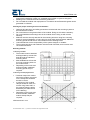
mounting points should also be used. Please see the drawing below.
Load calculations are the responsibility of the system designer or installer.
The mounting structure and hardware must be made of durable, anti-corrosion and
UV-resistant material.
Mounting methods 1. Mounting with Bolts 9
9
9
The module must be attached
and supported by at least four
bolts through the indicated
mounting holes.
Most installations will use the
four inner mounting holes on
the module frame.
Depending on the local wind
and snow loads, additional
mounting points may be
required.
2. Mounting with Clamping Hardware 9 If module clamps are used to
secure the module, the torque
on the clamp bolt should be
around 8–10 Nm.
9 A minimum of four module
clamps should be used, two
on each long frame side, in
the general clamping areas
denoted by the wide arrows
on the drawing.
9 Depending on the local wind
and snow loads, additional
module clamps may be
required.
All dimensions in mm.
www.ETSolar.com © 2009 ET Solar All Right Reserved
-3-