1
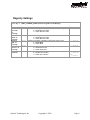
Root Key = [HKEY_CURRENT_USER\Software\Symbol\DataWedge\Serial]
Name
AutoPIE
Type
Description
Default
dword
0 = disable
Prefix
string
Suffix
string
AutoTab
dword
AutoEnter
dword
Binary
dword
Permits the enabling or disabling of AutoPIE mode
0 = disable AutoPIE mode
1 = enable AutoPIE mode
Allows the adjustment of the prefix string (the data sent before the
barcode data).
Allows the adjustment of the suffix string (the data sent after the
barcode data).
Sets whether or not a TAB key (VK_TAB virtual key code) should
be sent after the barcode (and after any selected suffix).
0 = do not send TAB key
1 = send TAB key
Sets whether or not an ENTER key (VK_RETURN virtual key code)
should be sent after the barcode (and after any selected suffix)
0 = do not send ENTER key
1 = send ENTER key
Sets whether or not a conversion of barcode data from ASCII to
UNICODE should take place before sending barcode data.
0 = convert barcode data to UNICODE
1 = don’t convert barcode data.
none
none
0 = do not
send
0 = do not
send
0 = convert
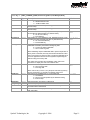
Note: DataWedge requires UNICODE data to produce keystrokes. If
binary mode is selected, the binary data will be formatted as a HEX
string (2 characters per byte) and then converted to UNICODE to be
sent. The application will thus receive keystrokes representing the
HEX encoding of the binary data.
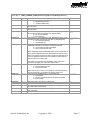
Data
dword
Feedback
dword
BeepTime
BeepFreq
LEDTime
dword
dword
dword
WaveFile
string
This option does not affect the Test Display, which has its own
mechanism to display Hex and Text formats of data.
Sets whether or not barcode data should be sent.
0 = don't send barcode data
1 = send barcode data
Note: If this is entry is set to 0, only the prefix and suffix (if present),
and any terminator (e.g. AutoTab or AutoEnter) will be sent.
Sets the type of feedback given on a successful read.
1 = no feedback
2 = play the wav file specified by the WaveFile setting
4 = sound a beep
Sets the duration of the beep in milliseconds
Sets the frequency of the beep in Hertz
Sets the length of time the green LED is on for following a
successful read in miliseconds
Specifies the wav file to play. This string should not contain any
path information.
Symbol Technologies, Inc
Copyright © 2006
1 = send
data
4 = beep
500
3000
3000
Page 14