1
E55 V1.0
Reference & Installation
We hope this product performs to your complete satisfaction. Should you have any
questions or comments, please visit www.paradox.com and send us your comments.
Table of Contents
Introduction...................................................................... 1
Features..............................................................................................
Specifications......................................................................................
System Overview ................................................................................
Modules Current Consumption List.....................................................
1
1
1
1
Installation........................................................................ 2
Location and Mounting .......................................................................
Earth Ground ......................................................................................
AC Power............................................................................................
Backup Battery ...................................................................................
PCB Layout........................................................................................
Metal Box Installation..........................................................................
Auxiliary Power Terminals ..................................................................
Telephone Line Connection ................................................................
Bell Output Connection .......................................................................
Programmable Output Connections ...................................................
Single Zone Inputs ..............................................................................
Advanced Technology Zone (ATZ) Connections ................................
2
2
2
2
3
4
4
4
5
5
6
7
Programming Methods.................................................... 8
WinLoad Software for Windows.......................................................... 8
Programming Using a Keypad ............................................................ 8
Configuring the Keypad Zone Number ............................................... 9
Programming Using A Memory Key.................................................. 10
Access Codes ................................................................ 11
Access Code Length.........................................................................
Installer Code (Default: 0000 / 000000) ............................................
Maintenance Code (Default: Empty).................................................
System Master Code (Default: 1234 / 123456).................................
User Code Options ...........................................................................
Lock Master Code.............................................................................
11
11
11
11
11
13
StayD Mode .................................................................... 14
Overview ...........................................................................................
Entry/Exit Paths ................................................................................
Entry/Exit with a Keypad ...................................................................
Window Mode and Re-arm Delay .....................................................
Advanced Settings ............................................................................
14
14
14
14
14
Zone Programming........................................................ 15
Zone Definitions ................................................................................
Zone Definition Status ......................................................................
Zone Partition Assignment................................................................
Zone Options ....................................................................................
EOL Zones........................................................................................
ATZ Zone Doubling...........................................................................
Tamper Input on ZX8 ID A (Panel + 1) .............................................
Tamper Input on ZX8 ID B (Panel + 9) .............................................
Tamper Input on ZX8 ID C (Panel + 17) ...........................................
ATZ Wiring Options ..........................................................................
Zone Timers......................................................................................
15
19
19
19
20
20
21
21
21
21
21
Keyswitch Programming............................................... 22
Keyswitch Numbering ....................................................................... 22
Keyswitch Definitions ........................................................................ 22
Keyswitch Options ............................................................................ 22
Arming and Disarming Options.................................... 23
Switch to Stay Arming if no Entry Delay is opened........................... 23
When Delay Zone is bypassed Follow Zones become Entry Delay 2 23
Regular Arming switches to Force Arming........................................ 23
Stay Arming switches to Stay Force Arming .................................... 23
Sleep Arming switches to Sleep Force Arming ................................ 23
Restrict Arming on Battery Failure ................................................... 23
Restrict Arming on Tamper Failure .................................................. 23
Calling the VDMP3 ........................................................................... 24
Timed Auto-Arming .......................................................................... 24
No Movement Auto-Arming .............................................................. 24
Auto-Arming Options ........................................................................ 24
One-Touch Arming ........................................................................... 25
One-Touch Bypass Programming .................................................... 25
Exit Delay ......................................................................................... 25
Bell Squawk On Arm/Disarm with Keypad ....................................... 25
No Exit Delay Beeps and No Bell Squawk When Stay/Sleep Arming 25
Exit Delay Termination ..................................................................... 25
Fast Exit ........................................................................................... 25
Alarm Options ................................................................ 26
Bell Cut-Off Timer.............................................................................
Recycle Alarm ..................................................................................
Tamper Recognition .........................................................................
Keypad/Bus Module Supervision .....................................................
Tamper Bypass Options...................................................................
Tamper Supervision on the Bus Module ..........................................
Keypad Panic Options......................................................................
Flex-Instant Delay ............................................................................
26
26
26
26
27
27
27
27
Reporting and Dialer settings....................................... 28
Zone Reporting Codes .....................................................................
User Reporting Codes......................................................................
Special Arming Report Codes ..........................................................
Special Disarming Report Codes .....................................................
Special Alarm Report Codes ............................................................
System Trouble Report Codes .........................................................
System Trouble Restore Report Codes ...........................................
System Special Report Codes .........................................................
Clear Reporting Codes.....................................................................
Reset Reporting Codes ....................................................................
Monitoring Station Telephone Numbers...........................................
Personal Dialing Numbers................................................................
Reporting Formats............................................................................
Dialing Method .................................................................................
Pulse Ratio .......................................................................................
Maximum Dialing Attempts...............................................................
Delay Between Dialing Attempts ......................................................
Switch to Pulse on 5th Attempt ........................................................
Alternate Dial Option ........................................................................
Force Dial Option .............................................................................
Recent Closing Delay.......................................................................
Auto Test Report ..............................................................................
Closing Delinquency Delay ..............................................................
Power Failure Report Delay .............................................................
Report System Disarming ................................................................
Zone Restore Report Options ..........................................................
Telephone Line Monitoring (TLM) ....................................................
Pager Reporting Delay .....................................................................
Pager Reporting Message Repetition ..............................................
Personal Reporting Delay ................................................................
Personal Reporting Message Repetition..........................................
Reporting..........................................................................................
28
28
28
28
28
29
29
29
29
30
30
30
30
32
32
32
32
32
32
32
33
33
33
33
34
34
34
34
34
34
35
35
Programmable Outputs................................................. 36
PGM Activation And Deactivation Event ......................................... 36
PGM Delay ....................................................................................... 36
PGM Options.................................................................................... 36
Esprit E55
System Settings............................................................. 37
Version Number Display ...................................................................
Installer Lock.....................................................................................
Keypad Lockout Feature...................................................................
Partitioning........................................................................................
Confidential Mode.............................................................................
Installer Function Keys .....................................................................
Audible Trouble Warning Except AC Failure ....................................
Audible Trouble Warning on AC Failure ...........................................
37
37
37
37
37
38
38
38
Settings for WinLoad Software .................................... 39
Panel Answer Options ......................................................................
Panel Identifier..................................................................................
PC Password ....................................................................................
PC Telephone Number .....................................................................
Call WinLoad Software .....................................................................
Answer WinLoad Software ...............................................................
Automatic Event Buffer Transmission...............................................
Call Back WinLoad ...........................................................................
Connecting to WinLoad ....................................................................
39
39
39
39
39
40
40
40
40
User Operation............................................................... 41
Alarm Display.................................................................................... 41
Trouble Display................................................................................. 41
Index ............................................................................... 42
Reference & Installation Manual
Part 1: Introduction
1.1
Features
• Supports StayD mode
• 4 zone inputs or 8 with zone doubling, expandable to 32 zones
• 32 users
• 4-wire expansion bus
• 1 on-board PGM
• 1.1A switching power supply
• Supports IP100 Internet Module
• Supports VDMP3 Plug-in Voice Dialer
• In-field firmware upgradeable via 307USB and Winload software (V4.10 or higher)
• Menu-driven programming for the Installer, Master, and Maintenance codes
• Multiple telephone numbers for event reporting: three for the monitoring station, five for personal dialing and one for pager
reporting
• Direct connect at 9.6k baud with WinLoad
• 256 event buffered
• Fits in 20cm x 25.5cm x 7.6cm (8in x 10in x 3in) and 28cm x 28cm x 7.6cm (11in x 11in x 3in) metal boxes
• Supports Memory Key (PMC-4 and PMC5)
1.2
Specifications
1.2.1
1.2.2
E55 Panel
•
AC Power:
•
•
•
•
Battery:
Aux. Power:
Bell Output:
PGMs:
E55 Keypads
•
•
•
•
1.3
Power input:
Typically 9-16Vdc
1 standard keypad zone
On-board anti-tamper switch (optional)
Maximum Range:
Maximum run of wire is 230m (750 feet)
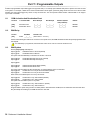
System Overview
Module
K636, MG10LEDV/H,
MG32LED, MG32I
APR-ZX8 & SP-ZX8
VDMP3
IP100
1.4
16.5Vac transformer with minimum 20VA rating (40VA recommended),
50-60Hz
12Vdc, 4Ah/7Ah
450mA, fuseless shutdown at 650mA
1A (fuseless shutdown at 3A)
One 50mA PGM transistor output
Description
10 and 32-Zone Hardwired LED
Maximum number per system
15 total including ZX8s
8-Zone Expansion Module
Plug-In Voice Dialer
Internet Module
3
1
1
Modules Current Consumption List
Module
K636, MG10LEDV/H
MG32LED, MG32I
APR-ZX8 & SP-ZX8
VDMP3
IP100
Current Consumption
Min. = 44mA / Max. = 95mA
Min. = 49mA / Max. = 148mA
Min. = 29mA / Max. = 31mA
Min. = 28mA / Max. = 28mA
Min. = 90mA / Max. = 120mA
Esprit E55 1
Part 2: Installation
2.1
Location and Mounting
Remove the PCB, mounting hardware and keypad from the packaging inside the panel box. The circuit board should not be
mounted into the back of the cabinet until all cables are pulled into the cabinet and prepared for connection. Before mounting the
cabinet, push the four white nylon-mounting studs into the back of the cabinet. Select an installation site that is not easily
accessible to intruders. Leave at least 5cm (2in) around the panel box to permit adequate ventilation and heat dissipation. The
installation site should be dry and close to an AC source, ground connection and telephone line connection. Avoid installation
near or in the path of strong RF fields (i.e. neon lights, computers), on or near metal objects, circuit breaker boxes, air
conditioners and heater ducts since they may cause interference and reduce sensitivity. Avoid installing the control panel in the
basement.
2.2
Earth Ground
Connect the zone and dialer ground terminals from the control panel to the metallic enclosure and cold water pipe or grounding
rod as per local electrical codes.
For maximum lightning protection, use separate earth grounds for the zone and dialer grounds as shown in the
PCB Layouts for each respective panel.
2.3
AC Power
Do not use any switch-controlled outlets to power the transformer. Connect the transformer as shown in Figure 1 on page 2. Use
Table 1 to determine the required transformer. Use a 16.5Vac (50-60Hz) transformer with a minimum 20VA (40VA recommended)
rating to provide sufficient AC power.
Table 1: Transformer Requirements Table
Transformer:
DC Power Supply rated at:
Auxiliary Supply can provide a maximum of:
Acceptable Battery Charge Currents
2.4
Amseco XP-1620 16VAC 20VA
1.1A
typ: 450mA, max: 650mA
350mA
16.5VAC 40VA
1.5A
typ: 600mA, max: 700mA
350mA/700mA
Backup Battery
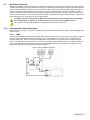
To provide power during a power loss, use a 12Vdc 4Ah/7Ah rechargeable acid/lead or gel cell battery as shown in Figure 1 below.
Connect the backup battery after applying AC power. When installing, verify proper polarity as reversed connections will blow the
battery fuse.
2.4.1
Battery Test
If the battery is disconnected or if the battery fuse is blown, a No/Low Battery failure will appear in the keypad’s trouble display
(see Trouble Display on page 41). This trouble will also appear if the battery’s capacity is too low or if the voltage drops to 10.5V
or lower while the control panel is running on the backup battery. At 8.5V or lower, the panel shuts down and all outputs close.
Figure 1: AC Power and Backup Battery Connections
Partial PCB view
Caution:
Disconnect battery before replacing the fuse.
Improper connection of the
transformer may result in
damage to the system.
2 Reference & Installation Manual
Rechargeable Battery
12Vdc / 4Ah or 7Ah
2.5
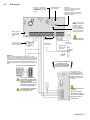
PCB Layout
Dialer and Accessories Port
used for voice reporting with
the VDMP3 plug-in voice
module.
Paradox Memory Key
(PMC-4, PMC5)
Status LED:
• Flash once every second = Normal
• Flashes ON 1 second and OFF 1
second = Any trouble
• Always ON = Panel is using phone line
• Fast flash 6 seconds after power up =
Installer lock enabled
Used for connecting the
IP100 Internet Module.
Also used for In-Field
Firmware upgrade
through a 307USB Direct
Connect Interface. See
Connecting to WinLoad
on page 40 for details.
Refer to AC Power
& Backup Battery
Connections on
page 2.
Refer to Single Zone
inputs on page 6
The “BELL” output
will shutdown if the
current exceeds 3A.
Disconnect telephone
line before servicing.
Cold water
pipe grounding
Connect to any
Common input.
AWG#14 single
conductor solid
copper wire
AUX Power
Refer to transformer requirements on page 2 for Aux. Power
Output. To connect additional wiring to auxiliary power, use the red
(+) and black (-) keypad connectors. Auxiliary power will shut down
if current exceeds 1.1A. If the auxiliary output is overloaded and is
shut down, you must disconnect all loads from the output for at
least 10 seconds before reconnecting any load back to the auxiliary
output.
Connection for Self-Contained Bell/Siren
The sum of the current drawn
from the BELL and AUX must be
limited to 1.3A (40VA transformer
strongly recommended).
Exceeding this limit will overload
the panel power supply and lead
to complete system shutdown.
This equipment must be installed
and maintained by qualified
service personnel only.
Ground
clamp
To metallic
enclosure
To provide maximum lightning
protection we strongly
recommend having separate
earth connections for the dialer
and zone ground terminals.
For the keypad’s zone
configurations, refer to the
Installer Quick Menu. If
EOL is enabled: see section
[706] option [2]. Also refer to
Keypad Zone Connections
on page 6.
Max. amount of keypads =
15 keypads
Max. current = 650 mA
Max. distance of keypad
from panel = 76m (250 feet)
Max. total run of wire =
230m (750 feet)
Esprit E55 3
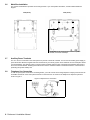
2.6
Metal Box Installation
The crosses and dotted line represent the mounting location. If you need specific dimensions, contact Paradox Distributor
Support.
E55 (8x10”)
E55 (11x11”)
For the bottom left mounting hole, instead of a plastic
standoff, use double-sided tape.
2.7
Auxiliary Power Terminals
The AUX+ and AUX- terminals on the control panel can provide a maximum of 450mA. You can use the auxiliary power supply to
power the motion detectors, keypads and other accessories in your security system. Their combined current consumption should
not exceed 650mA. The auxiliary supply is microprocessor-protected against current overload and automatically shuts down if
the current exceeds 650mA. Auxiliary power will resume once the overload condition is restored and within 1 to 60 seconds of
performing the dynamic battery test.
2.8
Telephone Line Connection
In order to report system events to the monitoring station, you must connect the incoming telephone company wires into the TIP
and RING connections of the control panel and then run the wires from T1 and R1 to the telephone or telephone system as
shown in Figure 2.
Figure 2: Telephone Line Connection
4 Reference & Installation Manual
2.9
Bell Output Connection
The BELL+ and BELL- terminals power bells, sirens and other warning devices requiring a steady voltage output during an alarm.
The bell output supplies 12Vdc upon alarm and can support one 30-watt or two 20-watt sirens. The bell output uses a fuseless
circuit and will automatically shut down if the current exceeds 3A. When this occurs the Maximum Bell Current failure will only
appear in the keypad’s trouble display (see Trouble Display on page 41) during an alarm. If the load on the BELL terminals
returns to normal, the control panel will re-instate power to the BELL terminals during the next alarm. When connecting sirens,
please verify correct polarity. Connect the positive lead to the BELL+ terminal and the negative lead to the BELL- terminal of the
control panel as shown in PCB Layouts for each respective panel.
If the BELL output is not being used, the Bell Disconnected failure will remain in the keypad’s trouble display
(see Trouble Display on page 41). To avoid this connect a 1KΩ resistor across the BELL terminals.
For connection of a self-contained bell/siren, see PCB Layouts for each respective panel.
2.10
Programmable Output Connections
When a specific event occurs in the system, a PGM can reset smoke detectors, activate strobe lights, open/close garage doors
and much more.
2.10.1
PGMs
The control panel includes one programmable output (PGM). When a specific event or condition occurs in the system, a PGM can
be used to reset smoke detectors, activate strobe lights, open or close garage doors and much more. The PGM provides a
maximum 50mA output. If the current draw on the PGM output exceeds 50mA, we recommend the use of a relay as show in
Figure 3. The PGM can be programmed to turn on and off for more than a thousand different events. For example, a PGM can
open and close an automatic garage door by pressing keys [1] and [2] simultaneously on the keypad. For details on how to
program the PGM, refer to see Programmable Outputs on page 36.
Figure 3: Relay and PGM Connections
Esprit E55 5
2.11
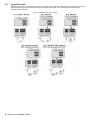
Single Zone Inputs
Detection devices such as motion detectors and door contacts are connected to the control panel's zone input terminals. Figure 4
demonstrates single zone input terminal connections recognized by the panel. Once connected, the associated zone's
parameters must be defined.
Figure 4: Single Zone Input Connections
6 Reference & Installation Manual
2.12
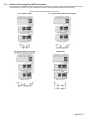
Advanced Technology Zone (ATZ) Connections
The ATZ feature is a software oriented feature that enables two detection devices to be installed per hardwired input terminal.
Each detection device has its own zone, displays its zone status on the keypad and sends its own alarm codes.
Figure 5: Advanced Technology Zone Connections
Esprit E55 7
Part 3: Programming Methods
3.1
WinLoad Software for Windows
Program the control panels remotely or on-site using the WinLoad Software (VX.XX or higher) for Windows®. For more
information, contact your local Paradox Distributor or visit our web site at paradox.com. If you are using the WinLoad software,
you must program the features (see Settings for WinLoad Software on page 39). Update the panel’s firmware by connecting it to
a PC via a 307USB Direct Connect Interface and then using the Winload software.
3.2
Programming Using a Keypad
Use the supplied programming guide to keep track of which sections were programmed and how. We recommend you read the
entire manual before you begin programming.
How Do I Enter Programming Mode?
1) Press [ENTER]
2) Enter your [INSTALLER CODE] (default: 0000 / 000000) or [MAINTENANCE CODE] (empty by default)
3) Enter 3-digit [SECTION] you wish to program
4) Enter required [DATA]
3.2.1
Single Digit Data Entry Method (Decimal and Hexadecimal)
Single Digit Data Entry is used in all sections except those specified in the Feature Select Programming Method
(below). After entering Programming Mode as described in the shaded box above, some sections will require that you
enter Decimal values from 000 to 255. Other sections will require that you enter Hexadecimal values from 0 to F. The
required data will be clearly indicated in this manual as well as in the programming guide. When entering the final digit
in a section, the control panel will automatically save and advance to the next section. Except sections 001 to 032,
after entering the first three digits the control panel will switch to Feature Select Programming. For phone number
programming, press [ENTER] to save the data.
Table 2: Decimal and Hexadecimal Programming Table
Value or Action
3.2.2
What Do I
Press?
What Do I See?
32-zone LED
10-zone LED
Value 0 / Replace Current Digit
with 0
[SLEEP]
Erase digit and remain in section Erase digit and remain in
section
Values 1 to 9
[1] to [9]
Zone 1 to 9
[1] to [9]
A (hex only)
[0]
Zone 10
[0]
B (hex only)
[OFF]
Zone 11
[OFF]
C (hex only)
[BYP]
Zone 12
[BYP]
D (hex only)
[MEM]
Zone 13
[MEM]
E (hex only)
[TBL]
Zone 14
[TBL]
F (hex only)
[ ]
Zone 15
[ ]
Exit Without Saving
[CLEAR]
Save Data (hex only)
[ENTER]
ARM & STAY LED flash
Advances to the next section
ARM & STAY LED flash
Advances to the next section
Feature Select Programming Method
After entering certain sections, eight options will be displayed where each option from [1] to [8] represents a specific
feature. Press the key corresponding to the desired option. This means the option is ON. Press the key again to
remove the digit, thereby, turning OFF the option. When the options are set, press the [ENTER] key to save and
advance to the next section.
8 Reference & Installation Manual
3.2.3
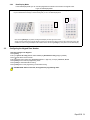
Data Display Mode
In the Data Display Mode you can view the programmed contents of each section one digit at a time.
Figure 6: Data Display Mode
To access the Data Display Mode, press the [ENTER] key after entering a section and before entering any data. The four LEDs/
keys as indicated below will begin to flash indicating that you are in the Data Display Mode.
Each time the [ENTER] key is pressed, the keypad will display the next digit in the current
section and will continue through all the following sections one digit at a time without changing the programmed values. Not
available for sections using the Multiple Feature Select Method. Press the [CLEAR] key at any time to exit the Data Display.
3.3
Configuring the Keypad Zone Number
How Do I Configure The Keypad?
Press [ENTER]
Enter your [INSTALLER CODE] (default: 0000 / 000000) or [MAINTENANCE CODE] (empty by default)
Press [ ] and hold for three seconds
Enter the desired zone number key (K636/MG10LEDV/H: 1-digit entry 1 to 0(10), MG32LED, MG32I
Press [ENTER] to save and exit programming mode
Press [CLEAR] to erase data without saving
Press [CLEAR] twice to exit programming mode without saving
PLEASE NOTE: After five minutes, the keypad exits programming mode.
Esprit E55 9
3.4
Programming Using A Memory Key
Copy the sections of one control panel into the Paradox Memory Key (PMC-4/PMC5). Then copy the contents of the Memory Key
into as many control panels as needed. Each panel is programmed in less than 3 seconds.
Download to control panel
1) Remove AC and battery power from the control panel.
2) Place the Memory Key on the serial connector labeled MEMORY KEY of the Control Panel that is to receive the contents of the
Memory Key.
3) Reapply AC and battery power.
4) In Installer Programming Mode, enter section [970], the keypad emits a confirmation beep.
5) When the keypad emits a second confirmation beep, remove the Memory Key.
Copy to Memory Key from control panel
1) Remove AC and battery power from the control panel.
2) Place Memory Key on the serial connector labeled MEMORY KEY of the Control Panel that you want to copy. Make sure the
write protect jumper of the Memory Key is on.
3) Reapply AC and battery power.
4) In Installer Programming Mode, enter section [975]. The keypad emits a confirmation beep.
5) After the keypad emits a second confirmation beep, remove the Memory Key. Remove the Memory Key’s jumper if you do not
wish to accidentally overwrite its contents.
Figure 7: PMC5
Blue LED flashes only
during transfer between
the key and the PC.
Prevents overwriting
content of key.
Connection to
USB Com Port.
Connection to
module or panel.
Copy and download
content of the key.
Insert Paradox Memory Key
onto the ‘MEMKEY’
connector.
10 Reference & Installation Manual
Lock Switch
Partial view of Esprit control panel
Part 4: Access Codes
The control panel supports the following access codes:
Installer Code [397]:
Used to program all control panel settings except user access codes.
Maintenance Code [398]:
The Maintenance code is similar to the Installer code. It can be used to enter programming mode, which
allows you to program all the features, options and commands except for user codes and the panel’s
communication settings. The maintenance code is empty by default.
System Master Code [399]:
Provides full access. Arm and disarm using any method described in the User Code Options below as
well as program the user access codes.
Master Code 1:
Permanently assigned to partition 1. Same as a regular user code except it can also program access
codes for user codes assigned to partition 1.
Master Code 2:
Permanently assigned to partition 2. Same as a regular user code except it can program access codes
for user codes assigned to partition 2. If the system is not partitioned Master Code 2 will be assigned to
partition 1.
29 User Codes [404] to [432]:
Can arm and disarm as per User Code Options on page 11.
4.1
Access Code Length
Section [701]: System Options
Option [1] OFF = 6-Digit Access Codes
Option [1] ON = 4-Digit Access Codes (default)
All access codes can be set to lengths of either 4- or 6-digits. When the 4-digit option is selected, entering a 4-digit code will allow
access. Using the 6-digit option, entering 6 digits is required to allow access.
If the access code length is changed from four digits to six digits when access codes have already been
programmed, the control panel will automatically add the last 2 digits by using the first 2 digits. For example, if
the access code is 1234 and you switch to 6 digits, the code will become 123412. Be sure to verify the access
codes after switching from 4-digit access codes to 6-digit codes. When switching from six digits to four digits, the
control panel will simply remove the final two digits of the access code. For example, 123456 will become 1234.
4.2
Installer Code (Default: 0000 / 000000)
The Installer Code is used to enter the system‘s programming mode, which allows you to program all the features, options and
commands of the control panel. The Installer Code can be 4- or 6-digits in length (see Access Code Length on page 11) where
each digit can be any value from 0 to 9. The Installer Code cannot be used to program Master Code 1, Master Code 2 or user
access codes. To program the Installer Code press:
[ENTER]+ [CURRENT INSTALLER CODE] + [397] + new 4- or 6-digit Installer Code
4.3
Maintenance Code (Default: Empty)
The Maintenance code is similar to the Installer code. It can be used to enter programming mode, which allows you to program all
the features, options and commands except for the system’s communication settings (sections [395], [397], [398], [815], [816],
[817], [910], and [911]) as well as any user codes. The Maintenance code can be 4 or 6 digits in length where each digit can be
any value from 0 to 9. The Maintenance code is empty by default. Set the Maintenance code in section [398].
[ENTER]+ [INSTALLER CODE] + [398] + new 4- or 6-digit Maintenance Code
4.4
System Master Code (Default: 1234 / 123456)
The Installer Code can be used to program the System Master Code. With the System Master Code a user can use any arming
method and can program any user access code, but not the User Code Options. The System Master Code can be 4 or 6 digits in
length, where each digit can be any digit from 0 to 9. The System Master Code can be modified but cannot be erased. To change
the System Master Code press:
[ENTER]+ [INSTALLER CODE] + [399] + new 4- or 6-digit System Master Code
4.5
User Code Options
Sections [404] to [432]: Options [1] to [8]
The User Code Options define which arming methods each user can use to arm or disarm the system. Regardless of these
settings, all users can Regular arm assigned partitions and all users except those with the Arm Only option can disarm an
assigned partition, regardless of how it is armed. Select one or more of the options described on the following pages for each
user access code, where sections [404] to [432] represent user access codes 004 to 032.
Esprit E55 11
4.5.1
Partition 1 Assignment
Sections [404] to [432]: User codes 004 to 032
Option [1] OFF = Deny access to partition 1
Option [1] ON = User code has access to partition 1 (default)
If the system is partitioned (see Partitioning on page 37), user codes with this option enabled can arm and disarm
partition 1.
If the system is not partitioned, you must assign partition 1 to the user access code. Otherwise, the
user access code will be considered disabled.
4.5.2
Partition 2 Assignment
Sections [404] to [432]: User Codes 004 to 032
Option [2] OFF = Deny access to partition 2 (default)
Option [2] ON = User code has access to partition 2
If the system is partitioned (see Partitioning on page 37), user codes with this option enabled can arm and disarm
partition 2. If the system is not partitioned, the control panel ignores this option.
4.5.3
Bypass Programming
Sections [404] to [432]: User Codes 004 to 032
Option [3] OFF = Bypass Programming Disabled
Option [3] ON = Bypass Programming Enabled (default)
User codes with this option enabled can perform Bypass Programming in assigned partitions.
4.5.4
Stay/Sleep Arming
Sections [404] to [432]: User Codes 004 to 032
Option [4] OFF = Stay/Sleep Arming Disabled
Option [4] ON = Stay/Sleep Arming Enabled for selected User Code (default)
User codes with this option enabled can Stay or Sleep arm assigned partitions.
4.5.5
Force Arming
Sections [404] to [432]: User Codes 004 to 032
Option [5] OFF = Force Arming Disabled
Option [5] ON = Force Arming Enabled for selected User Code (default)
User codes with this option enabled can Force arm assigned partitions.
4.5.6
Arm Only
Sections [404] to [432]: User Codes 004 to 032
Option [6] OFF = Arm Only Disabled (default)
Option [6] ON = Arm Only Enabled for selected User Code
The user code with this option enabled can arm assigned partitions, but cannot disarm any partitions. The type of
arming is dependent on the other User Code Options selected. Please note that with the Arm Only option, the user can
cancel a recently armed system by re-entering the access code before the end of the exit delay.
4.5.7
PGM Activation
Sections [404] to [432]: User Codes 004 to 048
Option [7] OFF = User Code follows User Code Options and can activate a PGM (default)
Option [7] ON = User Code can activate a PGM only
With option [7] off, entering the access code will arm or disarm according to the programmed User Code Options as
well as activate or deactivate a PGM. The appropriate PGM Activation/Deactivation Event must also be programmed
(see Programmable Outputs on page 36). With option [7] on, the control panel will ignore all other User Code Options.
Therefore, entering the access code will only activate or deactivate the PGM.
4.5.8
Duress
Sections [404] to [432]: User Codes 004 to 032
Option [8] OFF = User Code with duress disabled (default)
Option [8] ON = User Code with duress enabled
If you are coerced into arming or disarming your system, entering the access code with the duress option enabled will
arm or disarm the system and immediately transmit a silent alert (Duress Code) to the monitoring station.
12 Reference & Installation Manual
4.6
Lock Master Code
Section [701]: System Options
Option [2] OFF = Lock System Master Code Disabled (default)
Option [2] ON = Lock System Master Code Enabled
With this feature enabled, the control panel will lock the System Master Code (001), it cannot be modified. With this feature
disabled, the control panel will unlock the System Master Code, so that it can be changed. The System Master Code cannot be
deleted (see Master Quick Menu Programming in the User Guide).
Esprit E55 13
Part 5: StayD Mode
5.1
Overview
• NOTE: StayD is automatically enabled when a path is programmed to a keypad. From the system, the corresponding
path zones will also be deleted. StayD simplifies your life and makes it safer by protecting you 24 hours a day, 7 days a week
without ever having to disarm the system - even when entering an armed area. StayD lives with you and protects you at all
times, without any unprotected periods, and while automatically rearming the system so you don’t have to remember to do it.
This unique feature integrates security into your everyday life to give you safe, simple living with peace of mind.
5.2
Entry/Exit Paths
• StayD consists of programmed pathways, where the user enters and exits the property through pre-defined routes, with only
the route’s respective zones open for passage. A path can be programmed for each individual keypad, with a maximum of four
zones per path. Path zones must be defined as follow or delay zones only. StayD is automatically enabled when a path is
programmed to a keypad.
• The first zone programmed in a path is its designated entry point (e.g. doors, garage). Designated entry points are not
common to multiple paths. There is only one designated entry point per path.
• The system only disables the path zones corresponding to the keypad at the point of entry/exit, while re-arming as you enter/
exit.
• Validate your entry path by entering your code. You only need to enter your code once to validate one or more paths. For
example, you have entered your home through Path 1 and are at your keypad. Before disarming the system, you notice a Path 2
zone has opened. If you know it is a member of your family and would like to validate the open zone, enter your user code. All
paths, including Path 1, will subsequently be validated.
• You must enter your code for every zone that opens that is not part of any path. For example, if you have entered through Path
1 and a non-path zone opens, you must enter your code once to validate your path and once for the non-path zone. If you do
not validate the non-path zone, the system will fall in alarm.
5.3
Entry/Exit with a Keypad
• When entering with a keypad, the path zones will fall into entry delay, allowing you to reach the keypad. Use the keypad to
disarm the system and switch to Stay arm mode.
• When exiting with a keypad, only the path zones will fall into delay (same as exit delay), allowing you to leave while the rest of
the premises remains secure.
5.4
Window Mode and Re-arm Delay
• In a Stay-armed system: This mode allows you to open one exterior zone without triggering an alarm. To enter Window mode,
press [OFF], then your [ACCESS CODE]. All zones that can be opened flash. The system will start an exit delay, allowing you to
open an exterior zone such as a window or a door. The system will only allow you to open one zone as the exit delay will end
after doing so. When you close the open zone (window, door, etc.) that zone will re-arm.
• Re-arm Delay is a delay timer set so that when you close the open exterior zone (window, door etc.), it does not re-arm
instantly. Instead the system starts the delay to allow you to close the zone properly. The delay will start every time you open
the zone while trying to close it, and you must close the zone for 5 seconds for it to arm. This is especially useful for eliminating
false alarms caused by windows that stick.
5.5
Advanced Settings
Section
Data
[720]
__/__/__
Section
Data
[721]
__/__/__
Description
(000 to 255) sec.
Flex-Instant = Instant and follow zones will follow the delay at section [720]
when Stay or Sleep armed (default is 15 seconds / 000 = instant zone).
Description
(000 to 255) sec.
14 Reference & Installation Manual
Re-arm delay (delay before zone re-arms). Default = 005
Part 6: Zone Programming
When programming zones, the zone assignments are dependent on the designation of the assignment of keypad zones, and the detection
devices that are connected to the panel. For keypad assignment, see Configuring the Keypad Zone Number on page 9. After assigning the
required zones, you must set the zone’s definitions, partition assignment, and options see Figure 8 below. Certain Zone Definitions change
if a Flex-Instant delay is activated (section [720]). See see Zone Definition Status on page 19.
Table 3: Zone Recognition Table
Keypad
Hardwire
Zone 1
Yes
Yes (Input Z1)
Zone 2
Yes
Yes (Input Z2)
Zone 3
Yes
Yes (Input Z1 with ATZ)
Zone 4
Yes
Yes (Input Z2 with ATZ)
Zone 5 to 32 Yes
No
If a zone is already programmed and you assign a device to the same zone, the keypad zone will overwrite a hardwire zone.
Figure 8: Zone Programming
Zone Definitions
00 = Zone disabled (default)
01 = Entry Delay 1
02 = Entry Delay 2
03 = Entry Delay 1 (Full Arm)
04 = Entry Delay 2 (Full Arm)
05 = Follow
06 = Follow (Sleep / Full Arm)
07 = Follow (Full Arm)
08 = Instant
09 = Instant (Sleep / Full Arm)
10 = Instant (Full Arm)
11 = Instant Fire†
12 = Delayed Fire†
13 = Instant Fire Silent†
14 = Delayed Fire Silent†
15 = 24Hr. Buzzer
16 = 24Hr. Burglary
17 = 24Hr. Hold-up
18 = 24Hr. Gas
19 = 24Hr. Heat
20 = 24Hr. Water
21 = 24Hr. Freeze
22 = 24Hr. Panic††
23 = Instant No Pre-Alarm
24 = Follow no Pre-Alarm
25 = Keyswitch Maintain*
26 = Keyswitch Momentary*
* On-board hardwired control
panel zones only.
† Only on-board zones can be
defined as fire zones
†† This alarm will follow the
Panic 1 option (section [702],
option [1])
Section
6.1
Partition Assignment
[1]- Partition 1†
[2]- Partition 2†
[3]- Both partitions†
† To use both
partitions, use an
MG10LEDV/H,
MG32LED, or MG32I
keypad module.
Zone Options
[1] = Auto-zone Shutdown
[2] = Bypassable Zone
[4]
[5]
OFF OFF Audible Alarm
OFF ON Pulsed Alarm
ON OFF Silent Alarm
ON ON Report Only
[6] = Intellizone
[7] = Delay alarm transmission
[8] = Force Zone
Keyswitch Options (25-26)
[1]- N/A
[2]- N/A
[3]- N/A
[4] OFF = Disarm
ON = Disarm only if Stay/
Sleep armed
[5] = Arm only
[6] = Stay arming‡
[7] = Sleep arming‡
[8] = N/A
‡ Select only one. If all are off,
keyswitch will regular arm.
Zone Definition
Partition Assignment
Zone Options
[001] = Zone 1
_____/_____
_____________
1
2
3
4
5
6
7
8
[032] = Zone 32
_____/_____
_____________
1
2
3
4
5
6
7
8
Zone Definitions
As demonstrated in Figure 8 above, sections [001] to [032] represent zones 1 through 32 respectively, where the first two digits
in each of these sections represents the zone's definition. To disable a zone, enter [00]. There are 26 available Zone Definitions.
6.1.1
Entry Delay 1 Zones
Sections [001] to [032]: Zones 1 to 32, First Digits = 01
When the system is armed and a zone defined with Entry Delay 1 opens, the control panel will generate an alarm after
the programmed Entry Delay 1 Timer elapses. This is to provide users with enough time to enter the protected area
and disarm the system. To program the Entry Delay 1 Timer, key in the desired 3-digit delay value (000 to 255
seconds, Default = 45 seconds) into section [710]. Entry delay zones are commonly used at the entry/exit points of the
protected area (i.e. front/back door, garage, etc.). Using different entry delays is useful when, for example, one entry
point requires a longer delay than the other entry point or in a partitioned system where each partition may require a
different entry delay.
6.1.2
Entry Delay 2 Zones
Sections [001] to [032]: Zones 1 to 32, First Digits = 02
Entry Delay 2 zones are identical to the Entry Delay 1 zones, except it uses a separate entry delay timer. To program
the Entry Delay 2 Timer, key in the desired 3-digit delay value (000 to 255 seconds, Default = 45 seconds) into section
[711].
Esprit E55 15
6.1.3
Entry Delay 1 (Full Arm) Zones
Sections [001] to [032]: Zones 1 to 32, First Digits = 03
Upon regular arming, the zone is Entry Delay 1 (see Entry Delay 1 Zones on page 15). Upon Stay/Sleep arming, the
zone is bypassed by the system. See Zone Definition Status on page 19 for any exceptions.
6.1.4
Entry Delay 2 (Full Arm) Zones
Sections [001] to [032]: Zones 1 to 32, First Digits = 04
Upon regular arming, the zone is Entry Delay 2 (see Entry Delay 2 Zones on page 15). Upon Stay/Sleep arming, the
zone is bypassed by the system. See Zone Definition Status on page 19 for any exceptions.
6.1.5
Follow Zones
Sections [001] to [032]: Zones 1 to 32, First Digits = 05
When a Regular, Stay, or Sleep armed Follow Zone opens, the control panel will immediately generate an alarm,
unless an entry delay zone opens first:
•
•
If a Regular/Stay/Sleep armed Follow Zone opens after an entry delay zone opens, the control panel waits until the
entry delay timer has elapsed before generating an alarm.
If a Regular/Stay/Sleep armed Follow Zone opens after more than one entry delay zone opens, the control panel
will wait until the entry delay timer of the zone that opened first has elapsed.
This feature is commonly used when a motion detector is protecting the area occupied by the entry point keypad. This
will prevent the motion detector from causing an alarm when a user enters through the entry point to disarm the
system. See Zone Definition Status on page 19 for any exceptions.
6.1.6
Follow (Sleep / Full Arm) Zones
Sections [001] to [032]: Zones 1 to 32, First Digits = 06
Upon regular arming or sleep arming, the zone is Follow. Upon Stay arming, the zone is bypassed by the system. See
Zone Definition Status on page 19 for any exceptions.
6.1.7
Follow (Full Arm) Zones
Sections [001] to [032]: Zones 1 to 32, First Digits = 07
Upon regular arming, the zone is Follow (see Follow Zones on page 16). Upon Stay or Sleep arming, the zone is
bypassed by the system. See Zone Definition Status on page 19 for any exceptions.
6.1.8
Instant Zones
Sections [001] to [032]: Zones 1 to 32, First Digits = 08
When an armed Instant Zone opens, the control panel immediately generates an alarm. Instant Zones are commonly
used for windows, patio doors, skylights and other perimeter type zones. See Zone Definition Status on page 19 for
any exceptions.
6.1.9
Instant (Sleep / Full Arm) Zones
Sections [001] to [032]: Zones 1 to 32, First Digits = 09
All zones defined as Instant/Stay zones become Instant zones when the system is Regular armed. All zones defined
as Instant/Stay zones become bypassed when the system is Stay armed. See Zone Definition Status on page 19 for
any exceptions.
6.1.10
Instant (Full Arm) Zones
Sections [001] to [032]: Zones 1 to 32, First Digits = 10
All zones defined as Instant/Stay/Sleep zones become Instant zones when the system is Regular armed. All zones
defined as Instant/Stay/Sleep zones become bypassed when the system is Stay or Sleep armed. See Zone Definition
Status on page 19 for any exceptions.
16 Reference & Installation Manual
6.1.11
Instant Fire Zones
Sections [001] to [032]: Zones 1 to 32, First Digits = 11
when a Instant Fire zone opens, whether it is armed or disarmed, the control panel will send the corresponding Alarm
Report Code and the alarm is always audible regardless of other settings. Fire alarms generate an intermittent (pulsed)
bell/siren output signal as shown in Figure 9.
Figure 9: Bell/Siren Output during a Fire Alarm
6.1.12
Delayed Fire Zones
Sections [001] to [032]: Zones 1 to 32, First Digits = 12
When a Delayed 24Hr. Fire zone opens, whether it is armed or
disarmed, the control panel will react as shown in Figure 10.
Delayed 24Hr. Fire zones are commonly used in residential homes
where a smoke detector often generates false alarms (i.e., burning
bread, etc.). Fire alarms generate an intermittent (pulsed) bell/siren
output signal as shown in Figure 9.
6.1.13
Figure 10: Delayed 24Hr Fire Zone
Instant Fire Silent Zones
Sections [001] to [032]: Zones 1 to 32, First Digits = 13
When a Instant Fire Silent zone opens, whether it is armed or
disarmed, the control panel will generate the following:
The control panel can send the corresponding Alarm Report Code
and the alarm will be silent regardless of other settings.
6.1.14
Delayed Fire Silent Zones
Sections [001] to [032]: Zones 1 to 32, First Digits = 14
When a Delayed Fire zone opens, whether it is armed or disarmed,
the control panel will react as shown in Figure 10. Delayed 24Hr.
Fire zones are commonly used in residential homes where a
smoke detector often generates false alarms (i.e., burning bread,
etc.). The control panel can send the corresponding Alarm Report
Code and the alarm will be silent regardless of other settings.
6.1.15
24 Hr. Buzzer Zones
Sections [001] to [032]: Zones 1 to 32, First Digits = 15
When a 24Hr Buzzer Zone opens, whether the zone is armed or
disarmed, the control panel sets off the keypad’s buzzers to
indicate that the zone was breached. The control panel will report
the alarm, but will not enable the bell/siren output. Enter any valid
access code on the keypad to stop the buzzer. This zone definition
is particularly useful when a user wishes to be notified when
something such as a safe or locker within the home has been
accessed
(i.e. a child accessing a valuable collection).
6.1.16
24 Hr. Burglary Zones
Sections [001] to [032]: Zones 1 to 32, First Digits = 16
when a 24Hr Burglary Zone opens, whether the system is armed or disarmed, the control panel will immediately
generate an alarm. This alarm is defined by the alarm type, configured in Zone Programming under zone options [4]
and [5]. See Alarm Types on page 20.
Esprit E55 17
6.1.17
24 Hr. Hold-up Zones
Sections [001] to [032]: Zones 1 to 32, First Digits = 17
When a 24Hr. Hold-up zone opens, whether it is armed or disarmed, the control panel will immediately generate an
alarm. This alarm is defined by the alarm type, configured in Zone Programming under zone options [4] and [5]. See
Alarm Types on page 20. The SIA FSK and CID reporting formats include specific report codes to identify the alarm as
a Hold-up alarm.
6.1.18
24 Hr. Gas Zones
Sections [001] to [032]: Zones 1 to 32, First Digits = 18
When a 24Hr. Gas zone opens, whether it is armed or disarmed, the control panel will immediately generate an alarm.
This alarm is defined by the alarm type, configured in Zone Programming under zone options [4] and [5]. See Alarm
Types on page 20. The SIA FSK and CID reporting formats include specific report codes to identify the alarm as a Gas
alarm.
6.1.19
24 Hr. Heat Zones
Sections [001] to [032]: Zones 1 to 32, First Digits = 19
When a 24Hr. Heat zone opens, whether it is armed or disarmed, the control panel will immediately generate an alarm.
This alarm is defined by the alarm type, configured in Zone Programming under zone options [4] and [5]. See Alarm
Types on page 20. The SIA FSK and CID reporting formats include specific report codes to identify the alarm as a Heat
alarm.
6.1.20
24 Hr. Water Zones
Sections [001] to [032]: Zones 1 to 32, First Digits = 20
When a 24Hr. Water zone opens, whether it is armed or disarmed, the control panel will immediately generate an
alarm. This alarm is defined by the alarm type, configured in Zone Programming under zone options [4] and [5]. See
Alarm Types on page 20. The SIA FSK and CID reporting formats include specific report codes to identify the alarm as
a Water alarm.
6.1.21
24 Hr. Freeze Zones
Sections [001] to [032]: Zones 1 to 32, First Digits = 21
When a 24Hr. Freeze zone opens, whether it is armed or disarmed, the control panel will immediately generate an
alarm. This alarm is defined by the alarm type, configured in Zone Programming under zone options [4] and [5]. See
Alarm Types on page 20. The SIA FSK and CID reporting formats include specific report codes to identify the alarm as
a Freeze alarm.
6.1.22
24Hr. Panic
Sections [001] to [032]: Zones 1 to 32, First Digits = 22
When a 24Hr. Panic zone opens, whether it is armed or disarmed, the system will immediately generate an alarm. This
alarm is defined by the panic options set in section [702]. The SIA FSK and CID reporting formats include specific
report codes to identify the alarm as a Panic alarm. Section [702] option [1] (Panic 1) must be enabled for the 24Hr.
Panic zone to function.
6.1.23
Follow No Pre-Alarm
Sections [001] to [032]: Zones 1 to 32, First Digits = 23
This zone definition ignores the Flex-Instant delay, and acts like a traditional Instant zone.
6.1.24
Instant No Pre-Alarm
Sections [001] to [032]: Zones 1 to 32, First Digits = 24
This zone definition ignores the Flex-Instant delay, and acts like a traditional Follow zone.
18 Reference & Installation Manual
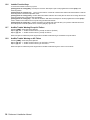
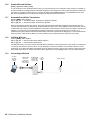
6.2
Zone Definition Status
There are eight zone definitions that are affected by the Flex-Instant delay (section [720]). The following table shows how the
zone definition changes depending on the arm status and if the Flex-Instant delay is enabled. see Zone Definition Status on page
19.
Zone Definitions
Stay Arm
Sleep Arm
Fully Arm
01 = Entry Delay 1
Entry Delay 1
Entry Delay 1
Entry Delay 1
02 = Entry Delay 2
Entry Delay 2
Entry Delay 2
Entry Delay 2
03 = Entry Delay 1 (Full Arm)
Not Armed
Not Armed
Entry Delay 1
04 = Entry Delay2 (Full Arm)
Not Armed
Not Armed
Entry Delay 2
Follow*
Follow*
Follow*
06 = Follow (Sleep/Full Arm)
Not Armed
Follow*
Follow
07 = Follow (Full Arm)
Not Armed
Not Armed
Follow
Instant*
Instant*
Instant*
09 = Instant (Sleep/Full Arm)
Not Armed
Instant*
Instant
10 = Instant (Full Arm)
Not Armed
Not Armed
Instant
23 = Follow No Pre-Alarm
Instant
Instant
Instant*
24 = Instant No Pre-Alarm
Follow
Follow
Follow*
05 = Follow
08 = Instant
* Flex-Instant = Zone will follow the delay at section [720], (default is 15 seconds / 0 = instant zone)
6.3
Zone Partition Assignment
Sections [001] to [032]: Zones 1 to 32,
The control panel provides the option of partitioning the security system into two completely independent systems. Sections [001]
to [032] represent zones 1 through 32 respectively, where the third digit in each of these sections represents the zone's partition
assignment. The zone is assigned to Partition 1 if third digit = 1, Partition 2 if third digit = 2, or both partitions is third digit = 3. For
more details, see Partitioning on page 37.
6.4
Zone Options
Sections [001] to [032] represent zones 1 through 32 respectively. After entering the definition and partition assignment, select
one or more of the following Zone Options by using the Multiple Feature Select Programming Method:
6.4.1
Auto Zone Shutdown
Sections [001] to [032] = Zones 1 to 32
Option [1] OFF = Auto Zone Shutdown Disabled
Option [1] ON = Auto Zone Shutdown Enabled for
selected zone (default)
If, in a single armed period, the number of alarms generated by a zone with the Auto Zone Shutdown option enabled
exceeds the number defined by the Auto Zone Shutdown Counter, the control panel will no longer generate an alarm
for that zone. To program the Auto Zone Shutdown Counter, key in the desired limit (000=Disabled, 001 to 015, Default
= 005) into section [712]. The Auto Zone Shutdown Counter resets every time a valid code is entered.
6.4.2
Bypassable Zones
Sections [001] to [032] = Zones 1 to 32
Option [2] OFF = Bypass Zone Disabled
Option [2] ON = Selected Zone is Bypass Enabled (default)
When a user utilizes the Bypass Programming feature (see Bypass Programming on page 12), only zones with the
Bypass option enabled can be programmed as bypassed.
Esprit E55 19
6.4.3
Alarm Types
Sections [001] to [032]: Zones 1 to 32
[4] OFF / [5] OFF: Audible Steady (default)
When the conditions for an alarm have been met, the control panel can transmit the appropriate Zone Alarm report
code and provides a steady output for any bells or sirens connected to the control panel’s bell output.
[4] OFF / [5] ON: Audible Pulsed Alarm
When the conditions for an alarm have been met, the control panel can transmit the appropriate Zone Alarm report
code and provides a pulsed output for any bells or sirens connected to the control panel’s bell output.
[4] ON / [5] OFF: Silent Alarm
When the conditions for an alarm are met, the control panel can transmit the appropriate Zone Alarm report code and
will not activate the control panel’s bell output. The appropriate ARM or STATUS LED on the keypads will flash to indicate
an alarm and the user will still have to disarm the system.
[4] ON / [5] ON: Report Only
When the conditions for an alarm have been met, the control panel can transmit the appropriate Zone Alarm report
code. The system will not have to be disarmed.
6.4.4
Intellizone
Sections [001] to [032]: Zones 1 to 32
Option [6] OFF = Intellizone Disabled (default)
Option [6] ON = Intellizone Enabled for Selected Zone
This feature reduces the possibility of false alarms. When a zone with the Intellizone option opens, the panel does not
immediately generate an alarm. First it triggers the Intellizone Delay Timer. To program the Intellizone Delay Timer, key
in the desired 3-digit value (000 to 255 seconds, Default = 48 seconds) into section [713]. If any of the following
conditions occur during this period, the panel will generate an alarm:
•
•
•
6.4.5
During the Intellizone Delay, a second zone has caused an alarm.
During the Intellizone Delay, the zone in alarm has restored (closed) and re-occurred (opened).
The zone in alarm remains open for the entire Intellizone Delay.
Delay Alarm Transmission
Sections [001] to [032]: Zones 1 to 32
Option [7] OFF = Delay Alarm Transmission Disabled (default)
Option [7] ON = Delay Alarm Transmission Enabled for Selected Zone
When an alarm condition occurs on a zone with this option enabled, the control panel enables the bell/siren output, but
does not report the alarm to the monitoring station until the end of the Delay Alarm Transmission. To program the
Delay Alarm Transmission, key in the desired 3-digit delay value (000 = Disabled, 001 to 255 seconds) into section
[833]. During this period, disarming the system disables the bell/siren output and cancels the report code transmission.
This feature is commonly used with entry delay zones to reduce false alarms created by new users who may not
disarm the system in time.
6.4.6
Force Zones
Sections [001] to [032]: Zones 1 to 32
Option [8] OFF = Force Zone Disabled
Option [8] ON = Selected Zone is Force Enabled (default)
Any open Force Zones at the time of arming will be considered deactivated by the control panel. If during this period a
deactivated zone is closed, the control panel will revert that zone to active status. Consequently, the control panel will
generate an alarm if the zone is breached.
6.5
EOL Zones
Section [706]: Zone Options
Option [2] OFF = Zones do not use EOL resistors (default)
Option [2] ON = Zones require EOL resistors
If all detection devices connected to the control panel have input terminals that require 1KΩ end of line resistors, enable option
[2] in section [706]. For details on using EOL resistors, see Single Zone Inputs on page 6.
6.6
ATZ Zone Doubling
Section [705]: General Zone Options
Option [1] OFF = ATZ zone doubling disabled (default)
Option [1] ON = ATZ zone doubling enabled
Enabling ATZ Zone Doubling allows you to install two detection devices per input terminal.
20 Reference & Installation Manual
6.7
Tamper Input on ZX8 ID A (Panel + 1)
Section [706]: General Zone Options 2
Option [4] OFF = Zone A (default)
Option [4] ON = Tamper input
Enabling this option will make the first zone on the ZX8 ID A (Panel +1) a tamper input. By default, it is a zone.
6.8
Tamper Input on ZX8 ID B (Panel + 9)
Section [706]: General Zone Options 2
Option [5] OFF = Zone B (default)
Option [5] ON = Tamper input
Enabling this option will make the first zone on the ZX8 ID B (Panel +9) a tamper input. By default, it is a zone.
6.9
Tamper Input on ZX8 ID C (Panel + 17)
Section [706]: General Zone Options 2
Option [6] OFF = Zone C (default)
Option [6] ON = Tamper input
Enabling this option will make the first zone on the ZX8 ID C (Panel +17) a tamper input. By default, it is a zone.
6.10
ATZ Wiring Options
Section [705]: General Zone Options
Option [2] OFF = ATZ Series (default)
Option [2] ON = ATZ Parallel doubling enabled
ATZ Zone Doubling can be configured in either a series or parallel connection.
6.11
Zone Timers
Sections [041] to [044]: Zones 1 to 4
001 to 255 X 10ms, Default = 060
The Zone Timer defines how quickly the control panel will respond to an open zone. The control panel will not display an open
zone on the keypad or generate an alarm until the programmed Zone Timer has elapsed. All other zone definitions and options
do not come into effect until the Zone Timer has elapsed. This feature prevents any momentary glitches from causing an alarm or
unnecessary reporting.
Esprit E55 21
Part 7: Keyswitch Programming
7.1
Keyswitch Numbering
On-board hardwire control panel zones only.
Keyswitch Numbering allows you to assign any hardwired input in the system to any of the 32 keyswitch zones in the control
panel.
7.2
Keyswitch Definitions
Keyswitch Definitions determine how a keyswitch is used.
7.2.1
Maintained Keyswitch
On-board hardwire control panel zones only.
To arm a partition using the Maintained Keyswitch, turn the switch from the ON to the OFF position. Disarm it by setting
the key on the ON position.
7.2.2
Momentary Keyswitch
On-board hardwire control panel zones only.
To arm or disarm a partition using the Momentary Keyswitch, turn the keyswitch to the ON position for three seconds,
then turn it to the OFF position.
7.3
Keyswitch Options
Each keyswitch zone can be programmed with one or more options.
7.3.1
Stay/Sleep Disarm Option (Keyswitch)
On-board hardwire control panel zones only: Option 4
When enabled, the keyswitch can only disarm assigned Stay or Sleep armed partitions. When option [4] is disabled,
the keyswitch can disarm partitions armed using any arming method.
7.3.2
Arm Only (Keyswitch)
On-board hardwire control panel zones only: Option 5
When enabled, the keyswitch can only arm assigned partitions. The type of arming is determined by the other
Keyswitch Options selected.
7.3.3
Stay Arming (Keyswitch)
On-board hardwire control panel zones only: Option 6
With disabled, the arming option will be Stay arming.
7.3.4
Sleep Arming (Keyswitch)
On-board hardwire control panel zones only: Option 7
Activating the keyswitch will Sleep Arm the partition.
Only one of the arming options (Stay, Force, Instant and Regular) can be selected.
22 Reference & Installation Manual
Part 8: Arming and Disarming Options
8.1
Switch to Stay Arming if no Entry Delay is opened
Section [741]: Partition 1, Section [742] = Partition 2
Option [5] OFF = Switch to Stay Arming Disabled (default)
Option [5] ON = Switch to Stay Arming Enabled
If a user Regular arms a partition, but does not exit through (open and close) an entry delay zone during the exit delay, the control
panel can be programmed to switch from Regular arming to Stay arming.
8.2
When Delay Zone is bypassed Follow Zones become Entry Delay 2
Section [741]: Partition 1, Section [742] = Partition 2
Option [6] OFF = Follow zones become entry delay 2 when delay zone is bypassed disabled (default)
Option [6] ON = Follow zones become entry delay 2 when delay zone is bypassed enabled
If a user has an entry point defined as a delay, and a motion detector set as a follow zone, this option allows the user to bypass a
delay zone so that the motion detector becomes an entry delay 2 zone. For example, if a user has a malfunctioning door contact,
they can bypass the delay zone and have the motion detector become an entry delay 2 zone so that they have sufficient time to
disarm the system. All follow zones become entry delay 2 if at least one delay zone is bypassed.
8.3
Regular Arming switches to Force Arming
(Not to be used with UL Installations)
Section [704]: Arming/Disarming Options
Option [1] OFF = Regular Arming Switches to Force Arming Disabled
Option [1] ON = Regular Arming Switches to Force Arming Enabled (default)
With this feature enabled, the control panel will always Force arm (if a force-enabled zone is open, see Force Zones on page 20)
instead of Regular arm when a valid user access code with the Force Arming Option is entered.
8.4
Stay Arming switches to Stay Force Arming
(Not to be used with UL Installations)
Section [704]: Arming/Disarming Options
Option [2] OFF = Stay Arming Switches to Stay Force Arming Disabled
Option [2] ON = Stay Arming Switches to Stay Force Arming Enabled (default)
With this feature enabled, the control panel will always Stay Force arm (if a force-enabled zone is open, see Force Zones on page
20) instead of Stay arm when a valid user access code with the Force Arming Option is entered.
8.5
Sleep Arming switches to Sleep Force Arming
(Not to be used with UL Installations)
Section [704]: Arming/Disarming Options
Option [3] OFF = Sleep Arming Switches to Sleep Force Arming Disabled
Option [3] ON = Sleep Arming Switches to Sleep Force Arming Enabled (default)
With this feature enabled, the control panel will always Sleep Force arm (if a force-enabled zone is open, see Force Zones on
page 20) instead of Sleep arm when a valid user access code with the Force Arming Option is entered.
8.6
Restrict Arming on Battery Failure
Section [703]: Arming/Disarming Options
Option [5] OFF = Permit arming on battery failure (default)
Option [5] ON = Restrict arming on battery failure
If this option is enabled, the control panel will not arm the system if the control panel detects that the backup battery is
disconnected, that its fuse is blown, or that the battery voltage drops to less than 10.5V. The control panel will not arm the system
until all battery trouble conditions are rectified.
8.7
Restrict Arming on Tamper Failure
Section [703]: Arming/Disarming Options
Option [6] OFF = Permit arming on tamper failure (default)
Option [6] ON = Restrict arming on tamper failure
If this option is enabled, the control panel will not arm the system if the control panel detects a tamper trouble on one or more
zones. The control panel will not arm the system until all tamper trouble conditions are rectified.
Esprit E55 23
This feature will not function if the tamper recognition options (see Tamper Recognition on page 26) are disabled
or whenever the tampered zone is bypassed and the tamper bypass options have been enabled (
8.8
Calling the VDMP3
Section [703]: Arming/Disarming Options
Option [8] OFF = Arm/Disarm with VDMP3 disabled
Option [8] ON = Arm/Disarm with VDMP3 enabled (default)
If this option is enabled, arming/disarming with the VDMP3 is functional. Disable the option if you do not want the ability to arm/
disarm the system via telephone.
8.9
Timed Auto-Arming
Section [741] = Partition 1, [742] = Partition 2
Option [1] OFF = Timed Auto-Arming Disabled (default)
Option [1] ON = Timed Auto-Arming Enabled
Each partition can be programmed to arm every day at the time specified by the Auto-arm Timer. The auto-arming options (see
Auto-Arming Options on page 24) determine the partition's arming method. Any open zones detected when a partition is autoarmed will be bypassed regardless of their definition (except 24Hr zones). The control panel will enter a 60-second exit delay
period before arming the system. At this point, auto-arming can be cancelled by entering a valid access code. Once the partition
has successfully armed, the control panel can transmit the Timed Auto-arming report code programmed in section [860].
Example: To automatically arm partition 2 everyday at 6:15PM, enable Timed Auto-arming for partition 2 by turning on option [1]
in section [742]. Then key in 18:15 into section [762].
8.9.1
Auto-Arm Timer
Section [761] = Partition 1, [762] = Partition 2
Select the section corresponding to the desired partition and program the time (use the 24-hour clock i.e. 6:30PM =
18:30) that you wish the control panel to attempt to arm the selected partition and/or send the Late to Close report code.
8.10
No Movement Auto-Arming
Section [741] = Partition 1, [742] = Partition 2
Option [2] OFF = No Movement Auto-Arming Disabled (default)
Option [2] ON = No Movement Auto-Arming Enabled
If no movement occurs in a partition's protected area for the period specified by the No Movement Timer, the control panel can
automatically arm that partition. The Auto-arming Option determines the partition's arming method. Any open zones detected
when a partition is Auto-armed will be bypassed regardless of their definition (except 24Hr zones). Upon arming, the control panel
will transmit the No Movement report code if programmed in section [860]. Regardless of whether the system was successfully
armed or not, the control panel will always transmit the No Movement report code if programmed in section [860]. If No
Movement Auto-arming is disabled, the control panel will still send the No Movement report code at the time specified by the No
Movement Timer.
Example: To arm partition 1 whenever there is no movement for a period of 4 hours, enable No Movement Auto-arming for
partition 1 by turning on the [2] Option in section [741]. Then in section [749] enter 016 (16x15min = 240min = 4 hours).
8.10.1
No Movement Timer
Section [749] = Partition 1, [750] = Partition 2
000 to 255x15min, Default = Disabled
Select the section corresponding to the desired partition and program the interval of time without movement you wish
the control panel to wait before arming and/or sending the No Movement report code. If No Movement Auto-arming is
disabled, the control panel can still send the No Movement report code when no movement has been detected for the
period specified by the No Movement Timer.
8.11
Auto-Arming Options
(Not to be used with UL installations)
Section [741] = Partition 1, [742] = Partition 2
[3]
[4]
OFF
OFF
Regular
OFF
ON
Sleep
ON
OFF
Stay
When using Timed Auto-arming or No Movement Auto-arming, the control panel can Regular, Sleep or Stay arm the selected
partition.
24 Reference & Installation Manual
8.12
One-Touch Arming
(Not to be used with UL installations)
Section [703]: Options [1] to [3]
Option [1] ON = Press & hold the [ARM] key for One-touch Regular Arming.
Option [2] ON = Press & hold the [STAY] key for One-touch Stay Arming.
Option [3] ON = Press & hold the [SLEEP] key for One-touch Sleep Arming.
The One-touch arming features allow users to arm the system without having to enter any access codes. To arm the system,
press and hold the appropriate key (see above) for approximately 3 seconds. If the system is partitioned, you must also press the
key corresponding to the partition you wish to arm.
8.13
One-Touch Bypass Programming
(Not to be used with UL installations)
Section [703]: Options [4]
Option [4] ON = Press & hold the [BYP] key for One-touch Bypass Programming.
Bypass programming allows users to program the alarm system to ignore (deactivate) specified zones the next time the system is
armed. Press and hold the [BYP] key for three seconds to access bypass programming mode.
8.14
Exit Delay
Section [745] = Partition 1, [746] = Partition 2
001 to 255 seconds, Default = 60 seconds, Maximum 60 seconds for UL Listed systems
After entering the required arming sequence (i.e. user access code, etc.), the exit delay parameter determines the amount of time
a user has to leave the protected area before the control panel arms the partition. The exit delay applies to all zones in the
selected partition. When enabled, the keypad will beep once every second during the exit delay and will beep rapidly during the
final 10 seconds of the exit delay.
8.14.1
Beep On Exit Delay
Section [704]: Arming/Disarming Options
Option [6] OFF = Beep on Exit Delay Disabled
Option [6] ON = Beep on Exit Delay Enabled (default)
8.15
Bell Squawk On Arm/Disarm with Keypad
Section [704]: Arming/Disarming Options
Option [5] OFF = Bell Squawk on Arm/Disarm Disabled (default)
Option [5] ON = Bell Squawk on Arm/Disarm Enabled
When this feature is enabled, the bell or siren will squawk once upon arming and twice upon disarming via the keypad.
8.16
No Exit Delay Beeps and No Bell Squawk When Stay/Sleep Arming
Section [704]: Arming/Disarming Options
Option [7] OFF = No Exit Delay Beeps and No Bell Squawk When Stay/Sleep Arming Disabled
Option [7] ON = No Exit Delay Beeps and No Bell Squawk When Stay/Sleep Arming Enabled (default)
With this feature enabled, the control panel will prevent the bell or siren from squawking and the keypads from beeping during the
exit delay, whenever a partition is Stay/Sleep armed.
8.17
Exit Delay Termination
Section [700]: Arming/Disarming Options
Option [6] OFF = Exit Delay Termination Disabled (default)
Option [6] ON = Exit Delay Termination Enabled
When option [6] is enabled (ON), the panel will reduce the Exit Delay to 10 seconds when an Entry Delay zone is opened and
closed during the Exit Delay.
Example: 15 seconds into a 45 second Exit Delay, an Entry Delay zone opens and closes. The remaining 30 seconds is reduced
to 10 seconds.
8.18
Fast Exit
When the system is already Stay or Sleep armed: This feature will allow you to exit and keep the system armed. Press and hold
the [OFF] key for 3 seconds to start the exit delay. After the exit delay has elapsed, the system will switch to its previous arming
mode.
Esprit E55 25
Part 9: Alarm Options
9.1
Bell Cut-Off Timer
Section [747] = Partition 1, [748] = Partition 2
000 = Disabled, 001 to 255 minutes, Default = 4 minutes, 5 minutes minimum for ULC installations
After an audible alarm, the bell or siren will stop upon disarming of the partition or when the Bell Cut-Off Timer has elapsed,
whichever comes first.
9.2
Recycle Alarm
After the Bell Cut-Off Timer and the Recycle Delay have elapsed, the control panel will re-verify the zone status. If there are any
open zones, the control panel will generate another alarm. In one armed period, the control panel will repeat this sequence the
number of times defined by the Recycle Counter.
9.2.1
Recycle Alarm Delay
Section [714]
000 = disabled, 001 to 255 minutes, Default = Disabled
The Recycle Delay determines the amount of time after Bell Cut-Off that the control panel will wait before re-verifying
zone status.
9.2.2
Recycle Alarm Counter
Section [715]
000 = disabled, 001 to 255, Default = Disabled
The Recycle Counter determines the number of times the control panel will re-verify the zone status after Bell Cut-Off
in one armed period.
9.3
Tamper Recognition
9.3.1
Keypad/Bus Module Tamper Recognition
Section [705]: Tamper Recognition Options
[3]
[4]
Keypad / Bus Module Tamper Recognition Options*
DISABLED
OFF OFF
OFF
ON
TROUBLE ONLY
ON
OFF
TROUBLE ONLY
ON
ON
AUDIBLE ALARM
* Tamper recognition of keypad/bus module only if section [700] option [7] is enabled.
If a device has been tampered with (i.e. the anti-tamper switch has been set off), the control panel can generate a
trouble, an alarm, and/or transmit a report code to the monitoring station.
9.4
Keypad/Bus Module Supervision
Section [705]: Supervision Options
[6]
OFF
OFF
ON
ON
[7]
OFF
ON
OFF
ON
Keypad / Bus Module Supervision Options
Disabled
TROUBLE ONLY
TROUBLE ONLY
AUDIBLE ALARM
The control panel waits for each of its assigned transmitters to send a status signal within a specified time period to confirm their
presence and functionality. If a device has not sent a signal within that time period, the control panel can generate a trouble, an
alarm, and/or transmit a report code to the monitoring station.
26 Reference & Installation Manual
9.5
Tamper Bypass Options
Section [705]: Zone Options
Option [5] OFF = Tampers on bypassed zones will be ignored
Option [5] ON = Will generate a tamper if detected on a bypassed zone (default)
With option [5] off, the Tamper Recognition feature follows the zone bypass definition. This means the control panel will ignore
any tampers detected on a bypassed zone. With option [5] on, Tamper Recognition ignores the bypass definition. This means the
control panel will generate an incident as per Tamper Recognition settings if a tamper or wire fault occurs on a bypassed zone.
9.6
Tamper Supervision on the Bus Module
Section [700]: Supervision Options
Option [7] OFF = Tamper supervision disabled (default)
Option [7] ON = Tamper supervision enabled
When the control panel detects a tamper on a bus module, the control panel can generate an alarm or trouble, unless the Tamper
Supervision is disabled.
9.7
Keypad Panic Options
Section [702]: General Options
Option [1] OFF = Panic 1 Disabled (default)
Option [1] ON = Panic 1 Enabled
Pressing the [1] and [3] keys simultaneously on the keypad for 3 seconds will generate a ‘report only’ or audible alarm as defined
by option [4].
Option [2] OFF = Panic 2 Disabled (default)
Option [2] ON = Panic 2 Enabled
Pressing the [4] and [6] keys simultaneously on the keypad for 3 seconds will generate a ‘report only’ or audible alarm as defined
by option [5].
Option [3] OFF = Panic 3 Disabled (default)
Option [3] ON = Panic 3 Enabled
Pressing the [7] and [9] keys simultaneously on the keypad for 3 seconds will generate a ‘report only’ or audible alarm as defined
by option [6].
Option [4] OFF = Panic 1 Report Only (default)
Option [4] ON = Panic 1 is Audible
Option [5] OFF = Panic 2 is Report Only (default)
Option [5] ON = Panic 2 is Audible
Option [6] OFF = Panic 3 is Report Only (default)
Option [6] ON = Panic 3 is Audible
Report only:
The control panel transmits the appropriate Panic report code if programmed in section [863]. The control panel will not enable
the keypad buzzers or the control panel’s BELL output (no audible alarm).
Audible alarm:
Same as silent alarm, except the keypad buzzers and the BELL output will activate until a user cancels the alarm (disarms) with a
valid user access code or when the Bell Cut-Off Timer elapses (see Bell Cut-Off Timer on page 26).
Whether the system is partitioned or not, the control panel will report all panic alarms to partition 1.
9.8
Flex-Instant Delay
Section [720]
The Flex-Instant Delay is used to prevent false alarms when the premises is Stay/Sleep armed. In section [720] enter a 3-digit
value (000 to 255, 000 = disabled) representing the number of seconds that the panel will delay an alarm allowing you to disarm
the system (default 15 seconds).
Esprit E55 27
Part 10: Reporting and Dialer settings
The following section explains all the features and options that must be programmed in order for your security system to properly report
system events to a monitoring station. When an event (e.g. zone in alarm) occurs in the system, the control panel verifies if a report code
was programmed in the section corresponding to the event (except Ademco Contact ID “All Codes”). If a report code was programmed, the
control panel will dial the monitoring station telephone number defined by the Event Call Direction feature. When the monitoring station
answers, the control panel will transmit the System Account Code, followed by the programmed report code.
10.1
Zone Reporting Codes
Sections [141] to [172]
A report code can be programmed for each of the available 32 zones. When an alarm, alarm restore, tamper, or tamper restore
occurs on a zone, the control panel can send the appropriate report code to the monitoring station.
10.2
User Reporting Codes
Sections [471] to [502]
A report code can be programmed for each of the available 32 users. When a user arms, disarms or cancels an alarm, the control
panel can send the appropriate report code to the monitoring station.
10.3
Special Arming Report Codes
Sections [860] and [861]
When the system is armed using one of the special arming features listed below, the control panel can send the appropriate
report code to the monitoring station identifying how the system was armed.
Section [860]
• Auto-Arming: A partition has armed itself at the programmed time.
• Late to Close: Reports every day at the time specified by the Auto-arm Timer.
• No Movement: No movement has been detected for the programmed amount of time in the partition.
• Partial Arming: A partition was Stay, Sleep, or Force armed or armed with Bypassed zones.
Section [861]
• Quick Arming: A partition was armed using a One-touch arming feature.
• Arming via PC: A partition was armed using the Winload software.
• Arming with Keyswitch: A partition was armed using a keyswitch
• N/A
10.4
Special Disarming Report Codes
Section [862]
When using one of the special disarming features, the control panel can send the report code to the monitoring station, identifying
how the system was disarmed.
• Cancel Auto-Arm: A partition is disarmed during the Timed Auto-arm's 60-second exit delay. Only reports if Disarming
Reporting Options are set to always report disarming.
• Disarming via PC: System is disarmed using the WinLoad software. Only reports if Disarming Reporting Options are set to
always report disarming.
• Cancel alarm with user or WinLoad: An alarm is cancelled using the WinLoad software.
• Cancel Paramedic Alarm: A paramedic alarm is cancelled.
10.5
Special Alarm Report Codes
Sections [863] and [864]
When the system generates an alarm due to one of the conditions listed below, the control panel can send the appropriate report
code to the monitoring station identifying the type of alarm.
Section [863]
• Emergency Panic: Panic keys [1] and [3] have been pressed.
• Auxiliary Panic: Panic keys [4] and [6] have been pressed.
• Fire Panic: Panic keys [7] and [9] have been pressed.
• Recent Closing: Reports when an alarm is generated after arming the system within period defined by the Recent Close
Delay.
Section [864]
• Zone Shutdown: A zone communicates more than the programmed number of transmissions in a single armed period.
• Duress: A Duress access code is keyed in.
• Keypad Lockout: If a consecutive number of invalid codes are entered into a keypad, the control panel can be set to deny
access from all keypads for a specified period.
28 Reference & Installation Manual
10.6
System Trouble Report Codes
Section [865] to [869]
When the system generates one of the instances listed below, the control panel can send the appropriate report code to the
monitoring station identifying the type of system trouble.
Section [865]
• N/A
• AC Failure: The control panel has detected a loss of AC power. Transmission of this report code can be delayed.
• Battery Failure: Backup battery is disconnected or battery voltage is low.
• Auxiliary Supply: Auxiliary power supply has overloaded.
Section [866]
• Bell Output Overload: Bell/siren output has overloaded.
• Bell Output Disconnected: Devices connected to the Bell Output have been disconnected.
• Timer Loss: The control panel has detected a loss in time or clock failure.
Section [867]
• Fail To Communicate: The control panel has failed all attempts to communicate with the monitoring station. The report code
will be transmitted upon the next successful attempt.
• Module Lost: The control panel has failed to communicate with one or more modules (including keypads).
• Module Tamper: The anti-tamper switch of a module (including keypads) has been triggered.
Section [868]
• Module AC Fail: The AC voltage of a module has dropped below recommended limits.
• Module Low/No Battery: The battery voltage of a module has dropped below recommended limits.
10.7
System Trouble Restore Report Codes
Sections [870] to [874]
When the system restores one of the troubles listed in System Trouble Report Codes above, the control panel can send the
appropriate report code to the monitoring station identifying the type of system trouble restore. If Telephone Line Monitoring is
enabled, the control panel can also transmit a TLM Restore report code.
10.8
System Special Report Codes
Sections [875] to [876]
When the system generates one of the instances listed below, the control panel can send the appropriate report code to the
monitoring station identifying the type of system occurrence.
Section [875]
• Cold Start: The control panel was completely shutdown (no battery, no AC) and then was re-started.
• Test Report: A test report has been generated automatically.
• WinLoad In: The control panel has commenced communication with WinLoad.
• WinLoad Out: The control panel has ended communication with WinLoad.
Section [876]
• Installer In: Installer/Maintenance has entered the programming mode.
• Installer Out: Installer has exited the programming mode.
• Closing Delinquency: The control panel will send a Closing Delinquency report code if the system has not been armed within
a programmed amount of days.
• N/A
Section [876]
• Disarm with Keyswitch
• Disarm with keyswitch after alarm
• Alarm cancelled with keyswitch
• N/A
10.9
Clear Reporting Codes
Section [966]: Clear Reporting Codes
Option [1] OFF = Clear zone reporting codes
Option [1] ON = Clear zone reporting codes (default)
Option [2] OFF = Clear user reporting codes
Option [2] ON = Clear user reporting codes (default)
Option [3] OFF = Clear arm/disarm/alarm reporting codes
Option [3] ON = Clear arm/disarm/alarm reporting codes (default)
Esprit E55 29
Option [4] OFF = Clear trouble reporting codes
Option [4] ON = Clear trouble reporting codes (default)
Enable all options you want to clear. The respective sets of reporting codes will be cleared after exiting the section.
10.10
Reset Reporting Codes
Section [967]: Reset Reporting Codes
Option [1] OFF = Reset zone reporting codes
Option [1] ON = Reset zone reporting codes (default)
Option [2] OFF = Reset user reporting codes
Option [2] ON = Reset user reporting codes (default)
Option [3] OFF = Reset arm/disarm/alarm reporting codes
Option [3] ON = Reset arm/disarm/alarm reporting codes (default)
Option [4] OFF = Reset trouble reporting codes
Option [4] ON = Reset trouble reporting codes (default)
Enable all options you want to reset to default. The respective sets of reporting codes will be reset after exiting the section.
10.11
Monitoring Station Telephone Numbers
Section [815] = Phone#1, [816] = Phone#2, [817] = Backup Phone#, [818] = Pager #, [819] = Numeric
Message Sent with Pager Reporting: Up to 32 digits
The control panel can dial up to 2 different monitoring station telephone numbers. You can enter any digit from 0 to 9 and any
special keys or functions (see Table 4 on page 30) up to a maximum of 32 digits. After the maximum dialing attempts (see
Maximum Dialing Attempts on page 32) to one monitoring station telephone number have failed, the control panel will then dial
the backup telephone number. If the Alternate Dial Option (see Alternate Dial Option on page 32) is enabled, the control panel will
dial the programmed backup telephone number after every failed attempt. If no backup telephone number is programmed, the
control panel will never report to the backup telephone number. Also see Delay Between Dialing Attempts on page 32.
Table 4: Special Keys for Telephone Numbers
Press
10.12
Action or Value
[OFF]
*
[BYP]
#
[MEM]
switch from pulse to tone dialing or vice versa
[TBL]
4-second pause
[SLEEP]
deletes current digit
[ ]
inserts blank space
Personal Dialing Numbers
Personal Dialing numbers are personal numbers (e.g. cellular, office) that the panel can call in case of an alarm or panic. To
program these five numbers see the Communicator Menu in either the Master or User Quick Menu. To set the call parameters,
see options [5], [6], and [7] of section [804].
The panel will call these personal numbers if programmed in the event of any panic or alarm (default) and sound a bell tone. To
program the delay between the call attempts, see section [832]. The panel can also be programmed to delay before sounding the
bell tone, which can be programmed in section [836].
The default delay is 20 seconds. To determine the length of time the bell tone sounds on the phone line, see section [837]. The
default value is 003, meaning the 10 second bell tone will repeat itself 3 times after the initial sequence (total= 40 seconds).
10.13
Reporting Formats
Section [810]: 1st digit = Format for Phone #1, 2nd digit = Format for Phone #2
The panel can use a number of different reporting formats and each monitoring station telephone number can be programmed
with a different reporting format. The first digit entered into section [810] represents the reporting format used to communicate
with Monitoring Station Telephone Number 1, the second digit represents the reporting format used to communicate with
Monitoring Station Telephone Number 2. The Backup Telephone Number uses the same reporting format as the last monitoring
station telephone number that was dialed.
30 Reference & Installation Manual
Table 5: Reporting Formats
Value Entered
Reporting Format
0
Ademco Slow (1400Hz, 1900Hz, 10BPS)
1
Silent Knight Fast (1400Hz, 1900Hz, 10BPS)
2
SESCOA (2300Hz, 1800Hz, 20BPS)
3
Ademco Express (DTMF 4+2)
4
Ademco Contact ID
If Hexadecimals (0 to FF) are used to program the report codes, verify that the pager also supports
Hexadecimals. If the pager does not support Hexadecimals, use only the digits 0 to 9.
UL Note: The installer is required to verify the complete compatibility of the DAC Receiver and formats at least
once per year.
10.13.1 Standard Pulse Formats
The control panel can use the Ademco slow, Silent Knight and Sescoa standard pulse reporting formats which will
transmit the 2-digit (00 to FF) report codes programmed into sections [860] to [876]. (see Table 5 on page 31).
10.13.2 Ademco Express
The Ademco Express is a high-speed reporting format, which will transmit the 2-digit (00 to FF) report codes programmed
into sections [860] to [876].
10.13.3 Ademco Contact ID
Ademco Contact ID is a fast communicator format that uses tone reporting instead of pulse reporting. This communicator
format also uses a pre-defined list of industry standard messages and report codes that will suit most of your basic
installation needs. Please refer to the Contact ID Report Codes List in the Programming Guide for a complete list of these
report codes and messages. If the reporting codes are set at 0xFF, the panel will send the appropriate report code from
the Automatic Report Code List in the programming guide. Alternatively, report codes can be programmed using the
Ademco Contact ID Report Codes in the programming guide.
10.13.4 Event Call Direction
Section [802]: Options [1] to [3]; Arming/Disarming
Option [1] ON =Call MSTN 1
Option [2] ON =Call MSTN 2
Option [3] ON =Call Pager telephone number
Section [802]: Options [5] to [7]; Alarm/Alarm Restore
Option [5] ON =Call MSTN 1
Option [6] ON =Call MSTN 2
Option [7] ON =Call Pager telephone number
Section [803]: Options [1] to [3]; Tamper/Tamper Restore
Option [1] ON =Call MSTN 1
Option [2] ON =Call MSTN 2
Option [3] ON =Call Pager telephone number
Section [803]: Options [5] to [7]; Trouble/Trouble Restore
Option [5] ON =Call MSTN 1
Option [6] ON =Call MSTN 2
Option [7] ON =Call Pager telephone number
Section [804]: Options [1] to [3]; Special Reporting
Option [1] ON =Call MSTN 1
Option [2] ON =Call MSTN 2
Option [3] ON =Call Pager telephone number
Section [804]: Options [5] to [7]
Option [5] ON =Call voice on zone alarm (burglary/fire)
Option [6] ON =Call voice on panic alarms
Option [7] ON =Call voice on paramedic alarm
The events are divided into six groups (see above) where each event group can be programmed to dial up to three
telephone numbers (MSTN 1 & 2 and the Pager telephone number).
When a reportable event occurs in the system, the panel will begin dialing the numbers sequentially starting from
MSTN 1 (if enabled), skipping any disabled numbers and stopping once all selected telephone numbers have been
Esprit E55 31
called. After a certain amount of failed attempts (section [831]) at trying to call the monitoring station, the control panel
will then dial the selected backup telephone number (if enabled; see Programming Guide).
If the Alternate Dial option is enabled, the control panel will dial the programmed backup telephone number (if enabled)
after every failed attempt. If no backup telephone number is programmed, the control panel will never report to the
backup telephone number.
Example: The system is armed and zone 1 has been breached causing an alarm. If options [5] and [7] are OFF and
option [6] is ON in section [802], the control panel will attempt to communicate with MSTN 2.
10.13.5 Account Numbers
Section [811]: Partition 1, Section [812]: Partition 2
All report codes are preceded by a 4-digit or 3-digit Partition Account Number to ensure correct identification in a
partitioned system. Partition account numbers can be any hexa-digit from 1 to F. To enter a 3-digit account number,
simply press the [SLEEP] key followed by a 3-digit account number. Also, when using 3-digit account numbers, you
must use 1-digit report codes.
10.14
Dialing Method
Section [800]: Dialer Options
Option [6] OFF = Pulse Dialing (see Pulse Ratio on page 32).
Option [6] ON = Tone/DTMF Dialing (default)
10.15
Pulse Ratio
Section [800]: Dialer Options
Option [7] OFF = European Pulse Ratio of 1:2
Option [7] ON = U.S.A. Pulse Ratio of 1:1.5 (default)
When using Pulse dialing, you can select one of two Pulse Ratios. Although most European countries use the 1:2 pulse ratio, the
1:1.5 ratio may provide better results in some cases. The same applies for North American countries. If the 1:1.5 pulse ratio is not
providing the desired results, the 1:2 ratio may be used.
10.16
Maximum Dialing Attempts
Section [841]
000 to 255 attempts, Default = 8 attempts
The value programmed in section [081] determines how many times the control panel will re-dial the same monitoring station
telephone number before proceeding to the next number.
10.17
Delay Between Dialing Attempts
Section [832]
000 to 255 seconds, Default = 20 seconds
This delay determines the amount of time the control panel will wait between each dialing attempt. This section applies to the
Plug-in Voice Dialer when using a VDMP3.
10.18
Switch to Pulse on 5th Attempt
Section [800]
Option [3] OFF = Switch to Pulse on 5th Attempt Disabled (default)
Option [3] ON = Switch to Pulse on 5th Attempt Enabled
With option [3] ON, the control panel will switch to pulse dialing on the 5th attempt of reaching the monitoring station.
10.19
Alternate Dial Option
Section [800]: Dialer Options
Option [4] OFF = Alternate Dial Disabled (default)
Option [4] ON = Alternate Dial Enabled
With option [4] OFF, the control panel will dial the backup programmed in section [817] after all attempts to one monitoring station
number have failed. With option [4] ON, the control panel will dial the backup number after every failed attempt.
10.20
Force Dial Option
Section [800]: Dialer Options
Option [5] OFF = Force Dial Disabled
Option [5] ON = Force Dial Enabled (default)
With option [5] is enabled, the panel will dial a telephone number even if no dial tone is present after 4 seconds.
32 Reference & Installation Manual
10.21
Recent Closing Delay
Section [838]
000 = Disabled, 001 to 255 seconds, Default = Disabled
If after having armed the system, an alarm is generated within the period defined by the Recent Close Delay, the control panel will
attempt to transmit the Recent Close report code programmed in section [863].
10.22
Auto Test Report
Sections [840]
000 = Disabled, 001 to 255 days, Default = Disabled
Section [850]: Time (HH:MM)
The control panel will transmit the Test Report report code programmed into section [875] after the number of days programmed
into section [840] has elapsed at the time programmed into section [850]. Use the 24-hour clock to program the time (i.e. 6:30PM
= 18:30). The first Test Report will be transmitted within 24 hours after the feature is enabled at the time programmed in [850].
Example: Section [840] = 005 and section [850] = 13:00. The first Test Report will be sent at 1 PM that day and then the report
will be sent every 5 days at 1 PM.
10.22.1 Auto Test Report Transmission Options
Sections [801]
[3]
[4]
Auto-Test Report Transmission Options
OFF
OFF Transmit the test report code every time the days programmed in section [840] have elapsed at the time programmed in
section [850] (default).
OFF
ON
ON
OFF The control panel will transmit the test report code every hour on the minute value programmed in section [850] (the last
two digits). Note that the first two digits of section [850] will be ignored. E.g. If 10:25 was programmed into section [850],
the test report code would be transmitted at the 25th minute of every hour, i.e. 11:25, 12:25, etc.
ON
ON
When disarmed: Transmit test report code every time the time programmed in section [852] has elapsed. When armed:
Transmit test report code every time the time programmed in section [851] has elapsed.
The test report code will be transmitted when any of the conditions of the second and third options listed above (options
[3] = OFF and [4] = ON / options [3] = ON and [4] = OFF) are met.
10.22.2 Armed Report Delay
Section [851]
000 = disabled, 001 to 255 minutes, Default = 5 min.
The Armed Report Delay determines the amount of time after an Arming event that the control panel will wait before
sending a report.
10.22.3 Disarmed Report Delay
Section [852]
000 = disabled, 001 to 255 minutes, Default = 60 min.
The Disarmed Report Delay determines the amount of time after an Disarming event that the control panel will wait
before sending a report.
10.23
Closing Delinquency Delay
Section [719]
000 = Disabled, 001 to 255 days, Default = Disabled
At midnight every day, the control panel will verify when the partition was last disarmed. If the partition has not been armed within
the time programmed in the Closing Delinquency Delay, the control panel will transmit a Closing Delinquency event to the
monitoring station.
Example: The Closing Delinquency Timer for partition 1 in section [719] is programmed for 005 days. The control panel verifies
when partition 1 was last disarmed at midnight every day. If partition 1 was not armed within the last 5 days, the panel will
transmit a Closing Delinquency event to the monitoring stations. Closing Delinquency Event and timer apply only to partition
1.
10.24
Power Failure Report Delay
Section [839]
001 to 255 minutes, Default = 15 minutes
The control panel will transmit the AC Failure report code programmed in section [865] after the Power Failure Report Delay
period has elapsed.
Esprit E55 33
10.25
Report System Disarming
Section [801]: Arming/Disarming Options
Option [1] OFF = Always Report Disarming
Option [1] ON = Report Disarming Only After Alarm (default)
With option [1] OFF, the control panel will send the Disarming report codes (see Special Disarming Report Codes on page 28) to
the monitoring station every time the system is disarmed. With option [1] ON, the control panel will send the Disarming report
codes to the monitoring station when the system is disarmed following an alarm.
10.26
Zone Restore Report Options
Section [801]: Zone Options
Option [2] OFF = Report On Bell Cut-Off (default)
Option [2] ON = Report On Zone Closure
With option [2] OFF, the panel will send the Zone Alarm Restore report codes to the monitoring station when the zone has
returned to normal and the Bell Cut-Off Timer has elapsed. With option [2] ON, the panel will send the Zone Alarm Restore report
codes to the monitoring station as soon as the zone returns to normal or when the system is disarmed.
10.27
Telephone Line Monitoring (TLM)
When enabled, the system verifies the existence of a telephone line once every second. A line test failure occurs when the TLM
detects less than 3 volts for the period defined by the TLM Fail Timer. If the line test fails, the control panel’s STATUS LED flashes
and generates one or more conditions as defined by the TLM settings below. These will be restored when the control panel
detects the telephone line again. Please note that when the dialer detects an incoming call, the TLM test will stop for 1 minute.
Section [800]: Dialer Options
[1] OFF / [2] OFF: TLM Disabled
[1] OFF / [2] ON: Trouble Only
Upon line test failure, a TLM Trouble will appear in the keypad’s trouble display (see Trouble Display on page 41).
[1] ON / [2] OFF: Audible Alarm If System Armed
Upon line test failure, a TLM Trouble will appear in the keypad’s trouble display (see Trouble Display on page 41) and if the
system is armed, the control panel will generate an audible alarm.
[1] ON / [2] ON: Silent Alarm Becomes Audible
Upon line test failure, a TLM Trouble will appear in the keypad’s trouble display (see Trouble Display on page 41) and causes a
silent zone or silent panic alarm to switch to audible.
10.27.1 TLM Fail Timer
Section [830]
016 to 255 x 2 seconds, Default = 32 seconds
If TLM does not detect the existence of a telephone line for the duration of this period, the control panel will generate
the condition(s) defined by the TLM options.
10.28
Pager Reporting Delay
Section [834]: Communication Timers
000 to 255 seconds, Default = 20 seconds
When using the Pager Reporting Format, the control panel will wait for the Pager Delay period before transmitting the report
codes. This is to allow time for the pager system to provide a dial tone or to bypass the “welcome” message before sending data.
10.29
Pager Reporting Message Repetition
Section [835]: Communication Timers
000 to 255 times, Max. 10, Default = 3
When using the Pager Reporting Format, the control panel will repeatedly send the report codes to the pager until the
transmission has been acknowledged.
10.30
Personal Reporting Delay
Section [836]: Communication Timers
000 to 255 times, Max. 127, Default = 5
When using the Personal Reporting Format, the control panel will wait for the Personal Delay period before transmitting the
report codes. This is to allow time for the system to provide a dial tone or to bypass the “welcome” message before sending data.
This section applies to the Plug-in Voice Dialer when using a VDMP3.
34 Reference & Installation Manual
10.31
Personal Reporting Message Repetition
Section [837]: Communication Timers
000 to 255 times, Max. 10, Default = 3
When using the Personal Reporting Format, the control panel will repeatedly send the report codes to the pager until the
transmission has been acknowledged. This section applies to the Plug-in Voice Dialer when using a VDMP3.
10.32
Reporting
Sections [800]
Option [1] OFF = Dialer Activated (default)
Option [1] ON = No Dialer
With this option disabled (default), the control panel will continue to report events. With the option enabled, reporting is disabled.
Esprit E55 35
Part 11: Programmable Outputs
A PGM is a programmable output that toggles to its opposite state (i.e. a normally open PGM will close) when a specific event has occurred
in the system. For example, a PGM can be used to activate bells or strobe lights, open/close garage doors and much more. When a PGM
activates, the control panel triggers any device or relay connected to it. The control panel includes two/four onboard PGMs. It can support
up to a total of 16 PGMs.
11.1
11.2
PGM Activation And Deactivation Event
Sections
1 on-board PGM
[220]
[221]
Activation Event
Deactivation Event
Event Group #
Sub-Group #
(____/____)
(____/____)
(____/____)
(____/____)
Partition # (99 for
both partitions)
(____/____)
(____/____)
Default
00/00/00
00/00/00
PGM Delay
Section
[281]
E55 Data
PGM1 ___/___/___
Default = 005
(000 to 255 x 1 sec./min.)
Instead of deactivating the PGM on the occurrence of a specific event, the PGM will deactivate after the period programmed here
has elapsed.
If a PGM Delay is programmed, the deactivation event can be used as a second activation event.
11.3
PGM Options
Section [261] to [276]: PGM Options
Option [1] OFF
Option [1] ON
= PGM Base Time in Seconds (default)
= PGM Base Time in Minutes
This option sets the PGM delay in increments of minutes or seconds.
Option [2] OFF
Option [2] ON
= PGM State Normally Open (N.O.) (default)
= PGM State Normally Closed (N.C.)
Option [3] N/A
Option [4] OFF
Option [4] ON
= PGM Activation Mode Steady (default)
= PGM Activation Mode Pulse
This option sets the PGM to be either steady (ON), or pulsed (ON/OFF) when it is activated.
Option [5] OFF
= PGM Pulse once every 30 seconds disabled (default)
Option [5] ON
= PGM Pulse once every 30 seconds enabled
When armed, the PGM will pulse once every 30 seconds.
Option [6] OFF
= PGM Pulse on any alarm disabled (default)
Option [6] ON
= PGM Pulse on any alarm enabled
This option sets the PGMs to pulse on any alarm.
Option [7] OFF
Option [7] ON
= PGM Pulse on any alarm Partition 1 (default).
= PGM Pulse on any alarm Partition 2.
Program PGMs to pulse during an alarm for either partition. With this feature enabled, and in combination with the Follow Arm/
Stay Arm/Sleep Arm PGM type, the PGM will mimic the Arm LED.
36 Reference & Installation Manual
Part 12: System Settings
12.1
Version Number Display
Enter section [980] to view the version number of the panel. The first digit will appear. Press [ENTER] to scroll through each
consecutive digit (the keypad will beep twice after every digit in the version number). Once the version number has been fully
displayed, an acknowledgement beep (3 beeps) will sound and the first digit will be displayed again.
12.2
Installer Lock
Section [395]
000 = Disabled, 147 = Lock Enabled, Default = Disabled
Program 147 into section [395] to lock all programming. Performing a hardware reset will not affect the current panel settings. To
remove the Installer Lock, enter 000. Please note that three seconds after turning on the control panel the STATUS LED and the
relay on the control panel will flash fast for 6 seconds to indicate that the installer lock is enabled. Once enabled, the panel cannot
be reset.
12.3
Keypad Lockout Feature
Sections [864]
If a consecutive number of invalid codes are entered into a keypad, the control panel can be set to deny access from all keypads
for a specified period and send the report code programmed in section [864]. Program the number of consecutive invalid codes
from 001 to 255 (000 = disabled) into section [717]. Program the duration of the Keypad Lockout from 001 to 255 minutes into
section [716].
12.4
Partitioning
Section [700]: General Options
Option [1] OFF = Partitioning Disabled (default)
Option [1] ON = Partitioning Enabled
The panel is equipped with a partitioning feature which can divide the alarm system into two distinct areas identified as Partition 1
and Partition 2. Partitioning can be used in installations where shared security systems are more practical, such as an office/
warehouse building. When partitioned, each zone, each user code (see Access Codes on page 11) and some of the system's
features can be assigned to Partition 1, Partition 2 or both. If the system is not partitioned, all user codes and features will
be recognized as belonging to Partition 1. Zones that have been manually assigned to partition 2 will no longer function.
•
•
•
•
•
12.5
Users can only arm partitions to which they have been assigned.
Only zones assigned to Partition 1 will arm/disarm when Partition 1 is armed or disarmed.
Only zones assigned to Partition 2 will arm/disarm when Partition 2 is armed or disarmed.
Zones assigned to both partitions will arm when both partitions are armed and will disarm when at least one disarms.
The following features can be programmed separately for each partition: Entry/Exit Delay Timer, Auto-arming Options, Bell
Cut-Off Timer, Switch to Stay arming, PGM Events and Account Numbers.
Confidential Mode
Section [701] Options [3], [4] and [5]
Option [3] OFF = Confidential Mode Disabled (default)
Option [3] ON = Confidential Mode Enabled
Option [4] OFF = Keypads activate when an access code is entered (default)
Option [4] ON = Keypads activate when a key is pressed
Option [5] OFF = Confidential Mode Timer is 2 minutes (default)
Option [5] ON = Confidential Mode Timer is 5 seconds
If Confidential Mode is enabled and no actions are performed on the keypads for the time defined by the Confidential Mode
Timer, all the keypad’s LEDs will be off until either a key is pressed or an access code is entered. When the system exits
Confidential Mode, the keypads will display the system’s status. Confidential Mode is activated by enabling option [3]. Option [4]
regulates whether the keypads will be activated at the touch of a key or only when an access code is entered. Option [5]
determines the amount of time without action before the system enters Confidential Mode (5 seconds or 2 minutes).
Esprit E55 37
12.6
Installer Function Keys
To access the Installer Function keys, press:
[ENTER]+[INSTALLER CODE]+[MEM] = Test Report: Send the “Test Report” report code programmed in section [875] to the
monitoring station.
[ENTER]+[INSTALLER CODE]+[STAY] = Cancel Communication: Cancels all communication with the WinLoad software or with the
monitoring station until the next reportable event.
[ENTER]+[INSTALLER CODE]+[SLEEP] = Answer WinLoad Software: Will force the control panel to answer an incoming call from the
monitoring station that is using the WinLoad software.
[ENTER]+[INSTALLER CODE]+[BYP] = Call WinLoad Software: Will dial the PC telephone number programmed in section [915] in
order to initiate communication with a computer using the WinLoad software.
[ENTER]+[INSTALLER CODE]+[TBL] = Installer Test Mode: The installer test mode will allow you to perform walk tests where the
siren will squawk to indicate opened zones. Press the [TBL] key again to exit.
12.7
Audible Trouble Warning Except AC Failure
Section [700]: General System Options
Option [3] OFF = Audible trouble warning except AC failure (default)
Option [3] ON = Audible trouble warning except AC failure
When this option is enabled the panel will generate an audible trouble warning on all troubles except AC failure.
12.8
Audible Trouble Warning on AC Failure
Section [700]: General System Options
Option [4] OFF = Audible trouble warning on AC failure (default)
Option [4] ON = Audible trouble warning on AC failure
When this option is enabled the panel will generate an audible trouble warning in the event of an AC failure.
38 Reference & Installation Manual
Part 13: Settings for WinLoad Software
WinLoad has not been verified by UL.
13.1
Panel Answer Options
The following two options define how the control panel answers an incoming call from a computer using the WinLoad Software for
Windows®.
13.1.1
Answering Machine Override Delay
Section [902]
000 = Disabled, 000 to 255 seconds, Default = 030
When using the WinLoad software to communicate with an installation site that uses an answering machine or service,
the answering machine override must be programmed. Using the WinLoad software you will call the control panel,
hang up, then call back. If the installation site is called back within the programmed delay period, the control panel will
override the answering machine or service by picking-up the line after the first ring on the second call. You must wait at
least 10 seconds before attempting the second call, otherwise, the control panel will think it is the same call. For details
on how to use the WinLoad software, refer to the WinLoad Help Manual. This section applies to the Plug-in Voice
Dialer when using a VDMP3.
Example: A security installation is using an answering machine set to answer after three rings. If section [902] has
been programmed with 040 (40 seconds) and the second call is made within 40 seconds, the control panel will pick up
the line on the first ring. If it takes more than 40 seconds, the control panel will not answer on the first ring and the
answering machine will answer after three rings.
13.1.2
Number of Rings
Section [901]
000 = disabled, 001 to 015 rings, Default = 8 rings
This value represents the number of rings the control panel will wait before picking-up the line. If the line is not
answered after the number of programmed rings, the control panel will answer the call. This section applies to the
Plug-in Voice Dialer when using a VDMP3.
13.2
Panel Identifier
Section [910]
0000 to FFFF
This 4-digit code identifies the control panel to the WinLoad software before initiating communication. The control panel will verify
that the Panel Identifier in the WinLoad software is the same. If the codes do not match, the control panel will not establish
communication. Therefore, be sure to program the same panel identifier into both the control panel and the WinLoad software.
For increased communication security, please change the default PC PASSWORD and PANEL ID in the control panel.
13.3
PC Password
Section [911]
0000 to FFFF
This 4-digit password identifies the PC to the panel before establishing communication. Program the same PC Password into
both the control panel and the WinLoad software. If the passwords do not match, the WinLoad software will not establish
communication. For increased communication security, please change the default PC PASSWORD and PANEL ID in the
control panel.
13.4
PC Telephone Number
Section [915]
Up to 32 digits
The control panel will dial this number when trying to initiate communication with a computer using the WinLoad software. You
can enter any digit from 0 to 9 and any special keys or functions up to a maximum of 32 digits.
13.5
Call WinLoad Software
[ENTER]+ [INSTALLER CODE] + [BYP]
The control panel will dial the PC Telephone Number programmed in section [915] in order to communicate with the WinLoad
software. The control panel and the WinLoad software will verify that the Panel Identifier and the PC Password match before
establishing communication.
Esprit E55 39
13.6
Answer WinLoad Software
[ENTER] + [INSTALLER CODE] + [SLEEP]
In order to perform on-site upload/download connect your computer directly to the control panel using an ADP-1 line adapter. In
the WinLoad software set Dialing Method to Blind Dial. Program the panel telephone number in WinLoad software and follow the
instructions on the ADP-1 adapter. When the computer has dialed, press [ENTER] followed by the Installer/Maintenance Code,
then press the [SLEEP] key to manually answer the WinLoad software from the control panel.
13.7
Automatic Event Buffer Transmission
Section [900]: Dialer Options
Option [2] OFF = Auto Event Buffer Transmission Disabled (default)
Option [2] ON = Auto Event Buffer Transmission Enabled
When the event buffer reaches 90% capacity, the control panel will make two attempts to establish communication with a PC
using the WinLoad software by calling the PC Telephone Number programmed in section [915]. The WinLoad software must be
in Wait to Dial mode. When the system establishes communication, it will upload the contents of the event buffer to the WinLoad
software. If communication is interrupted before completing transmission or if after two attempts communication is not
established, the system will wait until the Event Buffer attains another 90% capacity before attempting to re-communicate with the
monitoring station. When the Event Buffer is full, each subsequent new event will erase the oldest event in the buffer.
13.8
Call Back WinLoad
Section [900]: Dialer Options
Option [1] OFF = Call Back WinLoad Disabled (default)
Option [1] ON = Call Back WinLoad Enabled
For additional security, when a PC using the WinLoad software attempts to communicate with the control panel, the control panel
can hang up and call the PC back in order to re-verify identification codes and re-establish communication. When the control
panel hangs up, the WinLoad software automatically goes into Wait for Call mode, ready to answer when the control panel calls
back. Please note that the PC Telephone Number must be programmed in section [915] in order to use the Call Back feature.
13.9
Connecting to WinLoad
Computer
containing
WinLoad
software
Standard DB-9
cable- 9-pin
serial cable
(USB cable may
also be used)
307USB Adapter
(CONV4USB
Converter may
also be used)
40 Reference & Installation Manual
4-pin
connector
cable
Serial Connector
Part 14: User Operation
14.1
Alarm Display
If an alarm has occurred on a zone, the respective zone LED/key will flash, the [MEM] key will light up, and the zones will be
stored in memory. These respective LEDs/keys will continue to flash until disarming even if the zones are restored. To exit this
mode and switch to live display mode before disarming, press the [CLEAR] key. Once the system is disarmed, the zones’ LEDs/
keys will turn off, while the [MEM] key remains lit. Press the [MEM] key to illuminate the LEDs/keys corresponding to the zones that
were in alarm. The alarm memory will be erased when the next alarm occurs and after a valid code is entered or upon full-arming
the system.
14.2
Trouble Display
Press the [TBL] key to view the Trouble Display. Please note that the keypad can be programmed to emit a beep every 5 seconds
whenever a new trouble condition has occurred. Press the [TBL] key to stop the beeping.
To view the sub-menu, press the corresponding key in the main menu.
Main Menu Trouble
Sub-Menu Trouble Menu
[2] Power trouble
[1] Low/No battery on the control panel
[2] AC failure on control panel
[3] Auxiliary overload on control panel
[3] Bell trouble
[1] Bell disconnect on control panel
[2] Bell overload on control panel
[4] Communication trouble
[1] Telephone Line Monitoring on control panel
[2] Fail to communicate on Monitoring Telephone 1 on control panel
[3] Fail to communicate on Monitoring Telephone 2 on control panel
[5] Fail to communicate on voice telephone on control panel
[6] Fail to communicate with PC on control panel
[5] Tamper and zone wiring failure
[1] to [32] Zones in tamper and zone wiring failure
[6] Module tamper trouble
[1] MG-2WPGM
[2] Keypad bus
[8] Timer loss
[0 (10)] or [10] Module supervision loss
[1] MG-2WPGM
[2] Keypad bus (Panel reset will not clear this trouble, clear it in
section [955])
[SLEEP] Keypad fault (MG10LEDV/H only)
Esprit E55 41
INDEX
Numerics
24 Hr. Burglary Zones ..................................................... 17
24 Hr. Buzzer ................................................................... 17
24 Hr. Freeze Zones ........................................................ 18
24 Hr. Gas Zones ............................................................ 18
24 Hr. Heat Zones ........................................................... 18
24 Hr. Hold-up Zones ...................................................... 17
24 Hr. Water Zones ......................................................... 18
A
AC Failure Report Code .................................................. 29
AC Power .......................................................................... 2
Access Codes .................................................................. 11
Length ........................................................................ 11
Account ............................................................................ 32
Ademco Contact ID ......................................................... 31
Ademco Express ............................................................. 31
Advanced Settings ........................................................... 14
Advanced Technology Zone (ATZ) Connections ............... 7
Alarm Display .................................................................. 41
Alarm Options .................................................................. 26
Alarm Report Code Transmission, Delay ........................ 20
Alarm Types .................................................................... 20
Alternate Dial Option ....................................................... 32
Answer WinLoad Software .............................................. 40
Answering Machine Override .......................................... 39
Armed Report Delay ........................................................ 33
Arming and Disarming Options ........................................ 23
ATZ Wiring Options ......................................................... 20
ATZ Zone Doubling ................................................... 20, 21
Audible ............................................................................. 27
Audible Trouble Warning Except AC Failure ................... 38
Audible Trouble Warning on AC Failure .......................... 38
Auto Event Buffer Transmission ...................................... 40
Auto Force Arming ........................................................... 23
Auto Test Report ............................................................. 33
Auto Zone Shutdown ....................................................... 19
Counter ....................................................................... 19
Report Code ................................................................ 28
Auto-Arming
Options ....................................................................... 24
Timer .......................................................................... 24
Timing ........................................................................ 24
Auxiliary Panic Report Code ............................................ 28
Auxiliary Power .................................................................. 4
Auxiliary Supply Report Code .......................................... 29
B
Backup Battery .................................................................. 2
Battery Failure Report Code ............................................ 29
Battery, Backup ................................................................. 2
Beep On Exit Delay ......................................................... 25
Bell Cut-Off Timer ............................................................ 26
Bell Output
Connection .................................................................... 5
42 Reference & Installation Manual
Disconnected Report Code ........................................... 29
Overload Report Code .................................................. 29
Bell Squawk On Arm/Disarm
With Keypad ................................................................ 25
Bypassable Zones ........................................................... 19
C
Call Back Feature ............................................................ 40
Call WinLoad Software .................................................... 39
Cancel Auto-Arm Report Code ........................................ 28
Closing Delinquency ........................................................ 33
Cold Start Report Code ................................................... 29
Configuring The LED Keypads .......................................... 9
Connecting
Bells or Sirens ............................................................... 5
PGMs ........................................................................... 5
Single Zone Inputs ......................................................... 6
Telephone Lines ............................................................ 4
Counter, Auto Zone Shutdown ........................................ 19
D
Data Display Mode ............................................................ 9
Delay ......................................................................... 25, 34
Before Alarm Report Code Transmission ........................ 20
Between Dialing Attempts ............................................. 32
Power Failure Report ................................................... 33
Delayed Fire Silent Zones ............................................... 17
Delayed Fire Zones ......................................................... 17
Dialer settings .................................................................. 28
Dialing Attempts .............................................................. 32
Dialing Method ................................................................. 32
Disable Test Reporting .................................................... 35
Disarmed Report Delay ................................................... 33
Duress ............................................................................. 12
Duress Report Code ........................................................ 28
E
Emergency Panic Report Code ....................................... 28
Entry Delay 1 / Stay / Sleep Zones .................................. 16
Entry Delay 2 / Stay / Sleep Zones .................................. 16
Entry/Exit ......................................................................... 14
Entry/Exit with a Keypad .................................................. 14
EOL Zones ...................................................................... 20
Event Buffer Transmission .............................................. 40
Exit Delay ........................................................................ 25
F
Fail ................................................................................... 34
Fail to Communicate Report Code .................................. 29
Feature Select Programming Method ................................ 8
Flex .................................................................................. 27
Follow / Stay / Sleep Zones ............................................. 16
Follow / Stay Zones ......................................................... 16
Follow Zones ................................................................... 16
Force ................................................................................32
Force Arming ...................................................................12
Force Zones .....................................................................20
Multiple Feature Select Programming Method ..................8
N
No Arming
G
On Battery Fail .............................................................23
On Tamper Trouble ......................................................23
Ground ...............................................................................2
H
Hardware Reset ...............................................................37
I
Input Numbers
Keyswitch Numbering ...................................................22
Installation ..........................................................................2
Installer
Code ...........................................................................11
Lock ...........................................................................37
Quick Functions Keys ...................................................38
Installer In Report Code ...................................................29
Installer Out Report Code ................................................29
Instant / Stay / Sleep Zones .............................................16
Instant / Stay Zones .........................................................16
Instant Fire Silent Zones ..................................................17
Instant Fire Zones ............................................................17
Instant Zones ...................................................................16
Intellizone .........................................................................20
IP100 .............................................................................1, 3
K
Key. See Memory Card
Keypad
Lockout Report Code ....................................................28
Panic Options ..............................................................27
Keyswitch
Arm Only .....................................................................22
Definitions ...................................................................22
Keyswitch Numbering ...................................................22
Maintained ..................................................................22
Momentary ..................................................................22
Options .......................................................................22
Stay/Instant Disarm ......................................................22
L
Late to Close Report Code ..............................................28
LCD Keypad ....................................................................11
Length of Access Codes ..................................................11
Location and Mounting ......................................................2
Lock Master Code ............................................................13
Lock-out ...........................................................................37
No Audible Feedback Upon Stay Arming ........................25
No Movement Auto-Arming .............................................24
No Movement Report Code .............................................28
Number of Rings ..............................................................39
Numbers ..........................................................................32
O
One-Touch Arming ..........................................................25
Report Code ................................................................28
Options
Alarm ..........................................................................26
Arming and Disarming ..................................................23
Auto-Arming ................................................................24
User code ....................................................................11
Zone ...........................................................................19
Override Answering Machine ...........................................39
P
Pager ...............................................................................34
Panel Answer Options .....................................................39
Panel Identifier .................................................................39
Panic Options ............................................................27, 36
Partial Arming Report Code .............................................28
Partition Account Numbers ..............................................30
Partition Assignment, Zone ..............................................19
Paths ................................................................................14
PC Password ...................................................................39
PC Telephone Number ....................................................39
Personal .....................................................................34, 35
Personal Dialing Numbers ...............................................30
PGM .................................................................................36
PGM (Control Panel)
PGM Delay ..................................................................36
PGM Activation, User Code Option .................................12
Power .................................................................................2
Power Failure Report Delay .............................................33
Programmable Output Connections ..................................5
Programmable Outputs ....................................................36
Programming
Methods ........................................................................8
Using a Keypad .............................................................8
Pulse Ratio ......................................................................32
Q
M
Quick Arming ...................................................................25
Maintenance Code ...........................................................11
Maximum Dialing Attempts ..............................................32
Memory Card ...................................................................10
Message ....................................................................34, 35
Mode ................................................................................14
Mounting ............................................................................2
R
Re-arm .............................................................................14
Recent Close Delay .........................................................33
Recent Closing Report Code ...........................................28
Recycle Alarm ..................................................................26
Esprit E55 43
Regular Arming Switches to Force Arming ...................... 23
Remote Arming Report Code .......................................... 28
Remote Disarm Report Code .......................................... 28
Repetition .................................................................. 34, 35
Report ........................................................................ 27, 34
Report Code, Special
Cold Start .................................................................... 29
Installer In ................................................................... 29
Installer Out ................................................................. 29
Test Report ................................................................. 29
Report Code, Special Alarm
Auto Zone Shutdown .................................................... 28
Auxiliary Panic ............................................................. 28
Duress ........................................................................ 28
Emergency Panic ......................................................... 28
Keypad Lockout ........................................................... 28
Recent Closing ............................................................ 28
Report Code, Special Arming
Late to Close ............................................................... 28
No Movement .............................................................. 28
One-Touch Arming ....................................................... 28
Partial Arming .............................................................. 28
Remote Arming ............................................................ 28
Timed Auto-Arming ...................................................... 28
Report Code, Special Disarming
Cancel Auto-Arm ......................................................... 28
Remote Disarm ............................................................ 28
Report Code, System Trouble
AC Failure ................................................................... 29
Auxiliary Supply ........................................................... 29
Battery Failure ............................................................. 29
Bell Output Disconnected .............................................. 29
Bell Output Overload .................................................... 29
Fail to Communicate .................................................... 29
Timer Loss .................................................................. 29
Wireless Low Battery .................................................... 29
Reporting ................................................................... 34, 35
Reporting and Dialer settings .......................................... 28
Reporting Formats ........................................................... 30
Restrict Arming
On Battery Fail ............................................................ 23
On Tamper Trouble ................................................ 23, 24
Rings ............................................................................... 39
S
Single Digit Data Entry Method (Decimal and Hexadecimal)
8
Single Zone Inputs ............................................................. 6
Software, Upload/Download .............................................. 8
Special Alarm Report Codes ........................................... 28
Special Arming Report Codes ......................................... 28
Special Disarming Report Codes .................................... 28
Special Reporting Codes ................................................. 29
Standard Pulse Formats .................................................. 31
StayD ............................................................................... 14
Switch .............................................................................. 32
Switch to Stay Arming ..................................................... 23
System ............................................................................. 34
Master Code ................................................................ 11
Settings ...................................................................... 37
44 Reference & Installation Manual
Trouble Report Codes .................................................. 29
Trouble Restore Codes ........................................... 28, 29
T
Tamper Bypass Options .................................................. 27
Tamper Recognition ........................................................ 26
Telephone Line Connection ............................................... 4
Telephone Line Monitoring (TLM) ................................... 34
Telephone Number, PC ................................................... 39
Telephone Numbers ........................................................ 30
Termination ...................................................................... 25
Test Report
Automatic .................................................................... 33
Report Code ................................................................ 29
Timed Auto-Arming .......................................................... 24
Report Code ................................................................ 28
Timer ......................................................................... 33, 34
Timer Loss Report Code ................................................. 29
TLM ................................................................................. 34
Transformer Requirements ................................................ 2
Transmission Options ...................................................... 33
Trouble Display ................................................................ 41
U
Upload/Download Software ............................................... 8
User Code Options
Arm Only ..................................................................... 12
Bypass Programming ................................................... 12
Partition 1 Assignment .................................................. 12
Partition 2 Assignment .................................................. 12
PGM Activation ............................................................ 12
Stay Arming ................................................................ 12
User Operation ................................................................ 41
V
VDMP3 ............................................ 1, 3, 24, 32, 34, 35, 39
W
When Delay Zone is bypassed Follow Zones become Entry
Delay 2 ............................................................................ 23
Window ............................................................................ 14
Winload Software .............................................................. 8
Wireless Low Battery Report Code ................................. 29
Z
Zone Definition Status ..................................................... 19
Zone Definitions ............................................................... 15
Zone Options
Delay Before Alarm Report Code Transmission ............... 20
Force Zones ................................................................ 20
Zone Programming .......................................................... 15
Zone Restore Report Options .......................................... 34
Zone Shutdown, Auto ...................................................... 19
Zone Timers .................................................................... 21
Warranty
For complete warranty information on this product please refer to the Limited Warranty Statement found on the website www.paradox.com/terms. Your use of the Paradox product signifies your acceptance of all
warranty terms and conditions.
Limitations of Alarm Systems
It must be understood that while your Paradox alarm system is highly advanced and secure, it does not offer any guaranteed protection against burglary or other emergency (fire emergency options are only
available on certain Paradox models). This is due to a number of reasons, including by not limited to inadequate or improper installation/positioning, sensor limitations, battery performance, inadequate maintenance
or the potential for the system or telephone lines to be compromised or circumvented. As a result, Paradox does not represent that the alarm system will prevent personal injury or property damage, or in all cases
provide adequate warning or protection.
Your security system should therefore be considered as one of many tools available to reduce risk and/or damage of burglary or other emergencies, such other tools include but are not limited to insurance
coverage.
We also strongly recommend that you regularly maintain your security systems and stay aware of new and improved Paradox products and developments.
Warning for Connections to Non-Traditional Telephony (e.g. VoIP)
Paradox alarm equipment was designed to work effectively around traditional telephone systems. For those customers who are using a Paradox alarm panel connected to a non-traditional telephone system, such
as “Voice Over Internet Protocol” (VoIP) that converts the voice signal from your telephone to a digital signal traveling over the Internet, you should be aware that your alarm system may not function as effectively
as with traditional telephone systems.
For example, if your VoIP equipment has no battery back-up, during a power failure your system's ability to transmit signals to the central station may be compromised. Or, if your VoIP connection becomes disabled,
your telephone line monitoring feature may also be compromised. Other concerns would include, without limitation, Internet connection failures which may be more frequent than regular telephone line outages.
We therefore strongly recommend that you discuss these and other limitations involved with operating an alarm system on a VoIP or other non-traditional telephone system with your installation company. They
should be able to offer or recommend measures to reduce the risks involved and give you a better understanding.
TBR-21
In order to comply with TBR-21, standard force dialing must be enabled.
RECOMMENDED:
•
•
•
•
EOL resistor part #2011002000
All outputs are rated from 11.3Vdc to 12.7Vdc
12Vdc 4Ah rechargeable acid/lead or gel cell backup battery (YUASA model #NP7-12 recommended) for residential use.
Wheelock 46T-12 siren
Legal
© 2008 Paradox Security Systems Ltd. All rights reserved. Specifications may change without prior notice. One or more of the following US patents may apply: 7046142, 6215399, 6111256, 6104319, 5920259,
5886632, 5721542, 5287111, 5119069, 5077549, and RE39406. Canadian and international patents may also apply. Esprit is a trademark or registered trademark of Paradox Security Systems Ltd. or its
affiliates in Canada, the United States and/or other countries.
For technical support in Canada or the U.S., call 1-800-791-1919, Monday to Friday from 8:00 a.m. to 8:00
p.m. EST. For technical support outside Canada and the U.S., call 00-1-450-491-7444, Monday to Friday from
8:00 a.m. to 8:00 p.m. EST. Please feel free to visit our website at WW.PARADOX.COM.
PARADOX.COM
Printed in Canada 02/2008
E55-EI00