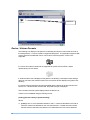
1
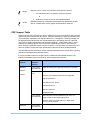
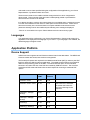
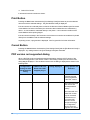
Supported
Devices
PDF /
Acrobat
Version
Restriction
correspondence)
- Digital Signatures (Its validity is not verified, however
it is printed. If the icon that indicates the presence of a
signature in a PDF file or the one indicating the
possibility of falsification exists, print is executed in a
state that the validity is unclear.)
- File Identifiers (Reference to external files not
supported)
- Output Intents
- Open Prepress Interface (OPI)
- 3D Artwork (3D model is not displayed, and any
alternate image is output.)
imageRUNNE
R ADVANCE
C5051(i) /
C5045(i) /
C5035(i) /
C5030(i)
PDF Version
1.7 or below
(Acrobat 8.0)
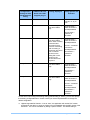
imageRUNNE
R ADVANCE
C7055i /
C7065i
PDF Version
1.7 or below
(Acrobat 8.0)
Prints according to the spec for PDF Ver1.7 or below.
However, the following items are not supported:
- Watermarks
Prints according to the spec for PDF Ver1.7 or below.
However, the following items are not supported:
- Watermarks
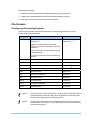
Scanning Formats
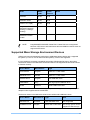
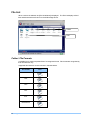
USB Print & Scan can create files on connected storage devices in the formats shown in the
table below:
6
File Type
Pages per file
Supported Devices
Default PDF
Multiple
All devices
Highly compressed PDF
Multiple
Optional on all
devices1
Searchable PDF
Multiple
Optional on all
devices1
Outline PDF
Multiple
Optional on all
devices1
Outline Searchable PDF
Multiple
Optional on all
devices1
Black and White TIFF
1
All devices
Introduction