1
10
CHAPTER 3. ACCESSING
Account-level token A token is also made available to each account, which
you can regard as an API key. This single token allows you to access data
of all devices and sensors associated with your account.
3.3
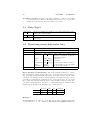
Data Types
unix time()
time range()
unit()
3.4
int32 representing the number of seconds elapsed since midnight UTC of Jan 1, 1970
minute, 15min, hour, day, week, month, year, decade, night
watt, kwhperyear, eurperyear, audperyear, lpermin, lperday,
m3peryear
Retrieving sensor time series data
request
verb
url
query params
response
retrieve sensor data in time series format from flukso.net
GET
https://api.flukso.net/sensor/<sensorid>
interval
time range() time range for which values
should be returned, from now interval till now
start
unix time()
start time
end
unix time()
end time
resolution time range() format data in this resolution
unit
unit()
convert values to specified unit
callback
string()
jsonp function name
a JSON array containing [unix timestamp, value] array elements
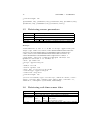
Query Parameter Compatibility The most straightforward way to extract
time series data from the platform is by use of the interval query parameter.
E.g. specifying interval=month will return one month worth of data in a day
resolution, the default resolution for this interval. A default resolution can be
overridden by including it explicitely in the query parameters. If you would
like to fully customize the interval, then you should instead use the start and,
optionally, end parameters. Below is a compatibility matrix detailing which
parameters are Required [R], Exclusive [X] or Optional [O].
interval
start
interval
R
X
start
X
R
end
X
O
resolution
O
O
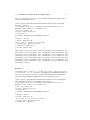
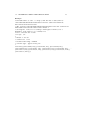
Example 1
icarus75@cirrus:~$ curl -k -v -X GET -H "Accept: application/json"
-H "X-Version: 1.0" -H "X-Token: d8a8ab8893ea73f768b66b45234b5c3a"