1
LINKTROPY MINI2 WAN EMULATOR USER’S GUIDE |
21
5 | BRIDGE/ROUTE TAB
Bridge and Routing Mode Configuration
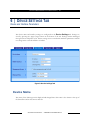
The Linktropy Mini2 can be installed as either a bridge or router to forward frames between the LAN
A and LAN B Ethernet interfaces. By default, the Linktropy Mini2 is configured as a bridge, and this
mode is recommended for simplicity unless the LAN A and LAN B interfaces need to be on separate
subnets.
To switch to IP Routing Mode from Bridging Mode, click on the link switch to IP Routing Mode. To
revert to Bridging Mode, click on the link switch to Bridging Mode.
Bridge/Route settings are not stored with emulation parameters and will not change when a stored
emulation is loaded.
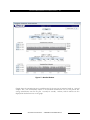
Bridging Mode
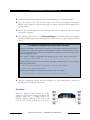
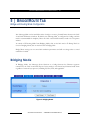
In Bridging Mode, the Linktropy device functions as a bridge between the Ethernet segments
connected to the LAN A and LAN B ports. In this mode, it can forward any Ethernet-based frame
regardless of network layer protocol, including IP, IPv6, IPX, and AppleTalk.
Figure 6: Bridging Mode
APPOSITE TECHNOLOGIES – WAN EMULATION MADE EASY™