1
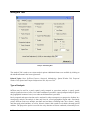
Log linear trend, specified by user: Specify an annual percent increase or decrease in the risk. A
decreasing trend is specified with a negative number. For example, if the rate decreases by 1.4 percent
per year, then write "-1.4" in the "% per year" box.
Log linear trend, automatically calculated: Rather than the user specifying the adjusted relative risk,
SaTScan can calculate the observed trend in the data and then adjust for exactly that amount of increase
or decrease.
The default is no temporal trend adjustment.
Related Topics: Spatial and Temporal Adjustment Tab, Spatial and Temporal Adjustments, Spatial
Adjustment, Adjustment with Known Relative Risk, Poisson Model.
Spatial Adjustment
When a purely spatial analysis is performed the purpose is to find purely spatial clusters. For space-time
analyses, this feature adjusts away all such clusters, to see if there are any space-time clusters not
explained by purely spatial clusters. This is done in a non-parametric fashion, through stratified
randomization by location, so that the total number of cases in each specific location is the same in the
real and random data sets. That is, only the time of a case is randomized.
The default is no spatial adjustment.
Note: It is not possible to simultaneously adjust for spatial clusters and purely temporal clusters using
stratified randomization. If both types of adjustments are desired, the space-time permutation model
should be used instead. It is possible to adjust for purely spatial clusters with stratified randomization
together with a temporal adjustment using a log linear trend.
Related Topics: Spatial and Temporal Adjustment Tab, Spatial and Temporal Adjustments, Temporal
Trend Adjustment, Adjustment with Known Relative Risk, Poisson Model.
Adjustment with Known Relative Risks
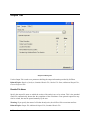
The most flexible way to adjust a Poisson model analysis is to use the special adjustments file. In this
file, a relative risk is specified for any location and time period combination, and SaTScan will adjust the
expected counts up or down based on this relative risk. One use of this option is to adjust for missing
data, by specifying a zero relative risk for those location and time combinations for which data is
missing.
The required format of the Adjustments File is described in the section on Input data.
Related Topics: Spatial and Temporal Adjustment Tab, Spatial and Temporal Adjustments, Temporal
Trend Adjustment, Spatial Adjustment, Adjustments File, Poisson Model.
SaTScan User Guide v7.0
51