1
Main Menu
Table of Contents
Troubleshooting
Troubleshooting Procedures (cont'd)
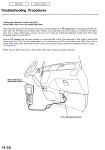
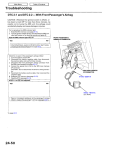
If the inspection for a particular code requires voltage or resistance checks at the ECM connectors, remove the bulkhead
panels. Unbolt the ECM. Check the system according to the procedure described for the appropriate code(s) listed on the
following pages.
ECM
BULKHEAD
PANELS
How to Use the Backprobe Sets
Connect the backprobe adapters to the stacking patch cords, and connect the cords to a multimeter. Using the wire insulation as a guide for the contoured tip of the backprobe adapter, gently slide the tip into the connector from the wire side
until it comes in contact with terminal end of the wire.
DIGITAL MULTIMETER
(Commercially available) or
KS - AHM - 32 - 003
STACKING PATCH
CORD
BACKPROBE SET
07SAZ - 001000A (two required)
BACKPROBE ADAPTER