1
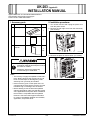
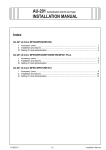
UK-203 Upgrade Kit
INSTALLATION MANUAL
Applied Machines: d-Color MF360/MF280/MF220
COLOR MFP: 36 ppm/28 ppm/22 ppm
Product Code: A0ED
I. Accessory parts
No.
Name
II. Installation procedures
Shape
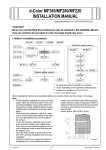
1. Turn off the machine and unplug the power cord
from the power outlet.
2. Remove the cover from the back of the machine
as shown in the illustration (four screws).
Q’ty
1. Memory
1
A0YDIXC001DA
2. Panel sheet
1
3. Installation
manual
1
set
4980IXC019DA
A0YAIXC009DA
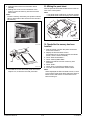
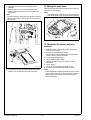
3. Remove the plate as shown below (12 screws).
After unpacking, be sure to get rid of the
packaging materials and keep them out of
the reach of children.
Putting the head in the plastic bag
involves danger of suffocation.
Note:
• The memory is highly susceptible to static electricity. Before touching the memory be sure to
touch a metal object to discharge any static
electricity from your body and clothes.
• Never touch any pins or other parts of the circuit board when removing the memory from the
insulation bag or inserting it into the socket.
• Before starting to use the firmware updated
with this upgrade kit, make sure that the version
of the applications and printer driver installed in
the machine is compatible with the updated
firmware. Check the field support information
for version compatibility between the firmware,
application, and printer driver.
• This manual provides the illustrations of the
accessory parts and machine that may be
slightly different in shape from yours. In that
case, instead of the illustrations, use the
appearance of your machine to follow the
installation procedure. This does not cause any
significant change or problem with the procedure.
Y110491-4
A0YAIXC010DA
E-1
Installation Manual