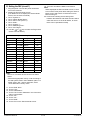
1
II. Installation procedures
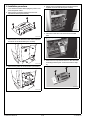
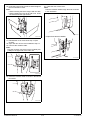
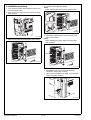
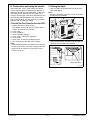
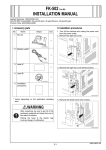
1. Turn off the machine and unplug the power cord
from the power outlet.
2. Remove the rear right cover from the main body
(four screws).
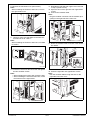
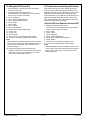
4. Insert the PCI expansion board.
Note:
When inserting the board, align it with the slits.
A0YAIXC008DB
A0YAIXC006DB
3. Remove the plate as shown below (six screws).
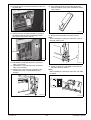
5. Reinstall the plate which has been removed in
step 3 (six screws).
Note:
When installing the plate, align two protrusions
with the holes.
Protrusion
A0YAIXC002DB
A0YAIXC004DB
6. Reinstall the rear right cover that has been
removed in step 2 (four screws).
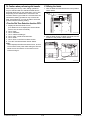
7. Remove the right side rear upper cover from the
main body (three screws).
A0YEIXC008DB
Installation Manual
E-10
Y110431-2