1
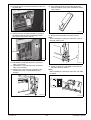
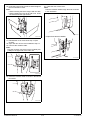
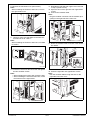
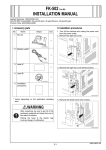
21. Close the door of the cover.
Note:
Pass the modular cable through the hole as shown
in the illustration.
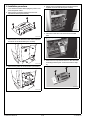
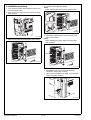
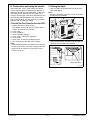
16. Insert the FAX kit into the left socket and tighten
the two shoulder screws.
Note:
• When inserting the board, align it with the slits.
• When installing the FAX kit to add a line, insert
the FAX kit into the right socket.
<Paper feed cabinet not installed>
A0YAIXC021DA
<Paper feed cabinet installed>
A0YAIXC018DA
17. Reinstall the cover removed in step 12 (four
screws).
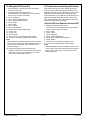
18. Open the door of the cover installed in step 17.
19. Connect the modular cable.
Note:
Plug the modular connector into the modular jack
(LINE) on the right side of the main unit.
A0YAIXC022DA
A0YAIXC019DA
20. Route the modular cable as shown in the illustration below.
A0YAIXC020DA
Installation Manual
E-4
Y110431-2